

Here in this application I will use an Item template, Edit Item template and Footer Template to do CRUD operations.
The following is my Data Table in design mode: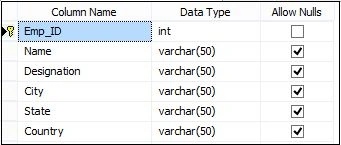
Image 1.
Data in my Data Table: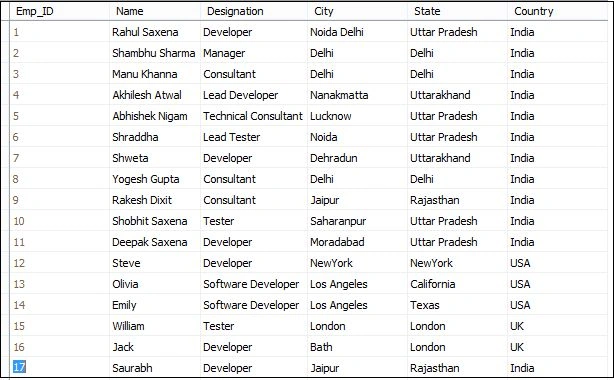
Image 2.
To create the new application go to Solution Explorer in your application then select Add New Item.
Add an ADO.NET Entity Data Model.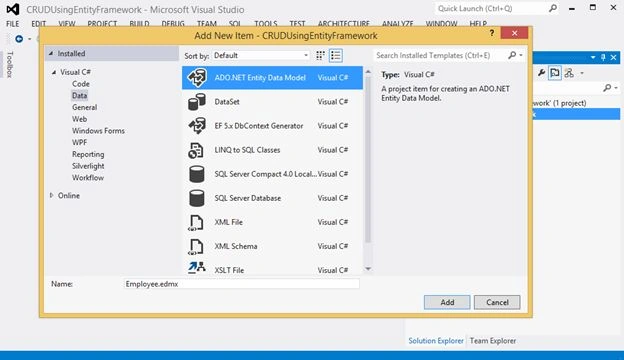
Image 3.
Image 4.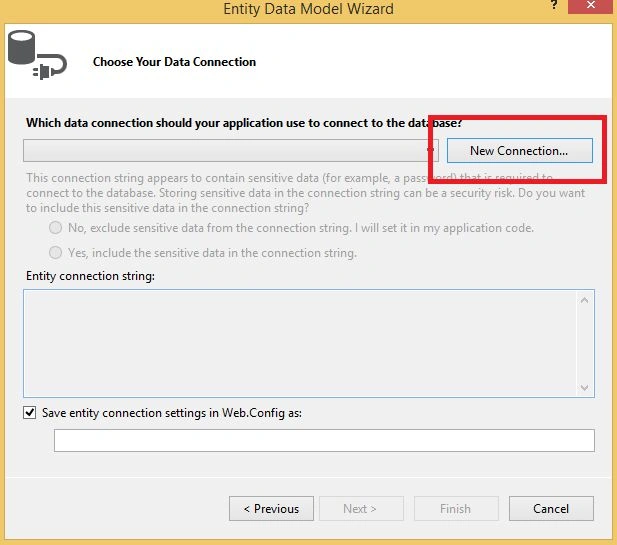
Image 5.
Enter your server information and select your database:
Image 6.
Image 7.
Image 8.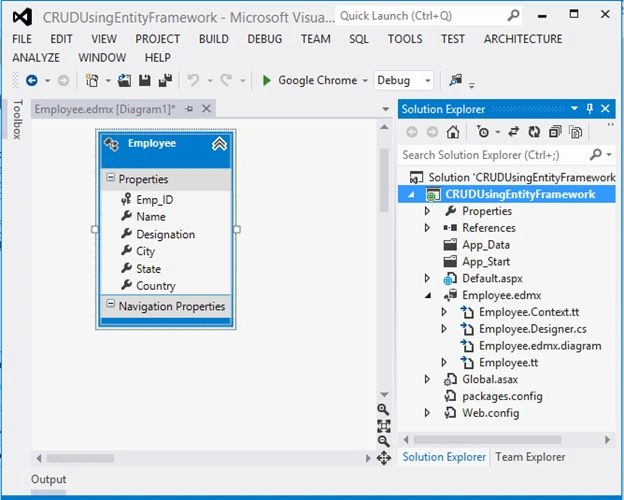
Image 9.
Now open Default.aspx and do the following code:
- <%@ Page Language="C#" AutoEventWireup="true" CodeBehind="Default.aspx.cs" Inherits="CRUDUsingEntityFramework.Default" %>
- <!DOCTYPE html>
- <html xmlns="http://www.w3.org/1999/xhtml">
- <head runat="server">
- <title>CRUD Operation Using Entity Framework In ASP.NET Grid View</title>
- </head>
- <body>
- <form id="form1" runat="server">
- <div>
- <table style="border: solid 15px blue; width: 100%; vertical-align: central;">
- <tr>
- <td style="padding-left: 20px; padding-top: 20px; padding-bottom: 20px;
- background-color: skyblue; font-family: 'Times New Roman';
- font-size: 20pt; color: red;">CRUD Operation Using Entity Framework In ASP.NET Grid View
- </td>
- </tr>
- <tr>
- <td style="text-align: left;">
- <asp:GridView ID="GVEmployee" runat="server"
- AutoGenerateColumns="False" ShowFooter="True"
- PageSize="10" AllowPaging="true"
- OnRowCommand="GVEmployee_RowCommand"
- DataKeyNames="Emp_ID" CellPadding="4" ForeColor="#333333"
- GridLines="None" OnRowCancelingEdit="GVEmployee_RowCancelingEdit"
- OnRowEditing="GVEmployee_RowEditing"
- OnRowUpdating="GVEmployee_RowUpdating"
- OnRowDeleting="GVEmployee_RowDeleting"
- OnPageIndexChanging="GVEmployee_OnPageIndexChanging">
- <AlternatingRowStyle BackColor="White" />
- <Columns>
- <asp:TemplateField HeaderText="Employee Name" HeaderStyle-HorizontalAlign="Left">
- <EditItemTemplate>
- <asp:TextBox ID="txtEmpName" runat="server" Text='<%# Bind("Name") %>'></asp:TextBox>
- <asp:RequiredFieldValidator ID="valEmpName" runat="server" ControlToValidate="txtEmpName"
- Display="Dynamic" ErrorMessage="Employee Name is required." ForeColor="Red" SetFocusOnError="True"
- ValidationGroup="vldEditRecord">*</asp:RequiredFieldValidator>
- </EditItemTemplate>
- <ItemTemplate>
- <asp:Label ID="lblEmpName" runat="server" Text='<%# Bind("Name") %>'></asp:Label>
- </ItemTemplate>
- <FooterTemplate>
- <asp:TextBox ID="txtEmpNameNew" runat="server"></asp:TextBox>
- <asp:RequiredFieldValidator ID="valEmpNameNew" runat="server" ControlToValidate="txtEmpNameNew"
- Display="Dynamic" ErrorMessage="Employee Name is required." ForeColor="Red" SetFocusOnError="True"
- ValidationGroup="vldNewRecord">*</asp:RequiredFieldValidator>
- </FooterTemplate>
- </asp:TemplateField>
- <asp:TemplateField HeaderText="Designation" HeaderStyle-HorizontalAlign="Left">
- <EditItemTemplate>
- <asp:TextBox ID="txtDesignation" runat="server" Text='<%# Bind("Designation") %>'></asp:TextBox>
- <asp:RequiredFieldValidator ID="valDesignation" runat="server" ControlToValidate="txtDesignation"
- Display="Dynamic" ErrorMessage="Designation is required." ForeColor="Red" SetFocusOnError="True"
- ValidationGroup="vldEditRecord">*</asp:RequiredFieldValidator>
- </EditItemTemplate>
- <ItemTemplate>
- <asp:Label ID="lblDesignation" runat="server" Text='<%# Bind("Designation") %>'></asp:Label>
- </ItemTemplate>
- <FooterTemplate>
- <asp:TextBox ID="txtDesignationNew" runat="server"></asp:TextBox>
- <asp:RequiredFieldValidator ID="valDesignationNew" runat="server" ControlToValidate="txtDesignationNew"
- Display="Dynamic" ErrorMessage="Designation is required." ForeColor="Red" SetFocusOnError="True"
- ValidationGroup="vldNewRecord">*</asp:RequiredFieldValidator>
- </FooterTemplate>
- </asp:TemplateField>
- <asp:TemplateField HeaderText="City" HeaderStyle-HorizontalAlign="Left">
- <EditItemTemplate>
- <asp:TextBox ID="txtCity" runat="server" Text='<%# Bind("City") %>'></asp:TextBox>
- <asp:RequiredFieldValidator ID="valCity" runat="server" ControlToValidate="txtCity"
- Display="Dynamic" ErrorMessage="City is required." ForeColor="Red" SetFocusOnError="True"
- ValidationGroup="vldEditRecord">*</asp:RequiredFieldValidator>
- </EditItemTemplate>
- <ItemTemplate>
- <asp:Label ID="lblCity" runat="server" Text='<%# Bind("City") %>'></asp:Label>
- </ItemTemplate>
- <FooterTemplate>
- <asp:TextBox ID="txtCityNew" runat="server"></asp:TextBox>
- <asp:RequiredFieldValidator ID="valCityNew" runat="server" ControlToValidate="txtCityNew"
- Display="Dynamic" ErrorMessage="City is required." ForeColor="Red" SetFocusOnError="True"
- ValidationGroup="vldNewRecord">*</asp:RequiredFieldValidator>
- </FooterTemplate>
- </asp:TemplateField>
- <asp:TemplateField HeaderText="State" HeaderStyle-HorizontalAlign="Left">
- <EditItemTemplate>
- <asp:TextBox ID="txtState" runat="server" Text='<%# Bind("State") %>'></asp:TextBox>
- <asp:RequiredFieldValidator ID="valState" runat="server" ControlToValidate="txtState"
- Display="Dynamic" ErrorMessage="State is required." ForeColor="Red" SetFocusOnError="True"
- ValidationGroup="vldEditRecord">*</asp:RequiredFieldValidator>
- </EditItemTemplate>
- <ItemTemplate>
- <asp:Label ID="lblState" runat="server" Text='<%# Bind("State") %>'></asp:Label>
- </ItemTemplate>
- <FooterTemplate>
- <asp:TextBox ID="txtStateNew" runat="server"></asp:TextBox>
- <asp:RequiredFieldValidator ID="valStateNew" runat="server" ControlToValidate="txtStateNew"
- Display="Dynamic" ErrorMessage="State is required." ForeColor="Red" SetFocusOnError="True"
- ValidationGroup="vldNewRecord">*</asp:RequiredFieldValidator>
- </FooterTemplate>
- </asp:TemplateField>
- <asp:TemplateField HeaderText="Country" HeaderStyle-HorizontalAlign="Left">
- <EditItemTemplate>
- <asp:TextBox ID="txtCountry" runat="server" Text='<%# Bind("Country") %>'></asp:TextBox>
- <asp:RequiredFieldValidator ID="valCountry" runat="server" ControlToValidate="txtCountry"
- Display="Dynamic" ErrorMessage="Country is required." ForeColor="Red" SetFocusOnError="True"
- ValidationGroup="vldEditRecord">*</asp:RequiredFieldValidator>
- </EditItemTemplate>
- <ItemTemplate>
- <asp:Label ID="lblCountry" runat="server" Text='<%# Bind("Country") %>'></asp:Label>
- </ItemTemplate>
- <FooterTemplate>
- <asp:TextBox ID="txtCountryNew" runat="server"></asp:TextBox>
- <asp:RequiredFieldValidator ID="valCountryNew" runat="server" ControlToValidate="txtCountryNew"
- Display="Dynamic" ErrorMessage="Country is required." ForeColor="Red" SetFocusOnError="True"
- ValidationGroup="vldNewRecord">*</asp:RequiredFieldValidator>
- </FooterTemplate>
- </asp:TemplateField>
- <asp:TemplateField HeaderText="">
- <ItemTemplate>
- <asp:LinkButton ID="lnkEdit" runat="server" Text="" CommandName="Edit" ToolTip="Edit">
- <img src="../Images/Edit.png" width="30px" />
- </asp:LinkButton>
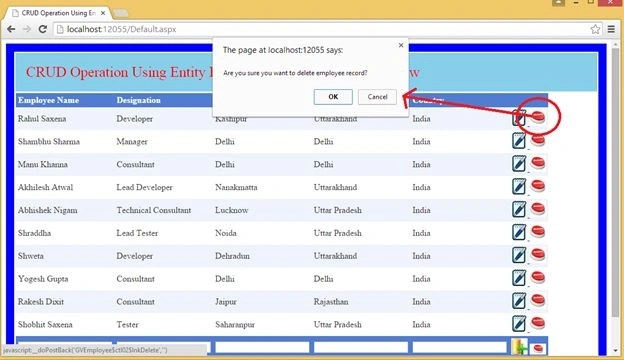
- <asp:LinkButton ID="lnkDelete" runat="server" Text="Delete" CommandName="Delete"
- ToolTip="Delete" OnClientClick='return confirm("Are you sure you want to delete employee record?");'>
- <img src="../Images/Delete.jpg" width="30px" />
- </asp:LinkButton>
- </ItemTemplate>
- <EditItemTemplate>
- <asp:LinkButton ID="lnkInsert" runat="server" Text="" ValidationGroup="vldEditRecord"
- CommandName="Update" ToolTip="Save"
- OnClientClick='return confirm("Employee Record Saved Successfully.");'>
- <img src="../Images/Save2.jpg" width="30px" />
- </asp:LinkButton>
- <asp:LinkButton ID="lnkCancel" runat="server" Text="" CommandName="Cancel" ToolTip="Cancel">
- <img src="../Images/Cancel.jpg" width="30px" />
- </asp:LinkButton>
- </EditItemTemplate>
- <FooterTemplate>
- <asp:LinkButton ID="lnkInsert" runat="server" Text="" ValidationGroup="vldNewRecord"
- CommandName="InsertNew" ToolTip="Add New Employee"
- OnClientClick='return confirm("Employee Record addedd Successfully.");'>
- <img src="../Images/Insert.jpg" width="30px" />
- </asp:LinkButton>
- <asp:LinkButton ID="lnkCancel" runat="server" Text="" CommandName="CancelNew" ToolTip="Cancel">
- <img src="../Images/Cancel.jpg" width="30px" />
- </asp:LinkButton>
- </FooterTemplate>
- </asp:TemplateField>
- </Columns>
- <EditRowStyle BackColor="#2461BF" />
- <FooterStyle BackColor="#507CD1" Font-Bold="True" ForeColor="White" />
- <HeaderStyle BackColor="#507CD1" Font-Bold="True" ForeColor="White" />
- <PagerStyle BackColor="#2461BF" ForeColor="White" HorizontalAlign="Center" />
- <RowStyle BackColor="#EFF3FB" />
- <SelectedRowStyle BackColor="#D1DDF1" Font-Bold="True" ForeColor="#333333" />
- <SortedAscendingCellStyle BackColor="#F5F7FB" />
- <SortedAscendingHeaderStyle BackColor="#6D95E1" />
- <SortedDescendingCellStyle BackColor="#E9EBEF" />
- <SortedDescendingHeaderStyle BackColor="#4870BE" />
- </asp:GridView>
- </td>
- </tr>
- </table>
- </div>
- </form>
- </body>
- </html>
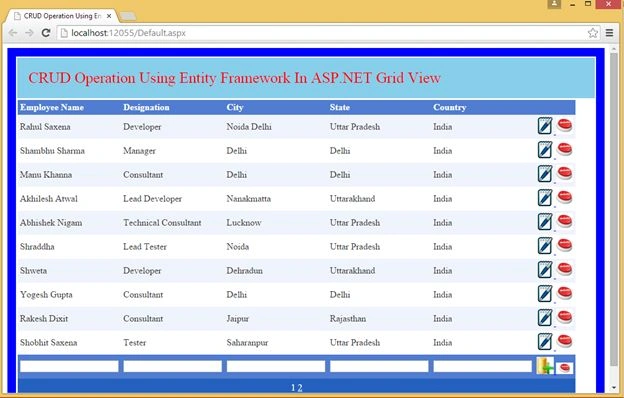


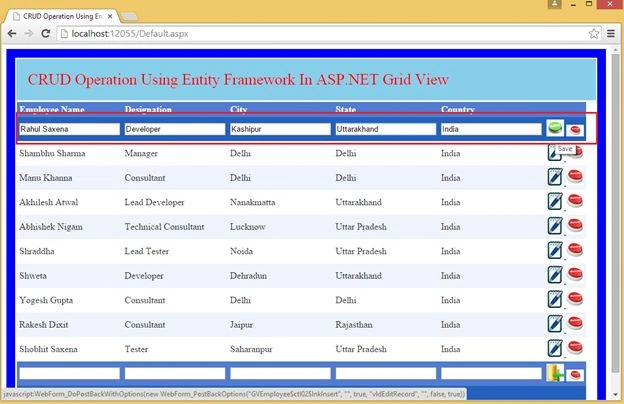
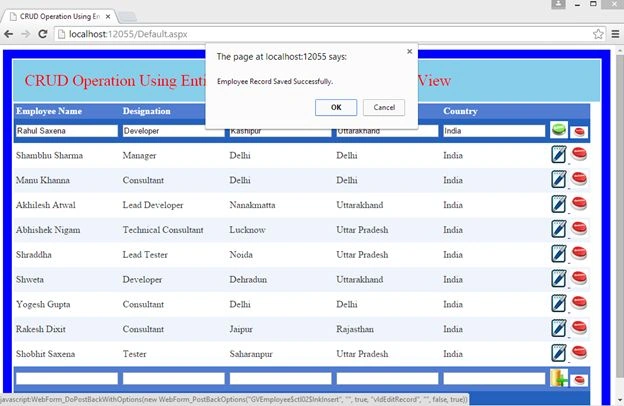
sk guptaPosted Feb 3, 2016, 8:26 AM
Nice post
Rahul Kumar SaxenaPosted May 24, 2015, 11:20 PM
Thanks Humayun Kabir Mamun...
Humayun Kabir MamunPosted May 24, 2015, 5:15 AM
Very nice Rahul...
Rahul Kumar SaxenaPosted Mar 11, 2015, 2:03 PM
Thank u Gowtham Rajamanickam...
Gowtham RajamanickamPosted Mar 11, 2015, 9:52 AM
good one.....
Rahul Kumar SaxenaPosted Feb 26, 2015, 5:20 AM
Thanks bro...
Manish Kumar ChoudharyPosted Feb 12, 2015, 2:19 AM
Nice one..