

Introduction
This article will explore how to perform CRUD (Create, Read, Update, and Delete) operations using stored procedures and the Entity Framework in an ASP.NET MVC application. Stored procedures can offer several benefits when working with a database, including improved performance and increased security. By utilizing the power of the Entity Framework, we can easily map our stored procedures to classes and objects in our application, making it simple to interact with our data. We are about to build an MVC application to implement the CRUD operations.
Let's use the following procedure to implement it.
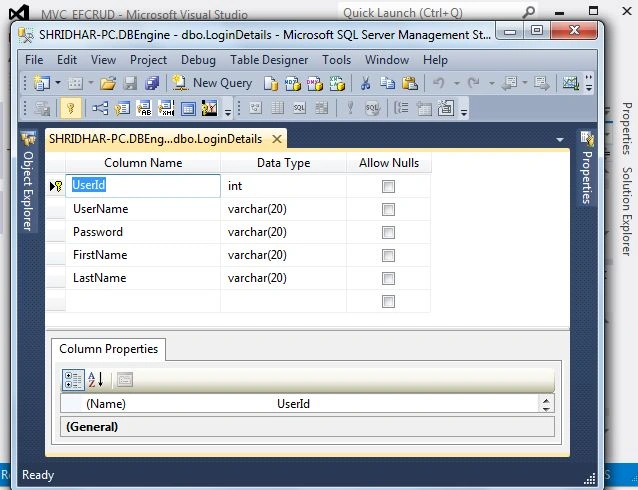
I have a database, DBEngine, with a table, LoginDetails.
CREATE TABLE [dbo].[LoginDetails](
    [UserId] [int] IDENTITY(1,1) NOT NULL,
    [UserName] [varchar](20) NOT NULL,
    [Password] [varchar](20) NOT NULL,
    [FirstName] [varchar](20) NOT NULL,
    [LastName] [varchar](20) NOT NULL,
 CONSTRAINT [PK_LoginDetails] PRIMARY KEY CLUSTERED
(
    [UserId] ASC
)WITH (PAD_INDEX = OFF, STATISTICS_NORECOMPUTE = OFF, IGNORE_DUP_KEY = OFF, ALLOW_ROW_LOCKS = ON, ALLOW_PAGE_LOCKS = ON) ON [PRIMARY]
) ON [PRIMARY]
The above SQL Statement creates a table named "LoginDetails" in a database with the following columns:
- UserId - an integer column that is set as the primary key for the table and is set to auto-incrementing by one and starting from 1.
- UserName - a varchar(20) column that cannot be null.
- Password - a varchar(20) column that cannot be null.
- FirstName - varchar(20) column that cannot be null.
- LastName - a varchar(20) column that cannot be null.
Additionally, it creates a primary key constraint on the UserId column, which enforces that the UserId column is unique and not null across all table rows. The primary key also creates a clustered index on the UserId column, which improves the performance of queries that filter or sort data based on the UserId column. It also specifies that the table will be created on the primary filegroup of the database.
Also, you can create by using Designer, as shown in the below snapshot.
Stored Procedures in SQL Server
INSERT
CREATE PROC [dbo].[INSERT_SP]
   (
    @Username varchar(20),
    @Password varchar(20),
    @FirstName varchar(20),
    @LastName varchar (20)
    )
    AS
    BEGIN
    INSERT INTO [dbo].[LoginDetails](UserName,Password,FirstName,LastName) values (@Username,@Password,@FirstName,@LastName);
    RETURN
    END
The SQL mentioned above creates a stored procedure used to insert data into a table called "LoginDetails" in a database. The stored procedure is named "INSERT_SP." It takes four parameters as input – @Username, @Password, @FirstName, and @LastName. These parameters are used to insert data into the corresponding columns of the "LoginDetails" table.
UPDATE
CREATE PROC [dbo].[UPDATE_SP]
   (
    @UserId int,
    @Username varchar(20),
    @Password varchar(20),
    @FirstName varchar(20),
    @LastName varchar (20)
    )
    AS
    BEGIN
    UPDATE [dbo].[LoginDetails] SET UserName=@Username,Password=@Password,FirstName=@FirstName,LastName=@LastName WHERE UserId=UserId;
    RETURN
    END
The SQL mentioned above statement is used to update data in a table called "LoginDetails" in a database. The stored procedure is named "UPDATE_SP." It takes five parameters as input – @UserId, @Username, @Password, @FirstName, and @LastName. These parameters update specific data in the "LoginDetails" table.
DELETE
CREATE PROC [dbo].[DELETE_SP]
(
  @UserId int
  )
    AS
    BEGIN
    DELETE FROM [dbo].[LoginDetails] WHERE UserId=@UserId
    RETURN
    END
The SQL mentioned above statement is used to delete data from a table called "LoginDetails" in a database. It takes one parameter as input, the @UserId, which is used to specify which rows should be deleted from the table. The stored procedure is named "DELETE_SP."
Now, let us move into Visual Studio. Select New Project→ Add MVC Application.
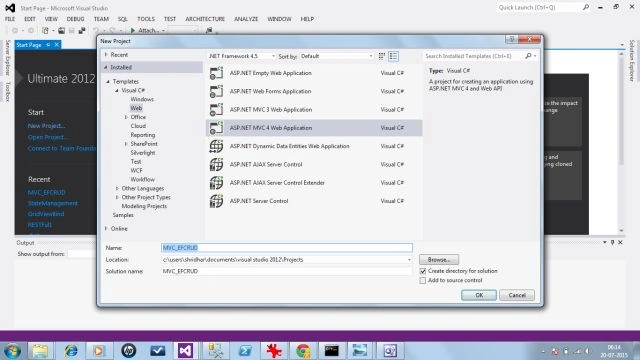
A new window opens. Choose Internet Application here so that we are not required to include different templates and dependencies from the packet manager in this project.
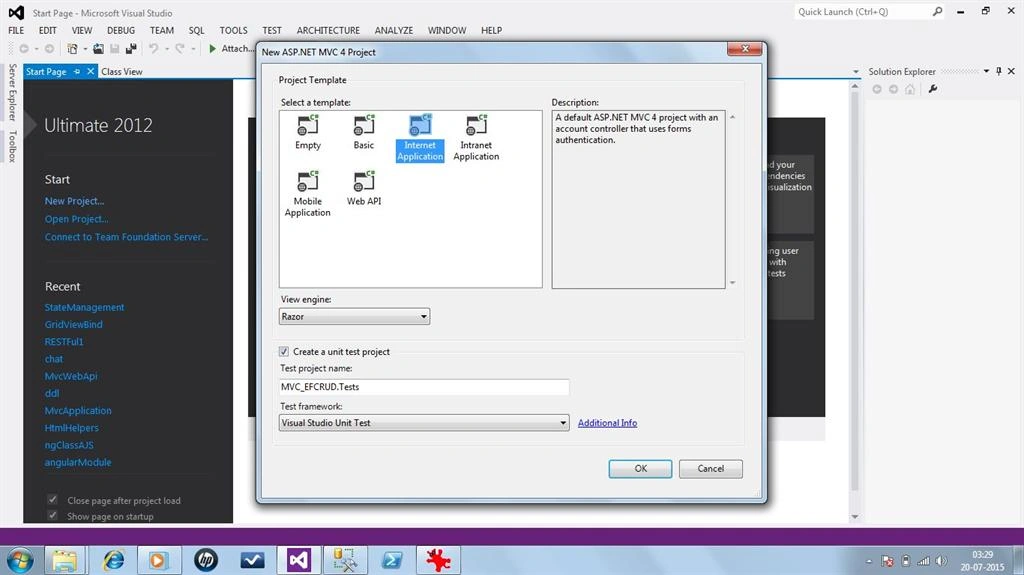
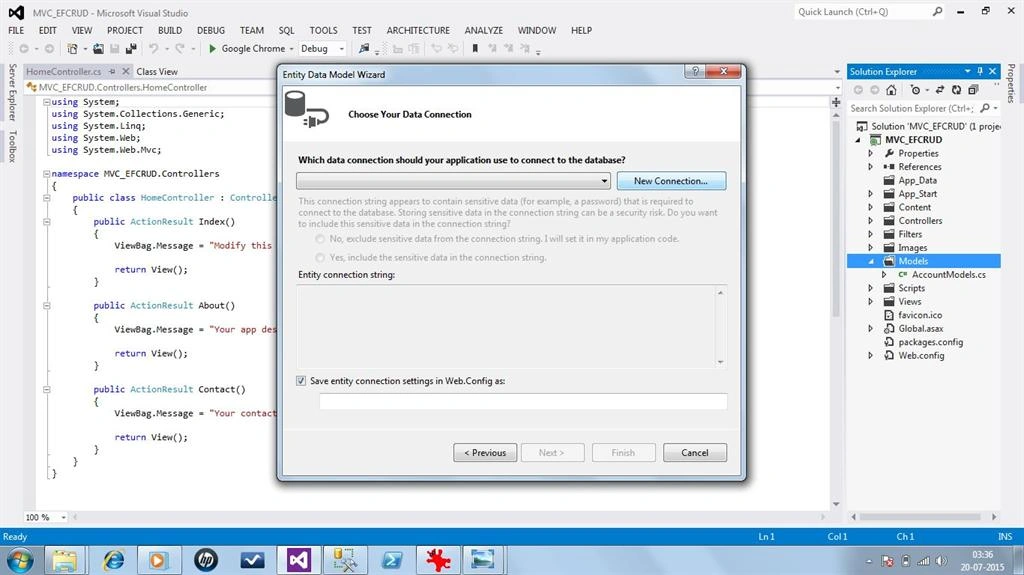
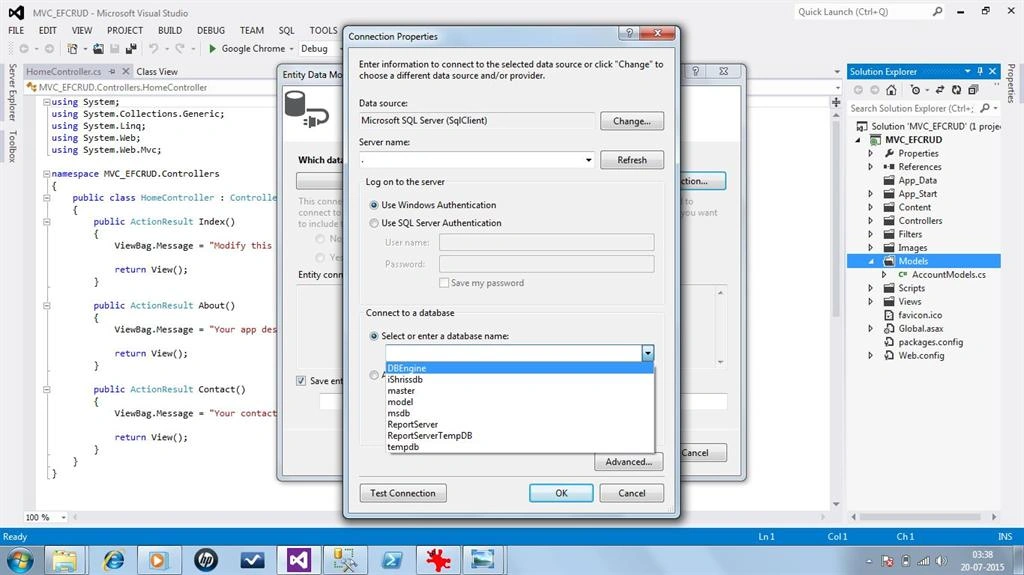
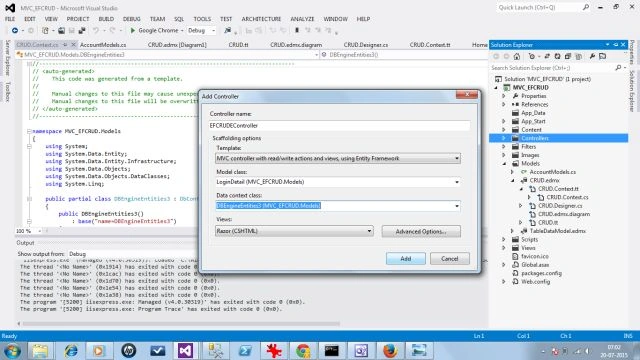
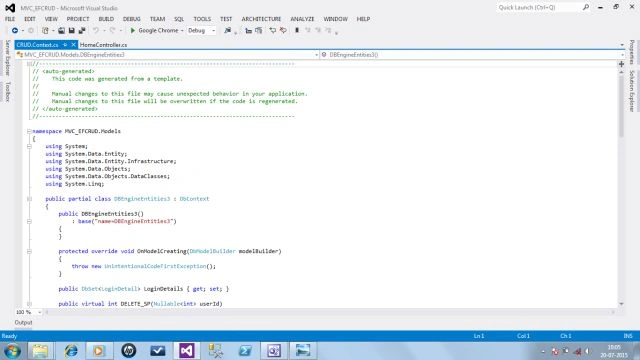
Here we have our MVC application with default folders for internet applications. Now let's add a Model with a table and Stored Procedures for CRUD operations.

Please provide the name of our Model as CRUD.









Dinesh GabhanePosted Nov 11, 2019, 1:27 AM
Good article
Navnath UgalePosted May 11, 2016, 3:10 AM
Good article but when we add 2 column in existing table that time how to application or add new model to application?
PrahaladPosted Mar 21, 2016, 3:06 PM
Good Article for basic crud operation and I bet the stored procedures created by you were not used to perform the CRUD operation here as per your screenshots. So you may ask "Then how it works?". Simple, it utilizes the MVC CRUD template along with entity framework that generates every operation(create, read, update and delete) to perform in and from DB .
Erwin FariasPosted Feb 24, 2016, 11:43 AM
Excellent ... question: how complicate is to add some code to make this functional as a master-detail crud ?
Shridhar SharmaPosted Aug 18, 2015, 11:12 AM
thank you Vipul :)
Shridhar SharmaPosted Aug 18, 2015, 11:11 AM
Thank you sreenivasa k. Glad you found it worthful. :)
Vipul MalhotraPosted Aug 18, 2015, 10:13 AM
nice article
sreenivasa kPosted Aug 17, 2015, 6:25 PM
worth article
Shridhar SharmaPosted Jul 28, 2015, 10:44 AM
Thanks Atul.
Atul RawatPosted Jul 27, 2015, 11:49 PM
nice article shridhar
Shridhar SharmaPosted Jul 25, 2015, 6:47 PM
Thanks Yatendra
Yatendra SharmaPosted Jul 25, 2015, 5:59 AM
very well explained
Shridhar SharmaPosted Jul 23, 2015, 4:00 PM
thank you Santhakumar Munuswamy sir
Santhakumar MunuswamyPosted Jul 23, 2015, 3:12 PM
Thanks for nice article:)
Shridhar SharmaPosted Jul 23, 2015, 11:42 AM
sure sir,thank you so much Nimit Joshi sir.
Nimit JoshiPosted Jul 23, 2015, 7:51 AM
keep it up....
Shridhar SharmaPosted Jul 22, 2015, 2:57 PM
Thank you Rahul Saxena sir :)
Rahul Kumar SaxenaPosted Jul 22, 2015, 2:20 PM
Good Show
Shridhar SharmaPosted Jul 22, 2015, 10:51 AM
thanks Matthew Paine .Glad you find it helpful.
Shridhar SharmaPosted Jul 22, 2015, 10:49 AM
thank you Gopi Chand sir
Shridhar SharmaPosted Jul 22, 2015, 10:49 AM
thank you Sibeesh Venu sir
Shridhar SharmaPosted Jul 22, 2015, 10:48 AM
thank you Rakesh Chavda sir
Guest UserPosted Jul 22, 2015, 5:59 AM
Excellent simple tutorial, thank you. ADO.NET was not available to add from Model. I had to add it to the project and define it. Right click the project name > Add > Class > ADO.NET Entity Data Model then define as per the example.
Gopi ChandPosted Jul 21, 2015, 3:42 AM
Good one
Sibeesh VenuPosted Jul 21, 2015, 2:10 AM
Nice Share
RakeshPosted Jul 20, 2015, 11:41 PM
Good Explain