

Introduction
In this article, I'm going to perform CRUD operations using Web API and React.js. ReactJS is an open-source JavaScript library that is used for creating user interfaces. It is developed and maintained by Facebook. Learn more about React.
Prerequisites
- We should have a basic knowledge of React.js and Web API.
- Visual Studio and Visual Studio Code IDE should be installed on your system.
- SQL Server Management Studio
Technologies we will use
- ASP.NET Web API
- ReactJS
- SQL Server
- React strap
- Bootstrap
Step 1. Create a table in the database.
Open SQL Server Management Studio, create a database named "CrudDemo", and in this database, create a table. Give that table a name like "studentmaster.
USE [CrudDemo]
GO

CREATE TABLE [dbo].[studentmaster](
    [Id] [int] IDENTITY(1,1) NOT NULL,
      NULL,
      NULL,
      NULL,
      NULL,
    CONSTRAINT [PK_studentmaster] PRIMARY KEY CLUSTERED
    (
        [Id] ASC
    )WITH (PAD_INDEX = OFF, STATISTICS_NORECOMPUTE = OFF, IGNORE_DUP_KEY = OFF, ALLOW_ROW_LOCKS = ON, ALLOW_PAGE_LOCKS = ON) ON [PRIMARY]
) ON [PRIMARY]
GO
Create a new Web API project
Step 2. Open Visual Studio and create a new project.
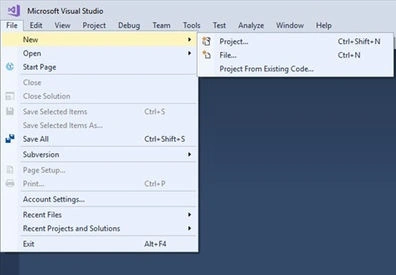
Step 3. Change the name to CrudUsingReact.
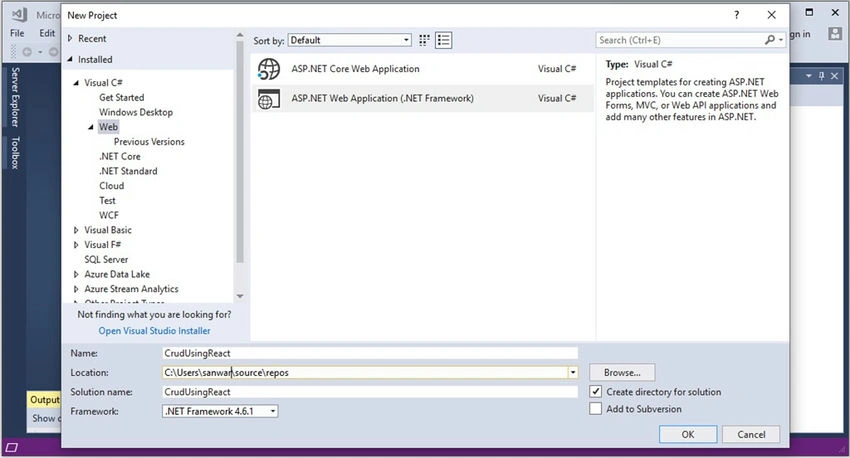
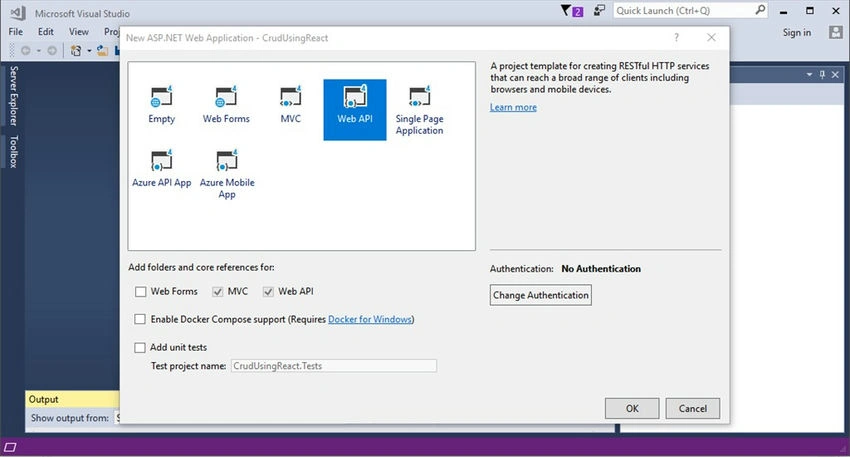
Step 4. Choose the template as Web API.
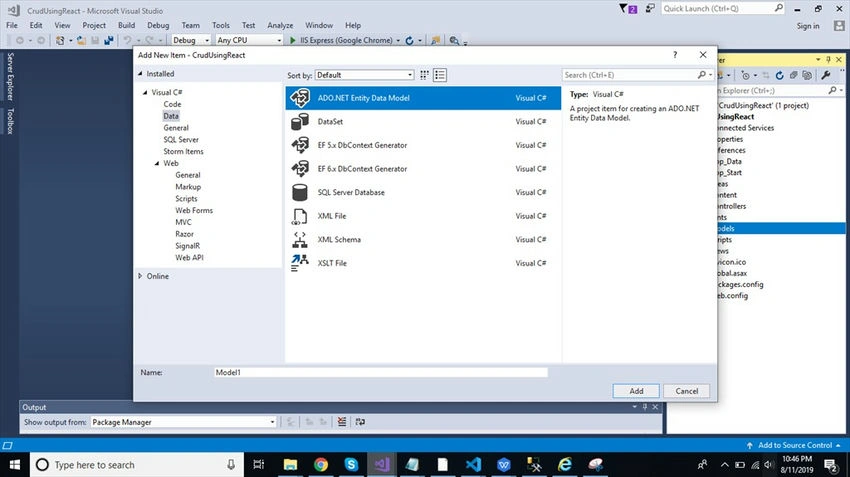
Step 5. Right-click the Models folder from Solution Explorer and go to Add >> New Item >> data.
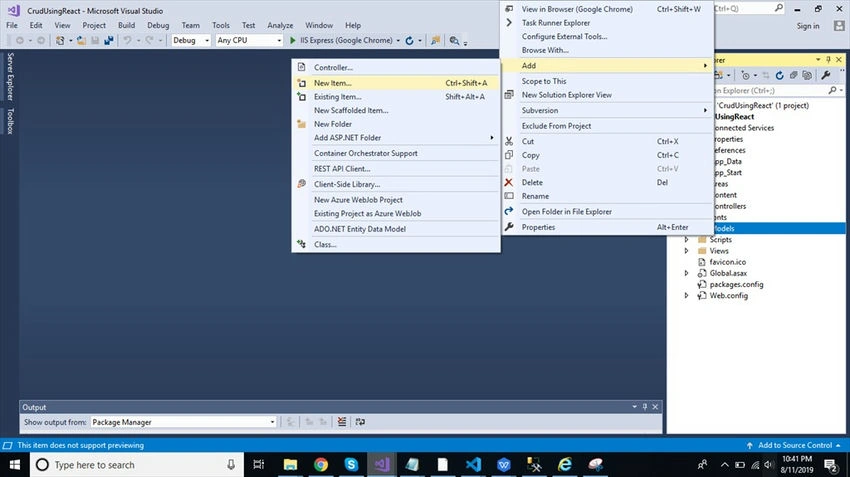
Step 6. Click on the "ADO.NET Entity Data Model" option and click "Add".
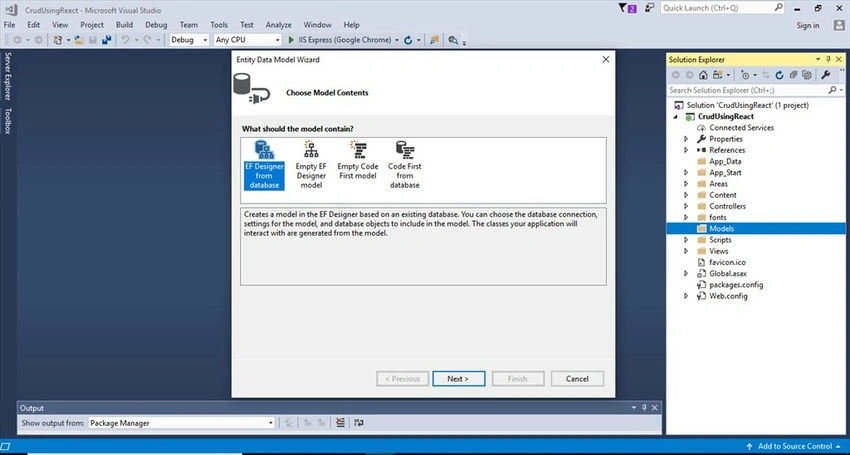
Step 7. Select EF Designer from the database and click the "Next" button.
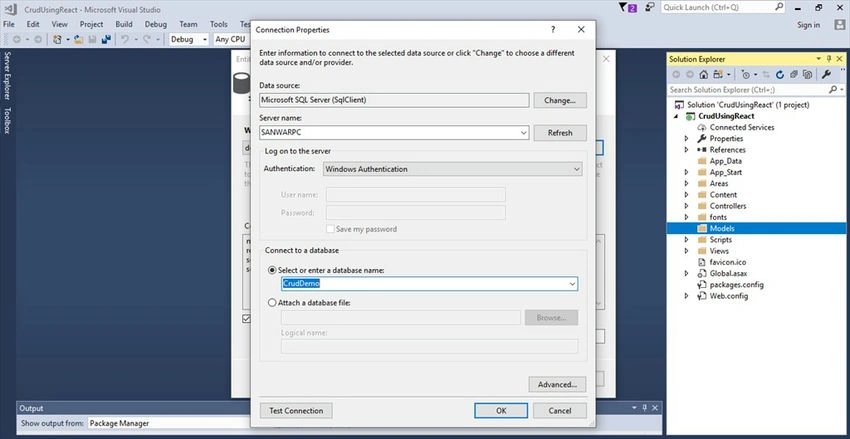
Step 8. Add the connection properties select the database name on the next page and click OK.
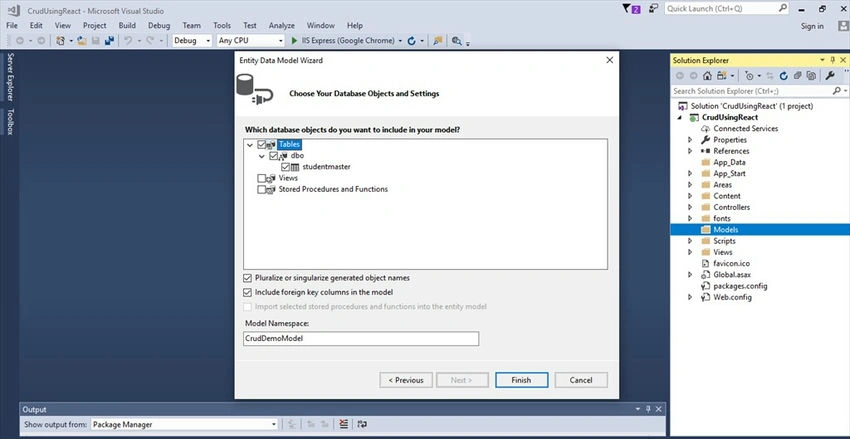
Step 9. Check the "Table" checkbox. The internal options will be selected by default. Now, click the "Finish" button.
Step 10. Right-click on the Models folder and add two classes - Student and Response respectively. Now, paste the following codes into these classes.
public class Student
{
    public string Name { get; set; }
    public string Rollno { get; set; }
    public string Class { get; set; }
    public string Address { get; set; }
}
public class Response
{
    public string Status { get; set; }
    public string Message { get; set; }
}
Step 11. Right-click on the Controllers folder and add a new controller. Name it as "Student Controller" and add the following namespace in the Student Controller.
using CrudUsingReact.Models;
Step 12. Now, add a method to insert and update data into the database.
[Route("AddotrUpdatestudent")]
[HttpPost]
public object AddotrUpdatestudent(Student st)
{
    try
    {
        if (st.Id == 0)
        {
            studentmaster sm = new studentmaster();
            sm.Name = st.Name;
            sm.RollNo = st.Rollno;
            sm.Address = st.Address;
            sm.Class = st.Class;
            DB.studentmasters.Add(sm);
            DB.SaveChanges();
            return new Response
            {
                Status = "Success",
                Message = "Data Successfully"
            };
        }
        else
        {
            var obj = DB.studentmasters.Where(x => x.Id == st.Id).ToList().FirstOrDefault();
            if (obj.Id > 0)
            {
                obj.Name = st.Name;
                obj.RollNo = st.Rollno;
                obj.Address = st.Address;
                obj.Class = st.Class;
                DB.SaveChanges();
                return new Response
                {
                    Status = "Updated",
                    Message = "Updated Successfully"
                };
            }
        }
    }
    catch (Exception ex)
    {
        Console.Write(ex.Message);
    }
    return new Response
    {
        Status = "Error",
        Message = "Data not insert"
    };
}
Step 13. Add other methods to delete and fetch data respectively from the database.
[Route("Deletestudent")]
[HttpDelete]
public object Deletestudent(int id)
{
    var obj = DB.studentmasters.Where(x => x.Id == id).ToList().FirstOrDefault();
    DB.studentmasters.Remove(obj);
    DB.SaveChanges();
    return new Response
    {
        Status = "Delete",
        Message = "Delete Successfuly"
    };
}
[HttpGet]
public object Studentdetails()
{
    var a = DB.studentmasters.ToList();
    return a;
}
Complete Student controller code
using System;
using System.Collections.Generic;
using System.Linq;
using System.Net;
using System.Net.Http;
using System.Web.Http;
using CrudUsingReact.Models;

namespace CrudUsingReact.Controllers
{
    [RoutePrefix("Api/Student")]
    public class StudentController : ApiController
    {
        CrudDemoEntities DB = new CrudDemoEntities();

        [Route("AddotrUpdatestudent")]
        [HttpPost]
        public object AddotrUpdatestudent(Student st)
        {
            try
            {
                if (st.Id == 0)
                {
                    studentmaster sm = new studentmaster();
                    sm.Name = st.Name;
                    sm.RollNo = st.RollNo;
                    sm.Address = st.Address;
                    sm.Class = st.Class;
                    DB.studentmasters.Add(sm);
                    DB.SaveChanges();
                    return new Response
                    {
                        Status = "Success",
                        Message = "Data Successfully"
                    };
                }
                else
                {
                    var obj = DB.studentmasters.Where(x => x.Id == st.Id).ToList().FirstOrDefault();
                    if (obj.Id > 0)
                    {
                        obj.Name = st.Name;
                        obj.RollNo = st.RollNo;
                        obj.Address = st.Address;
                        obj.Class = st.Class;
                        DB.SaveChanges();
                        return new Response
                        {
                            Status = "Updated",
                            Message = "Updated Successfully"
                        };
                    }
                }
            }
            catch (Exception ex)
            {
                Console.Write(ex.Message);
            }
            return new Response
            {
                Status = "Error",
                Message = "Data not insert"
            };
        }

        [Route("Studentdetails")]
        [HttpGet]
        public object Studentdetails()
        {
            var a = DB.studentmasters.ToList();
            return a;
        }

        [Route("StudentdetailById")]
        [HttpGet]
        public object StudentdetailById(int id)
        {
            var obj = DB.studentmasters.Where(x => x.Id == id).ToList().FirstOrDefault();
            return obj;
        }

        [Route("Deletestudent")]
        [HttpDelete]
        public object Deletestudent(int id)
        {
            var obj = DB.studentmasters.Where(x => x.Id == id).ToList().FirstOrDefault();
            DB.studentmasters.Remove(obj);
            DB.SaveChanges();
            return new Response
            {
                Status = "Delete",
                Message = "Delete Successfuly"
            };
        }
    }
}
Step 14. Now, let's enable CORS. Go to Tools, open NuGet Package Manager, search for CORS and install the "Microsoft.Asp.Net.WebApi.Cors" package. Open Webapiconfig.cs and add the following lines.
EnableCorsAttribute cors = new EnableCorsAttribute("*", "*", "*");
config.EnableCors(cors);
Create React.js Project
Step 15. To create a new ReactJS project, open the command prompt and enter the following command.
npx create-react-app crudwithceactjs
Open the newly created project in Visual Studio Code and install Reactstrap and Bootstrap in this project by using the following commands respectively.
npm install --save bootstrap
npm install --save reactstrap react react-dom
Step 16. Now, go to the "src" folder add a new folder "Student" and add 4 new components.
- Addstudent.js
- Studentlist.js
- Editstudent.js
- Table.js
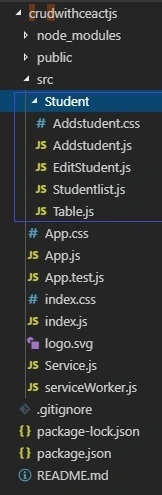
Step 17. Install the Axios library by using the following command. Learn more about Axios library
npm install --save axios
Step 18. Add routing: Use the following command to add routing in React.
npm install react-router-dom --save
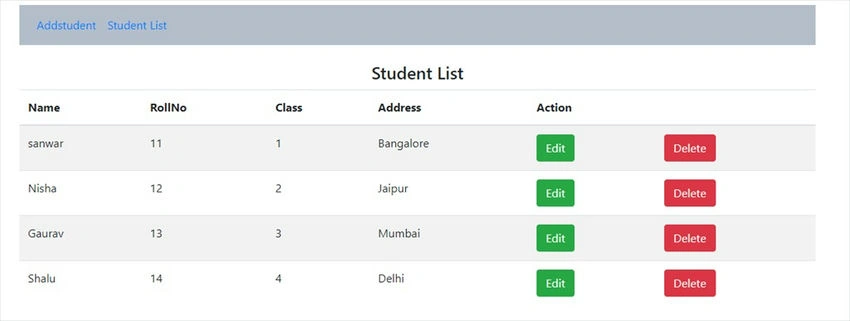
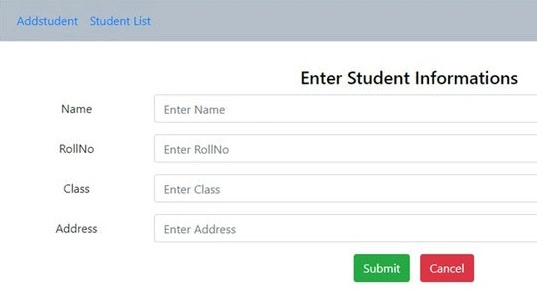
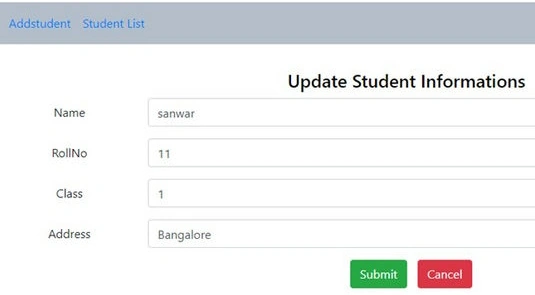
Step 19. Now, open the Addstudent.js file and add the following code.
Mukesh SagarPosted Jul 22, 2023, 2:21 PM
While running the application I got the error Missing script: "start"
P KPosted Jun 26, 2021, 8:13 AM
Failed to load resource: net::ERR_CONNECTION_REFUSEDcreateError.js:16 Uncaught (in promise) Error: Network Error at createError (createError.js:16) at XMLHttpRequest.handleError (xhr.js:84)
P KPosted Jun 26, 2021, 8:12 AM
My submit button dies not working why..sir????
swapnil rajPosted Feb 11, 2021, 7:52 AM
Getting 404(Not Found error on submit click)Xhr.js:177 POST http://localhost:51012/api/Student/AddotrUpdatestudent/ 404 (Not Found)
Amit HajarePosted Jan 22, 2021, 9:58 AM
My problem - Cannot find file: 'EditStudent.js' does not match the corresponding name on disk: '.\src\Student\Editstudent.js'.
Sandeep PradhanPosted Jul 7, 2020, 6:46 AM
Hi, is this working for anyone?
Sandeep PradhanPosted Jul 6, 2020, 1:00 AM
1)the screen does not render in the way you have shown it is basic html. 2) the add function does not wprk
Sandeep PradhanPosted Jul 6, 2020, 12:59 AM
Hi I followed your instructions but there are 2 problems that I am facing.
Sandeep PradhanPosted Jul 5, 2020, 9:09 AM
Also it says the namspace cannot directly contain members such as fields or methods for AddotrUpdatestudent
Sandeep PradhanPosted Jul 5, 2020, 9:05 AM
Hi, What is DB.studentmasters . It is showing an error for the word DB, says DB does not exist in this context?
vyas senthilPosted May 19, 2020, 3:23 AM
Could you please provide a link for the code?
Lawrence LokePosted Feb 17, 2020, 1:32 AM
The edit didnt worked for me. It didnt edit the data but instead it creates another new row of data with new PK Id
Muh SinaPosted Jan 2, 2020, 3:30 AM
Sir, where i put step 12 code?
Mohammed AshrafPosted Aug 16, 2019, 1:28 AM
Good...Nice Article
Amit MohantyPosted Aug 15, 2019, 11:42 PM
Nice article