

Introduction
In this article, we will discuss related how to perform crud operations with the blazor web assembly clients we've got a web API for our server project and additionally, we will also add and use entity framework core with a SQL server database.
Link to download the project source code here
Step 1
Let's create a Blazor WebAssembly App. Open Visual Studio 2022 and click on Create a new project.
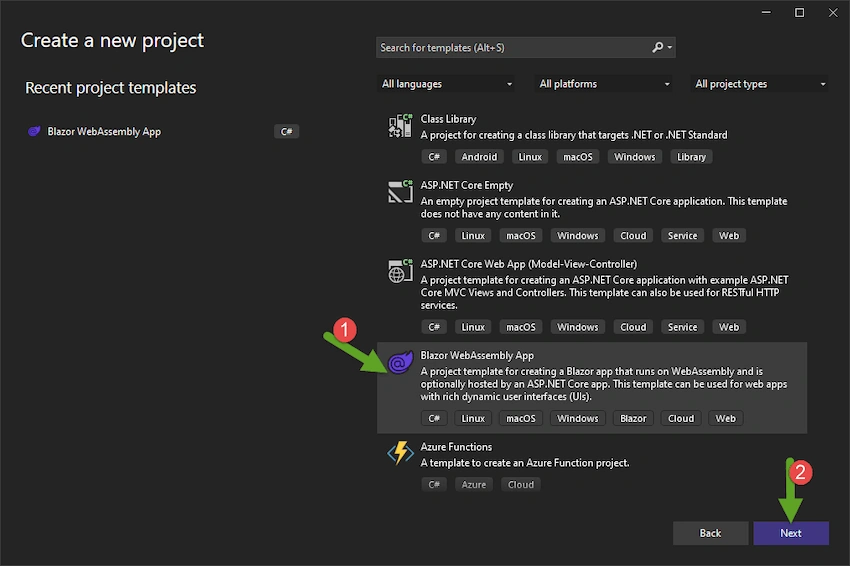
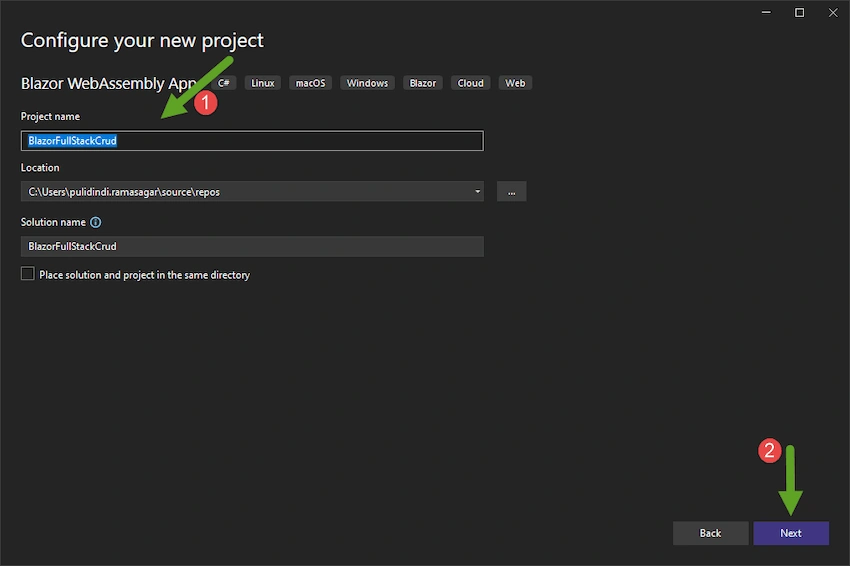
Select .Net 6.0 Framework
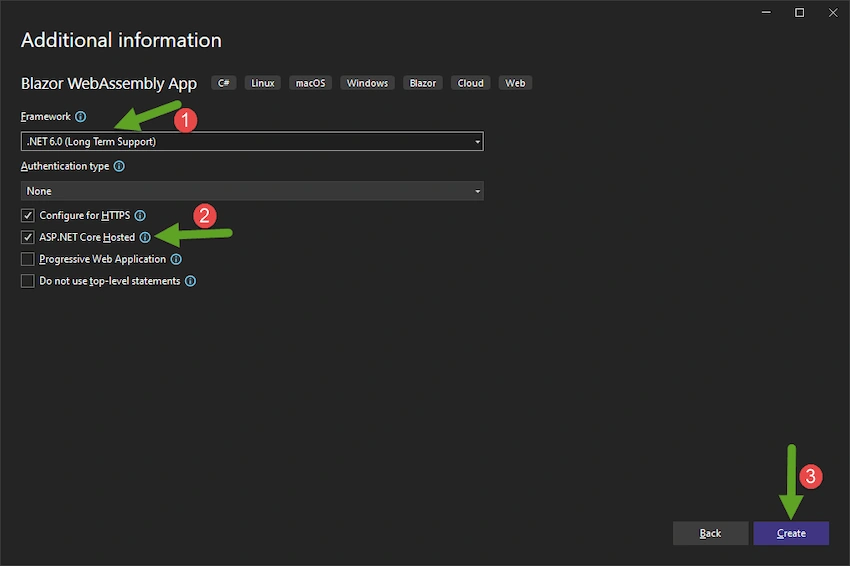
Step 2
Let's build a kind of a doctors database. Create the models with some properties.
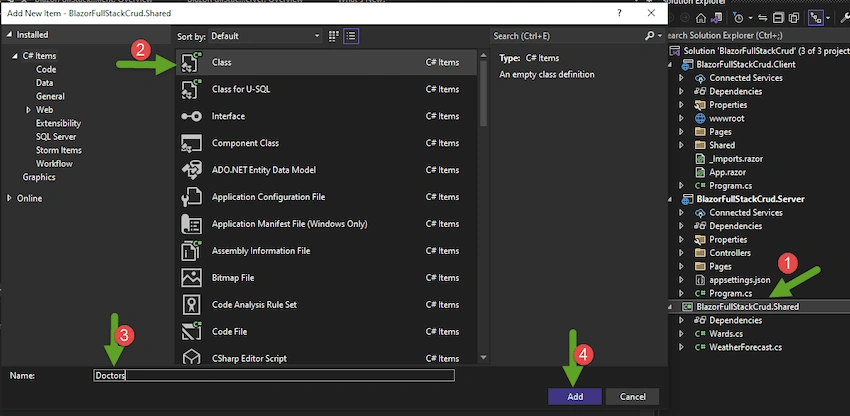
Right-click on Shared Project and Create Wards and Doctors Model class as below
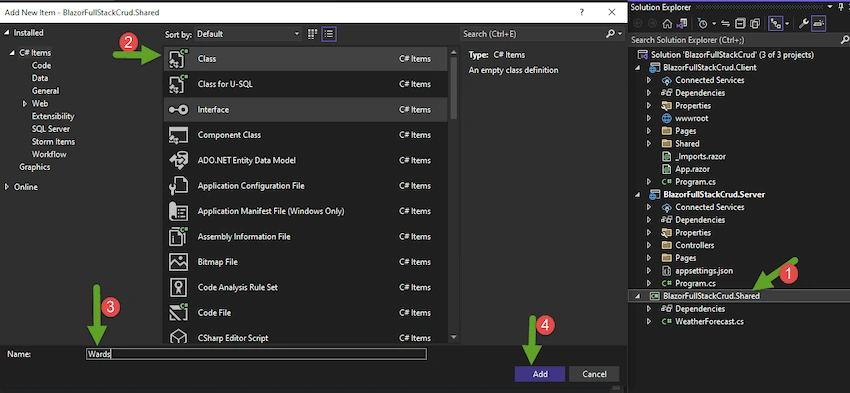
using System;
using System.Collections.Generic;
using System.Linq;
using System.Text;
using System.Threading.Tasks;

namespace BlazorFullStackCrud.Shared
{
    public class Ward
    {
        public int Id { get; set; }
        public string Name { get; set; } = string.Empty;
    }
}
Also add Doctor class with the below properties
using System;
using System.Collections.Generic;
using System.Linq;
using System.Text;
using System.Threading.Tasks;

namespace BlazorFullStackCrud.Shared
{
    public class Doctor
    {
        public int Id { get; set; }
        public string FirstName { get; set; } = string.Empty;
        public string LastName { get; set; } = string.Empty;
        public string Specialization { get; set; } = string.Empty;
        public Ward? Ward { get; set; }
        public int WardId { get; set; }
    }
}
Step 3
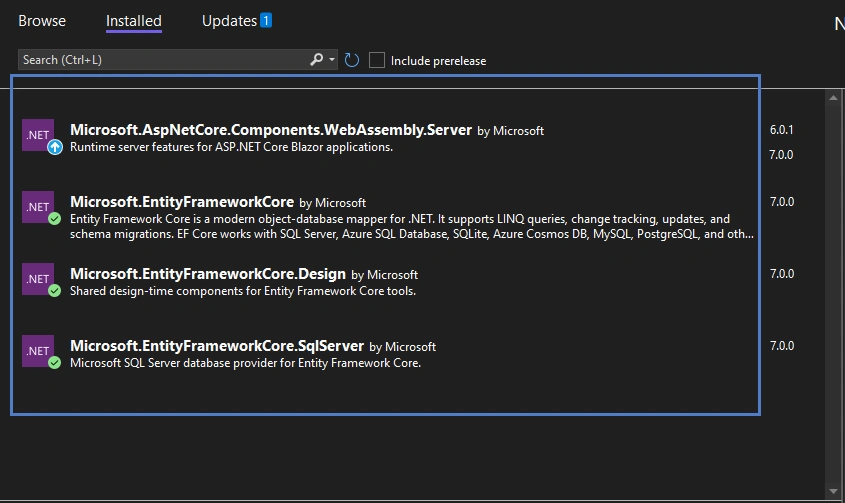
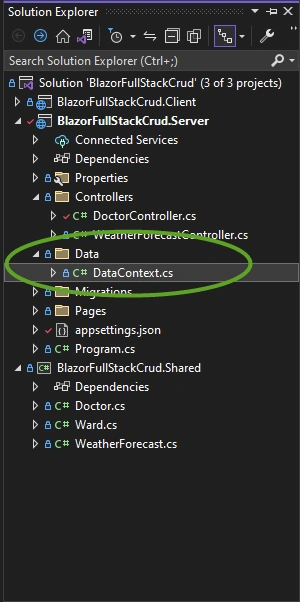
Let's work on data part. Create a folder named Data and add a DataContext class and inherit it from DbContext. Before that let's install the required nuget packages too.
A DbContext instance represents a session with the database and can be used to query and save instances of your entities, DbContext is a combination of the Unit Of Work and Repository patterns.
Entity Framework Core does not support multiple parallel operations being run on the same DbContext instance. This includes both parallel executions of async queries and any explicit concurrent use from multiple threads.
Typically we create a class that derives from DbContext and contains DbSet<TEntty> properties foreach entity in the model. The DbSet<TEntity> properties have a public setter, they are automatically initialized when the instance of the derived context is created.
namespace BlazorFullStackCrud.Server.Data
{
    public class DataContext : DbContext
    {
        public DataContext(DbContextOptions<DataContext> options) : base(options)
        {

        }

        protected override void OnModelCreating(ModelBuilder modelBuilder)
        {
            modelBuilder.Entity<Ward>().HasData(
                new Ward { Id = 1, Name = "General" },
                new Ward { Id = 2, Name = "ICU" }
            );

            modelBuilder.Entity<Doctor>().HasData(
                new Doctor
                {
                    Id = 1,
                    FirstName = "Sukesh",
                    LastName = "D",
                    Specialization = "General Anesthesia",
                    WardId = 1,
                },
                new Doctor
                {
                    Id = 2,
                    FirstName = "Madhu",
                    LastName = "Pilli",
                    Specialization = "Orthopaedics",
                    WardId = 2
                }
            );
        }

        public DbSet<Doctor> Doctors { get; set; }

        public DbSet<Ward> Wards { get; set; }
    }
}
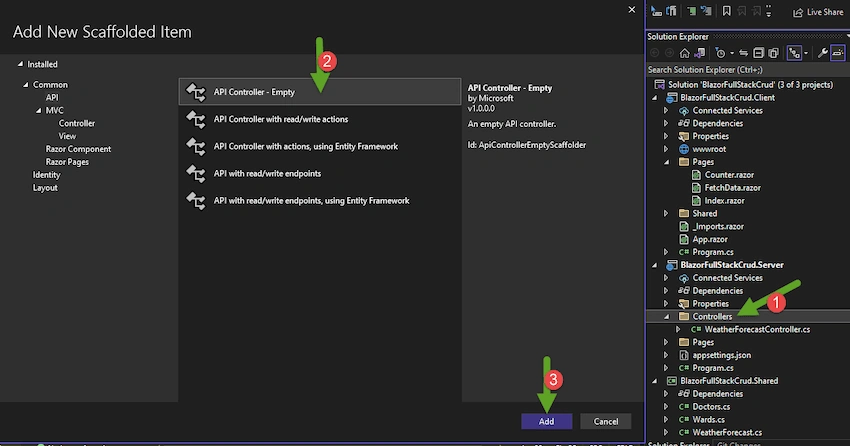
Step 4 - Now let's start by creating a controller and implement the get calls so the read operations for a list of doctors and then use entity framework and move the mock data to the database.
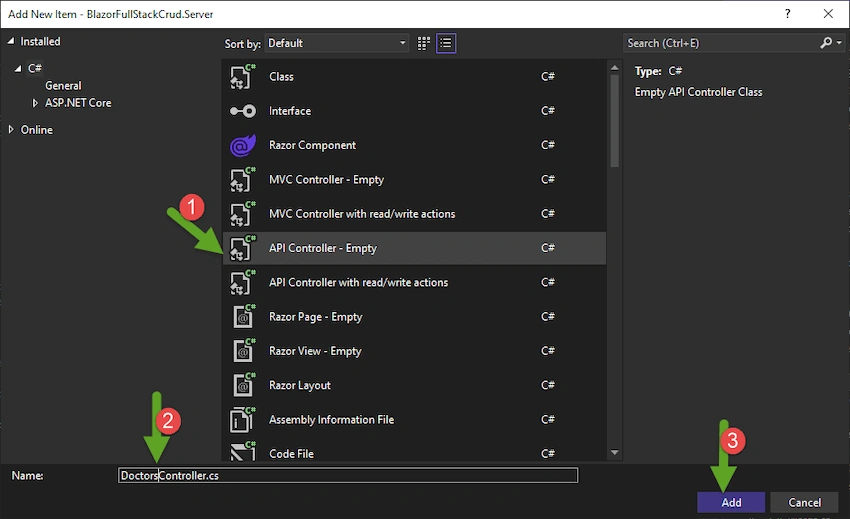
using Microsoft.AspNetCore.Http;
using Microsoft.AspNetCore.Mvc;

namespace BlazorFullStackCrud.Server.Controllers
{
    [Route("api/[controller]")]
    [ApiController]
    public class DoctorController : ControllerBase
    {
        private readonly DataContext _context;

        public DoctorController(DataContext context)
        {
            _context = context;
        }

        [HttpGet]
        public async Task<ActionResult<List<Doctor>>> GetDoctors()
        {
            var doctors = await _context.Doctors.Include(sd => sd.Ward).ToListAsync();
            return Ok(doctors);
        }

        [HttpGet("wards")]
        public async Task<ActionResult<List<Ward>>> GetWards()
        {
            var wards = await _context.Wards.ToListAsync();
            return Ok(wards);
        }

        [HttpGet("{id}")]
        public async Task<ActionResult<Doctor>> GetSingleDoctor(int id)
        {
            var doctor = await _context.Doctors
                .Include(h => h.Ward)
                .FirstOrDefaultAsync(h => h.Id == id);
            if (doctor == null)
            {
                return NotFound("Sorry, no doctor here. :/");
            }
            return Ok(doctor);
        }

        [HttpPost]
        public async Task<ActionResult<List<Doctor>>> CreateDoctor(Doctor doctor)
        {
            doctor.Ward = null;
            _context.Doctors.Add(doctor);
            await _context.SaveChangesAsync();

            return Ok(await GetDbDoctors());
        }

        [HttpPut("{id}")]
        public async Task<ActionResult<List<Doctor>>> UpdateDoctor(Doctor doctor, int id)
        {
            var dbDoctor = await _context.Doctors
                .Include(sd => sd.Ward)
                .FirstOrDefaultAsync(sd => sd.Id == id);
            if (dbDoctor == null)
                return NotFound("Sorry, but no doctor for you. :/");

            dbDoctor.FirstName = doctor.FirstName;
            dbDoctor.LastName = doctor.LastName;
            dbDoctor.Specialization = doctor.Specialization;
            dbDoctor.WardId = doctor.WardId;

            await _context.SaveChangesAsync();

            return Ok(await GetDbDoctors());
        }

        [HttpDelete("{id}")]
        public async Task<ActionResult<List<Doctor>>> DeleteDoctor(int id)
        {
            var dbDoctor = await _context.Doctors
                .Include(sd => sd.Ward)
                .FirstOrDefaultAsync(sd => sd.Id == id);
            if (dbDoctor == null)
                return NotFound("Sorry, but no doctor for you. :/");

            _context.Doctors.Remove(dbDoctor);
            await _context.SaveChangesAsync();

            return Ok(await GetDbDoctors());
        }

        private async Task<List<Doctor>> GetDbDoctors()
        {
            return await _context.Doctors.Include(sd => sd.Ward).ToListAsync();
        }
    }
}
Join the conversation! Your thoughts help the community grow.