

The main thought behind the sample was to generate common types of code easily.
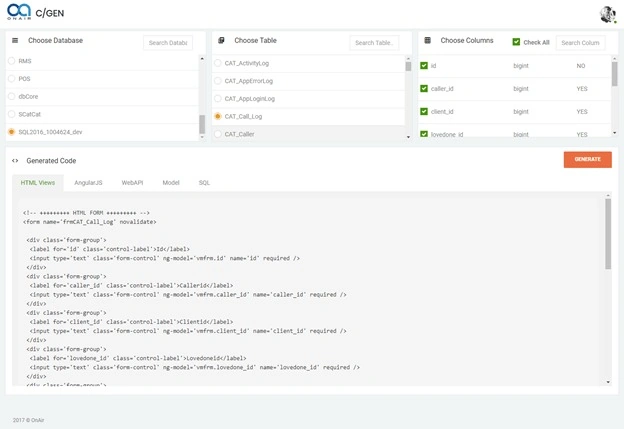
A single-page application is built with ASP.NET Core & AngularJS, here’s the execution environment & API service in .NET Core to generate the code. For the front end, I have used AngularJS.
Content Focused
- Connect to the database server
- Get all database lists
- Get all Table Columns by selecting a particular table
- Choose column then
- Generate code, that’s it.
Let’s dive into the code, first let’s get started with back-end work. We have connected our database server using a connection string.
Let's Work with Back-End and connect to the Database.
Create an API Controller to get all our operations done. In our controller class, let’s put a connection string to get connected with our databases.
private string conString = "server=DESKTOP-80DEJMQ; uid=sa; pwd=sa@12345;";
Get All Databases
Let’s create a method to get all the database lists from the database server. Below is the SQL query to get all databases.
SELECT name from sys. databases WHERE name NOT IN ('master', 'tempdb', 'model', 'msdb') ORDER BY create_date
Here’s the Get method to list all our databases on the server.
// api/Codegen/GetDatabaseList
[HttpGet, Route("GetDatabaseList"), Produces("application/json")]
public List<vmDatabase> GetDatabaseList()
{
    List<vmDatabase> data = new List<vmDatabase>();
    using (SqlConnection con = new SqlConnection(conString))
    {
        int count = 0;
        con.Open();
        using (SqlCommand cmd = new SqlCommand("SELECT name from sys.databases WHERE name NOT IN ('master', 'tempdb', 'model', 'msdb') ORDER BY create_date", con))
        {
            using (IDataReader dr = cmd.ExecuteReader())
            {
                while (dr.Read())
                {
                    count++;
                    data.Add(new vmDatabase()
                    {
                        DatabaseId = count,
                        DatabaseName = dr[0].ToString()
                    });
                }
            }
        }
    }
    return data.ToList();
}
Get all Table Column
Here, we are getting all tables from the selected database.
// api/Codegen/GetDatabaseTableList
[HttpPost, Route("GetDatabaseTableList"), Produces("application/json")]
public List<vmTable> GetDatabaseTableList([FromBody] vmParam model)
{
    List<vmTable> data = new List<vmTable>();
    string conString_ = conString + " Database=" + model.DatabaseName + ";";
    using (SqlConnection con = new SqlConnection(conString_))
    {
        int count = 0;
        con.Open();
        DataTable schema = con.GetSchema("Tables");
        foreach (DataRow row in schema.Rows)
        {
            count++;
            data.Add(new vmTable()
            {
                TableId = count,
                TableName = row[2].ToString()
            });
        }
    }
    return data.ToList();
}
Choose Column
Below SQL query below is used to get all table columns.
SELECT
    COLUMN_NAME,
    DATA_TYPE,
    ISNULL(CHARACTER_MAXIMUM_LENGTH, 0),
    IS_NULLABLE,
    TABLE_SCHEMA
FROM
    INFORMATION_SCHEMA.COLUMNS
WHERE
    TABLE_NAME = '" + model.TableName + "'
ORDER BY
    ORDINAL_POSITION
Here is the method to list all selected table columns in the server.
// api/Codegen/GetDatabaseTableColumnList
[HttpPost, Route("GetDatabaseTableColumnList"), Produces("application/json")]
public List<vmColumn> GetDatabaseTableColumnList([FromBody] vmParam model)
{
    List<vmColumn> data = new List<vmColumn>();
    string conString_ = conString + " Database=" + model.DatabaseName + ";";
    using (SqlConnection con = new SqlConnection(conString_))
    {
        int count = 0;
        con.Open();
        using (SqlCommand cmd = new SqlCommand(
            "SELECT COLUMN_NAME, DATA_TYPE, ISNULL(CHARACTER_MAXIMUM_LENGTH, 0), IS_NULLABLE, TABLE_SCHEMA " +
            "FROM INFORMATION_SCHEMA.COLUMNS " +
            "WHERE TABLE_NAME = '" + model.TableName + "' " +
            "ORDER BY ORDINAL_POSITION", con))
        {
            using (IDataReader dr = cmd.ExecuteReader())
            {
                while (dr.Read())
                {
                    count++;
                    data.Add(new vmColumn()
                    {
                        ColumnId = count,
                        ColumnName = dr[0].ToString(),
                        DataType = dr[1].ToString(),
                        MaxLength = dr[2].ToString(),
                        IsNullable = dr[3].ToString(),
                        Tablename = model.TableName.ToString(),
                        TableSchema = dr[4].ToString()
                    });
                }
            }
        }
    }
    return data.ToList();
}
Now, let’s get an overview of the server code that is producing the generated code based on our database column.
[EnableCors("AllowCors"), Produces("application/json"), Route("api/Codegen")]
public class CodegenController : Controller
{
    private readonly IHostingEnvironment _hostingEnvironment;
    private string conString = "server=DESKTOP-80DEJMQ; uid=sa; pwd=sa@12345;";

    public CodegenController(IHostingEnvironment hostingEnvironment)
    {
        _hostingEnvironment = hostingEnvironment;
    }

    #region +++++ Database +++++
    // api/Codegen/GetDatabaseList
    [HttpGet, Route("GetDatabaseList"), Produces("application/json")]
    public List<vmDatabase> GetDatabaseList()
    {
        List<vmDatabase> data = new List<vmDatabase>();
        using (SqlConnection con = new SqlConnection(conString))
        {
            int count = 0;
            con.Open();
            using (SqlCommand cmd = new SqlCommand(
                "SELECT name from sys.databases WHERE name NOT IN ('master', 'tempdb', 'model', 'msdb') ORDER BY create_date", con))
            {
                using (IDataReader dr = cmd.ExecuteReader())
                {
                    while (dr.Read())
                    {
                        count++;
                        data.Add(new vmDatabase()
                        {
                            DatabaseId = count,
                            DatabaseName = dr[0].ToString()
                        });
                    }
                }
            }
        }
        return data.ToList();
    }

    // api/Codegen/GetDatabaseTableList
    [HttpPost, Route("GetDatabaseTableList"), Produces("application/json")]
    public List<vmTable> GetDatabaseTableList([FromBody] vmParam model)
    {
        List<vmTable> data = new List<vmTable>();
        string conString_ = conString + " Database=" + model.DatabaseName + ";";
        using (SqlConnection con = new SqlConnection(conString_))
        {
            int count = 0;
            con.Open();
            DataTable schema = con.GetSchema("Tables");
            foreach (DataRow row in schema.Rows)
            {
                count++;
                data.Add(new vmTable()
                {
                    TableId = count,
                    TableName = row[2].ToString()
                });
            }
        }
        return data.ToList();
    }

    // api/Codegen/GetDatabaseTableColumnList
    [HttpPost, Route("GetDatabaseTableColumnList"), Produces("application/json")]
    public List<vmColumn> GetDatabaseTableColumnList([FromBody] vmParam model)
    {
        List<vmColumn> data = new List<vmColumn>();
        string conString_ = conString + " Database=" + model.DatabaseName + ";";
        using (SqlConnection con = new SqlConnection(conString_))
        {
            int count = 0;
            con.Open();
            using (SqlCommand cmd = new SqlCommand(
                "SELECT COLUMN_NAME, DATA_TYPE, ISNULL(CHARACTER_MAXIMUM_LENGTH, 0), IS_NULLABLE, TABLE_SCHEMA " +
                "FROM INFORMATION_SCHEMA.COLUMNS " +
                "WHERE TABLE_NAME = '" + model.TableName + "' " +
                "ORDER BY ORDINAL_POSITION", con))
            {
                using (IDataReader dr = cmd.ExecuteReader())
                {
                    while (dr.Read())
                    {
                        count++;
                        data.Add(new vmColumn()
                        {
                            ColumnId = count,
                            ColumnName = dr[0].ToString(),
                            DataType = dr[1].ToString(),
                            MaxLength = dr[2].ToString(),
                            IsNullable = dr[3].ToString(),
                            Tablename = model.TableName.ToString(),
                            TableSchema = dr[4].ToString()
                        });
                    }
                }
            }
        }
        return data.ToList();
    }
    #endregion

    #region ++++ CodeGeneration ++++
    // api/Codegen/GenerateCode
    [HttpPost, Route("GenerateCode"), Produces("application/json")]
    public IActionResult GenerateCode([FromBody] object[] data)
    {
        List<string> spCollection = new List<string>();
        try
        {
            string webRootPath = _hostingEnvironment.WebRootPath; // From wwwroot
            string contentRootPath = _hostingEnvironment.ContentRootPath; // From Others

            var tblColumns = JsonConvert.DeserializeObject<List<vmColumn>>(data[0].ToString());

            string fileContentSet = string.Empty;
            string fileContentGet = string.Empty;
            string fileContentPut = string.Empty;
            string fileContentDelete = string.Empty;
            string fileContentVm = string.Empty;
            string fileContentView = string.Empty;
            string fileContentNg = string.Empty;
            string fileContentAPIGet = string.Empty;
            string fileContentAPIGetById = string.Empty;

            // SP
            fileContentSet = SpGenerator.GenerateSetSP(tblColumns, webRootPath);
            fileContentGet = SpGenerator.GenerateGetSP(tblColumns, webRootPath);
            fileContentPut = SpGenerator.GeneratePutSP(tblColumns, webRootPath);
            fileContentDelete = SpGenerator.GenerateDeleteSP(tblColumns, webRootPath);
            spCollection.Add(fileContentSet);
            spCollection.Add(fileContentGet);
            spCollection.Add(fileContentPut);
            spCollection.Add(fileContentDelete);

            // VM
            fileContentVm = VmGenerator.GenerateVm(tblColumns, webRootPath);
            spCollection.Add(fileContentVm);

            // VU
            fileContentView = ViewGenerator.GenerateForm(tblColumns, webRootPath);
            spCollection.Add(fileContentView);

            // NG
            fileContentNg = NgGenerator.GenerateNgController(tblColumns, webRootPath);
            spCollection.Add(fileContentNg);

            // API
            fileContentAPIGet = APIGenerator.GenerateAPIGet(tblColumns, webRootPath);
            spCollection.Add(fileContentAPIGet);
        }
        catch (Exception ex)
        {
            ex.ToString();
        }

        return Json(new
        {
            spCollection
        });
    }
    #endregion
}
In our generation mechanism, the .txt template is used for representing the real structure. In the below folder, we have all the formatted templates to present the real structure in generated code.
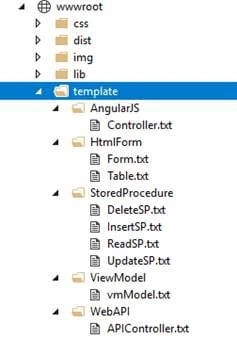
Let’s expand the generator. Here’s the list that we have generated by this app
- API Controller
- ViewModel
- AngularJS Controller
- Stored Procedure
- HTML Form
API-Generator
The below code method will generate the API Controller using a formatted text file.
public static dynamic GenerateAPIGet(List<vmColumn> tblColumns, string contentRootPath)
{
    TextInfo textInfo = new CultureInfo("en-US", false).TextInfo;
    StringBuilder builderPrm = new StringBuilder();
    StringBuilder builderSub = new StringBuilder();
    builderPrm.Clear();
    builderSub.Clear();
    string fileContent = string.Empty;
    string queryPrm = string.Empty;
    string submitPrm = string.Empty;

    string tableName = tblColumns[0].Tablename;
    string tableSchema = tblColumns[0].TableSchema;
    string path = @"" + contentRootPath + "\\template\\WebAPI\\APIController.txt";

    // Api Controller
    string routePrefix = "api/" + textInfo.ToTitleCase(Conversion.RemoveSpecialCharacters(tableName.ToString()));
    string apiController = textInfo.ToTitleCase(Conversion.RemoveSpecialCharacters(tableName.ToString())) + "Controller";
    string collectionName = "List<" + tableName.ToString() + ">";
    string listObj = tableName.ToString() + "s";
    string getDbMethod = "_ctx." + tableName.ToString() + ".ToListAsync()";
    string entity = tableName.ToString();
    string urlApiGet = "api/" + textInfo.ToTitleCase(Conversion.RemoveSpecialCharacters(tableName.ToString())) + "/GetAll";
    string urlApiGetByID = "api/" + textInfo.ToTitleCase(Conversion.RemoveSpecialCharacters(tableName.ToString())) + "/GetByID/5";
    string urlApiPost = "api/" + textInfo.ToTitleCase(Conversion.RemoveSpecialCharacters(tableName.ToString())) + "/Save";
    string urlApiPut = "api/" + textInfo.ToTitleCase(Conversion.RemoveSpecialCharacters(tableName.ToString())) + "/UpdateByID/5";
    string urlApiDeleteByID = "api/" + textInfo.ToTitleCase(Conversion.RemoveSpecialCharacters(tableName.ToString())) + "/DeleteByID/5";

    // Entity Fields
    foreach (var item in tblColumns)
    {
        // Parameter
        builderPrm.AppendLine();
        builderPrm.Append("                entityUpdate." + item.ColumnName + " = model." + item.ColumnName + ";");
    }
    submitPrm = builderPrm.AppendLine().ToString();

    using (StreamReader sr = new StreamReader(path, Encoding.UTF8))
    {
        fileContent = sr.ReadToEnd()
            .Replace("#RoutePrefix", routePrefix.ToString())
            .Replace("#APiController", apiController.ToString())
            .Replace("#Collection", collectionName.ToString())
            .Replace("#ListObj", listObj.ToString())
            .Replace("#DbMethod", getDbMethod.ToString())
            .Replace("#Entity", entity.ToString())
            .Replace("#UrlApiGet", urlApiGet.ToString())
            .Replace("#UrlGetByID", urlApiGetByID.ToString())
            .Replace("#UrlPostByID", urlApiPost.ToString())
            .Replace("#UrlApiPut", urlApiPut.ToString())
            .Replace("#ColUpdate", submitPrm.ToString())
            .Replace("#UrlDeleteByID", urlApiDeleteByID.ToString());
    }

    return fileContent.ToString();
}
API Controller Format
In this portion, we have read the text as it is till the end line then replaced those #tag properties using C# dynamically. This is the main trick that is used in code generation.
[Route("#RoutePrefix"), Produces("application/json")]
public class #APiController : Controller
{
    private dbContext _ctx = null;

    public #APiController(dbContext context)
    {
        _ctx = context;
    }

    // GET: #UrlApiGet
    [HttpGet, Route("GetAll")]
    public async Task<object> GetAll()
    {
        #Collection #ListObj = null;
        try
        {
            using (_ctx)
            {
                #ListObj = await #DbMethod;
            }
        }
        catch (Exception ex)
        {
            ex.ToString();
        }
        return #ListObj;
    }

    // GET #UrlGetByID
    [HttpGet, Route("GetByID/{id}")]
    public async Task<#Entity> GetByID(int id)
    {
        #Entity obj = null;
        try
        {
            using (_ctx)
            {
                obj = await _ctx.#Entity.FirstOrDefaultAsync(x => x.Id == id);
            }
        }
        catch (Exception ex)
        {
            ex.ToString();
        }
        return obj;
    }

    // POST #UrlPostByID
    [HttpPost, Route("Save")]
    public async Task<object> Save([FromBody]#Entity model)
    {
        object result = null;
        string message = "";
        if (model == null)
        {
            return BadRequest();
        }
        using (_ctx)
        {
            using (var _ctxTransaction = _ctx.Database.BeginTransaction())
            {
                try
                {
                    _ctx.#Entity.Add(model);
                    await _ctx.SaveChangesAsync();
                    _ctxTransaction.Commit();
                    message = "Ok";
                }
                catch (Exception e)
                {
                    _ctxTransaction.Rollback();
                    e.ToString();
                    message = "Error";
                }

                result = new
                {
                    message
                };
            }
        }
        return result;
    }

    // PUT #UrlApiPut
    [HttpPut, Route("UpdateByID/{id}")]
    public async Task<object> UpdateByID(int id, [FromBody]#Entity model)
    {
        object result = null;
        string message = string.Empty;
        if (model == null)
        {
            return BadRequest();
        }
        using (_ctx)
        {
            using (var _ctxTransaction = _ctx.Database.BeginTransaction())
            {
                try
                {
                    var entityUpdate = _ctx.#Entity.FirstOrDefault(x => x.Id == id);
                    if (entityUpdate != null)
                    {
                        #ColUpdate

                        await _ctx.SaveChangesAsync();
                    }
                    _ctxTransaction.Commit();
                    message = "Ok";
                }
                catch (Exception e)
                {
                    _ctxTransaction.Rollback();
                    e.ToString();
                    message = "Error";
                }

                result = new
                {
                    message
                };
            }
        }
        return result;
    }

    // DELETE #UrlDeleteByID
    [HttpDelete, Route("DeleteByID/{id}")]
    public async Task<object> DeleteByID(int id)
    {
        object result = null;
        string message = "";
        using (_ctx)
        {
            using (var _ctxTransaction = _ctx.Database.BeginTransaction())
            {
                try
                {
                    var idToRemove = _ctx.#Entity.SingleOrDefault(x => x.Id == id);
                    if (idToRemove != null)
                    {
                        _ctx.#Entity.Remove(idToRemove);
                        await _ctx.SaveChangesAsync();
                    }
                    _ctxTransaction.Commit();
                    message = "Ok";
                }
                catch (Exception e)
                {
                    _ctxTransaction.Rollback();
                    e.ToString();
                    message = "Error";
                }

                result = new
                {
                    message
                };
            }
        }
        return result;
    }
}
Alpesh ManiyaPosted Jan 27, 2022, 4:56 PM
Very good information. Do we have any integration for dropdown.
roll mPosted Jul 28, 2021, 1:15 PM
Very useful and clean code, fantastic
sai thejaPosted Sep 17, 2018, 9:09 AM
Source code link ?