

Introduction
Continuous from
Part - 3, in previous article we have learn how User Controls exposes
the properties. Now in this article we will discuss how to expose the event from
a User Control. Exposing events is useful when we need to pass information up to
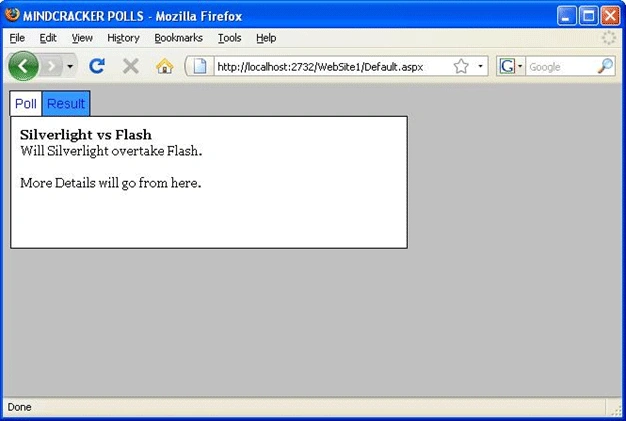
the containing page. For example, we want to create a custom tab strip with a
User control. When a user clicks a tab, we want to change the content displayed
in the page as given below in image.
A good example on MINDCRACKER given below that is using User Control event
exposing.
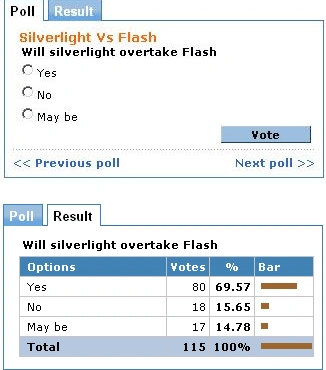
Look at above picture, this image is belongs to MINDCRACKER Polls. In above
image you can see two tabs named Poll and Result that is created (can be
created) by using User Control Even exposing. There is nothing like AJAX used.
Now let's take a look to create above one ourselves.
TabStrip.ascx File Code
<%@
Control Language="VB"
ClassName="TabStrip"
%>
<%@
Import Namespace="System.Collections.Generic"
%>
<script
runat="server">
Public Event TabClick As EventHandler
'''
<summary>
''' The index of the selected tab
'''
</summary>
Public
ReadOnly Property SelectedIndex()
As Integer
Get
Return
dlstTabStrip.SelectedIndex
End Get
End
Property
''' <summary>
''' Create the tabs
'''
</summary>
Private
Sub Page_Load()
If Not
Page.IsPostBack Then
' Create the tabs
Dim tabs
As New
List(Of
String)()
tabs.Add("Poll")
tabs.Add("Result")
'
Bind tabs to the DataList
dlstTabStrip.DataSource = tabs
dlstTabStrip.DataBind()
'
Select first tab
dlstTabStrip.SelectedIndex = 0
End If
End Sub
''' <summary>
''' This method executes when a user
clicks a tab
'''
</summary>
Protected
Sub dlstTabStrip_SelectedIndexChanged(ByVal
sender As Object,
ByVal e As
EventArgs)
RaiseEvent TabClick(Me,
EventArgs.Empty)
End Sub
</script>
<asp:DataList
id="dlstTabStrip"
RepeatDirection="Horizontal"
OnSelectedIndexChanged="dlstTabStrip_SelectedIndexChanged"
CssClass="tabs"
ItemStyle-CssClass="tab"
SelectedItemStyle-CssClass="selectedTab"
Runat="server">
<ItemTemplate>
<asp:LinkButton
id="lnkTab"
Text='<%#
Container.DataItem
%>'
CommandName="Select"
Runat="server"
/>
</ItemTemplate>
</asp:DataList>
The tab strip is created with the help of a DataList control. The DataList
control displays links for each of the items created in the Page_Load() event
handler. Notice that the TabStrip control exposes an event named TabClick. This
event is raised in the dlstTabStrip_SelectedIndexChanged() event handler when a
user clicks a tab.
The page given below uses the TabStrip control to display different content
depending on the tab selected.
Default.aspx File Code
<%@
Page Language="VB"
CodeFile="Default.aspx.vb"
Inherits="_Default"%>
Gowtham RajamanickamPosted Apr 7, 2016, 3:02 AM
good one..