Before reading this article, I highly recommend reading the previous part of the series on AngularJS:
In the previous article, we discussed the different types of directives including isolated scope of the directives. Now, in this article, we will discuss the directive scope of the directive. The main advantage of directive scope is that it is areusable component that can easily be used multiple times. Also, we can provide multiple additional values to the directives and also bind those values in directives. For this purpose, we use:
- “@” scope: This type of scope is used for passing value to the directive scope.
- “=” scope: This type of scope is used for passing the variables instead of the scope values. The purpose of doing this is to implement two way binding in the directive.
- “&” scope: This type of scope is used for pass the value and its reference to the directives. In this scope, we can pass the expression to the directives.
For doing this, we first create a js file with name SampleDirective.js and write the following code for the directive:
- 'use strict';
-
- var testApp = angular.module('TestApp', []);
- testApp.directive('shoppingCart', ['$http', function () {
- return {
- restrict: 'E',
- scope: {
- unit: '@'
- },
- bindToController: {
- param: '=',
- book: '&'
- },
- template: '<div class="rowDiv">' +
- ' <div class="col-lg-3">{{item}}</div>' +
- ' <div class="col-lg-2">{{qty}}</div>' +
- ' <div class="col-lg-2">{{price}} {{unit}}</div>' +
- ' <div class="col-lg-3"><input type="text" value="" data-ng-model="model.param.quantity" /></div>' +
- ' <div class="col-lg-2"><input type="button" value="Buy" class="btn-rounded" data-ng-click="model.book();" /></div>' +
- '</div>',
- link: function (scope, element, attr) {
- scope.item = attr.item;
- scope.qty = attr.quantity;
- scope.price = attr.price;
- scope.unit = '$';
- },
- controllerAs: 'model',
- controller: function ($http) {
- var self = this;
-
- if (self.param == undefined) {
- self.param = {};
- }
-
- if (self.param.quantity == undefined) {
- self.param.quantity = 0;
- }
-
- }
- }
- }]);
Now, add an html file name
Index.html and write the following code:
- <!DOCTYPE html>
- <html xmlns="http://www.w3.org/1999/xhtml">
-
- <head>
- <title>Directive Types</title>
- <link href="../../RefStyle/bootstrap.min.css" rel="stylesheet" />
- <script src="../../Scripts/angular.min.js"></script>
- <script src="SampleDirective.js"></script>
- <script src="IndexController.js"></script>
- </head>
-
- <body data-ng-app="TestApp" data-ng-controller="IndexController as model">
- <div class="row animated fadeInRight">
- <div class="col-lg-12">
- <div class="rowDiv">
- <h3>{{model.message}}</h3> </div>
- </div>
- <div class="col-lg-12">
- <div class="rowDiv">
- <h2>Shopping Cart</h2> </div>
- </div>
- <div class="col-lg-12">
- <div class="rowDiv">
- <div class="col-lg-3" style="border:solid;border-width:thin; border-color:black;background-color :gray;font-weight:bold;"><span>Product</span></div>
- <div class="col-lg-2" style="border:solid;border-width:thin;border-color:black;background-color :gray;font-weight:bold;"><span>Available Quantity</span></div>
- <div class="col-lg-2" style="border:solid;border-width:thin;border-color:black;background-color :gray;font-weight:bold;"><span>Price</span></div>
- <div class="col-lg-3" style="border:solid;border-width:thin;border-color:black;background-color :gray;font-weight:bold;"><span>Taken Qty</span></div>
- <div class="col-lg-2"></div>
- </div>
- </div>
- <div class="col-lg-12">
- <shopping-cart item="IPhone" quantity="{{model.totalUnit}}" price="40000.00" unit="{{model.priceUnit}}" param="model.args" book="model.validateQuantity()"></shopping-cart>
- </div>
- </body>
-
- </html>
Now add another js file named indexcontroller.js and write the following code -
- testApp.controller('IndexController', ['$http', function ($http, urlService) {
- var self = this;
-
- self.message = 'Directive Scope';
- self.priceUnit = 'INR';
- self.totalUnit = 50;
- self.args = {
- quantity: 0
- };
-
- self.validateQuantity = function () {
- self.priceUnit = 'INR1';
- if (self.args.quantity == 0) {
- alert('Put valid quantity no for book');
- }
- else {
- if (self.args.quantity > self.totalUnit) {
- alert('Booked Qunatity above available Quantity');
- self.param.quantity = 0;
- return;
- }
- else {
- alert('Booked Quantity is Available');
- }
- }
- }
- }]);
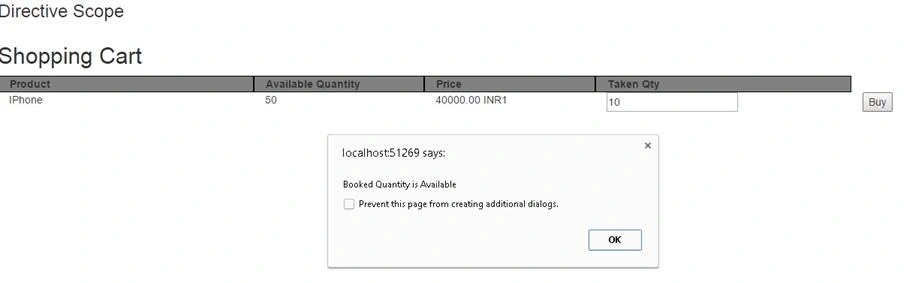
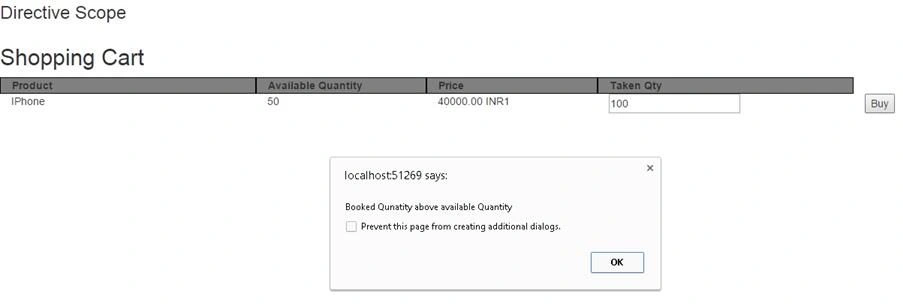
Now, run the code and the output will be like below, where we pass the
validateQuantity() method to the directive to validate the given quantity. Also, we pass parameters to the directive for other scope variables.
Read more articles on AngularJS:


ashok kallaguntaPosted May 27, 2017, 2:06 AM
Http://www.c-sharpcorner.com/forums/having-issue-with-2-way-binding-in-angular-directive
Sr KarthigaPosted Apr 19, 2016, 10:54 PM
Nice explanation
Anil Kumar MurmuPosted Mar 9, 2016, 8:54 AM
Good one
Prashant VermaPosted Mar 9, 2016, 2:02 AM
nice
Shailesh UkePosted Mar 9, 2016, 1:07 AM
Nice One..
Mohammed IbrahimPosted Mar 7, 2016, 10:39 PM
nice