
Stored ProcedureSuppose we have 2000 records in a table and we want to display only 10 records in a page; then why fetch 2000-10 = 1990 extra records. These extra records take too much bandwidth and reduce performance.
So here is how to solve the problem step-by-step
Step 1: Create a Stored Procedure for paging, as in: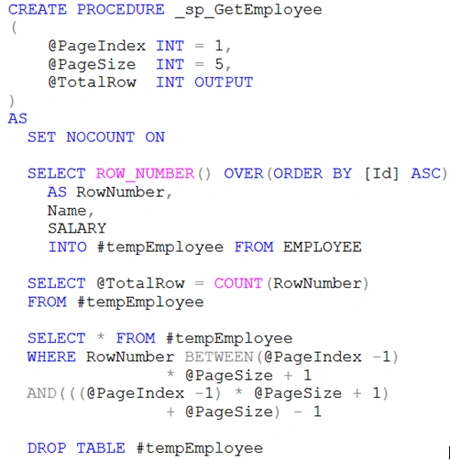
In the above Stored Procedure we are passing three parameters, two input parameters and one output parameter. The input parameters @PageIndex and @PageSize are to fetch records. These parameters represent the page number and how may records to display on that page. The output parameter @TotalRow is to display how many total records are in the table.
Step 2: Use a GridView
Now I use a grid view that shows employee data.
Step 3: Use a Repeater
A Repeater Control is used as a pager (to change pages). It uses a linkbutton that shows the page number in the bottom of the grid view.
Step 4: Fill Employee Data in GridView
I create a method that gets all employee specific page data and the total number of records in the table. Here I define the pagesize as 5, in other words each page will display only 5 records. TotalRow is used to determine how many rows there are in the table so we can create paging according.
Step 5: Create pager
Here I create the page number depending on the total number of records in the table. Here we are also adding two extra link buttons; these are "First" and "Next". These page numbers are bound with the repeater control.
Step 6: Change Page Index
When the page index changes then again new data is obtained depending on the new page and page size.
Step 7: First time load data
We fill the grid view when the page loads the first time.
Step 8: Output 

Custom Paging in Gridview
Join the conversation! Your thoughts help the community grow.
Sign in to leave a comment
It is the same account you read, post and publish with — and you will come straight back to this page.
Ravi RajPosted Jun 5, 2018, 3:09 AM
What about showing all page no. How can I show set of 5 page only
Sandeep Singh ShekhawatPosted Dec 9, 2012, 6:20 AM
Thanks Anil !
Anil KumarPosted Dec 2, 2012, 11:58 PM
good one :)