
Introduction #region EmailID #region Age [Range(18,40,ErrorMessage="Age must be 18 ~ 40")]
public string Age
{
get { return _Age; }
set
{ Now Run your application. Enter wrong input and you will get the error messages. That's it we have successfully used Data Annotations to validate user input, and without using INotifyPropertyChanged interface.
In my last article titled "Data Validation In Silverlight 3 Application", we discussed about how we can validate the user input. In this article we will see how Data Annotations help us in validating the data in Silverlight 3 Application.
Crating Silverlight Project
Fire up Visual Studio 2008 and create a Silverlight Application. Name it as DataAnnotationsInSL3.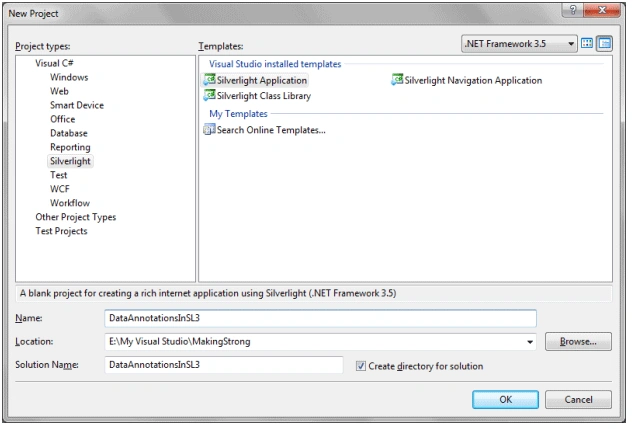
To make the application look good I am going to design it in Blend 3, don't worry this will be a simple design.
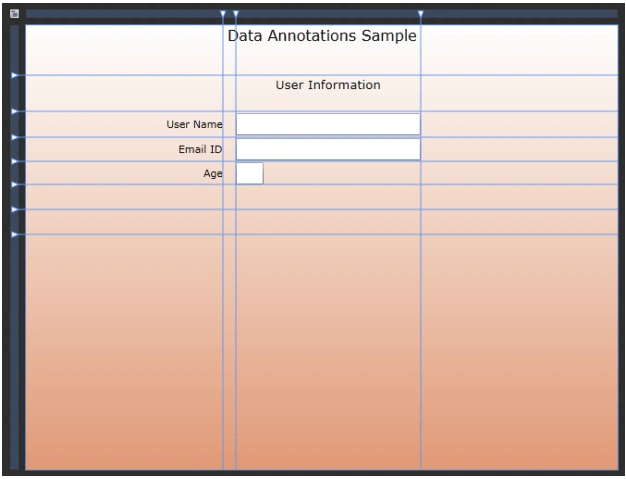
As you see from the above figure, I have 3 text boxes for User Name, Email ID, and Age. I have 2 Password Boxes for Password and confirm Password. All arefor User Input.
Now design part is done open the solution in Visual Studio Again. Here is the Xaml Code after designing.
<Grid x:Name="LayoutRoot">
<Grid.RowDefinitions>
<RowDefinition Height="0.112*"/>
<RowDefinition Height="0.081*"/>
<RowDefinition Height="0.058*"/>
<RowDefinition Height="0.054*"/>
<RowDefinition Height="0.052*"/>
<RowDefinition Height="0.056*"/>
<RowDefinition Height="0.056*"/>
<RowDefinition Height="0.529*"/>
</Grid.RowDefinitions>
<Grid.ColumnDefinitions>
<ColumnDefinition Width="0.333*"/>
<ColumnDefinition Width="0.022*"/>
<ColumnDefinition Width="0.312*"/>
<ColumnDefinition Width="0.333*"/>
</Grid.ColumnDefinitions>
<Grid.Background>
<LinearGradientBrush EndPoint="0.5,1" StartPoint="0.5,0">
<GradientStop Color="#FFE19A76" Offset="1"/>
<GradientStop Color="White"/>
</LinearGradientBrush>
</Grid.Background>
<TextBlock Text="User Name" TextWrapping="Wrap" Margin="0" Grid.Row="2" HorizontalAlignment="Right" VerticalAlignment="Center"/>
<TextBlock HorizontalAlignment="Right" Margin="0" VerticalAlignment="Center" Grid.Row="3" Text="Email ID" TextWrapping="Wrap"/>
<TextBlock HorizontalAlignment="Right" Margin="0" VerticalAlignment="Center" Grid.Row="6" Text="Age" TextWrapping="Wrap"/>
<TextBox x:Name="txtUserName" TextWrapping="Wrap" Margin="0" Grid.Column="2" Grid.Row="2" d:LayoutOverrides="Height" VerticalAlignment="Center"/>
<TextBox x:Name="txtEmailID" Margin="0" VerticalAlignment="Center" Grid.Column="2" Grid.Row="3" TextWrapping="Wrap"/>
<TextBox x:Name="txtAge" Margin="0" VerticalAlignment="Center" Grid.Column="2" Grid.Row="6" TextWrapping="Wrap"/>
<TextBlock HorizontalAlignment="Center" HorizontalAlignment="Left" Width="30" VerticalAlignment="Top" Text="Data Validation Sample" TextWrapping="Wrap" Grid.Column="2" FontSize="16"/>
<TextBlock HorizontalAlignment="Center" VerticalAlignment="Top" Grid.Column="2" FontSize="13.333" Text="User Information" TextWrapping="Wrap" Grid.Row="1"/>
</Grid>
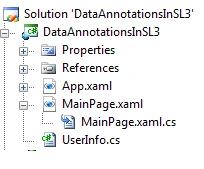
In my previous article on Data Validation, I had implemented INotifyPropertyChanged interface. Here we don't need that. We will see how it is not required.
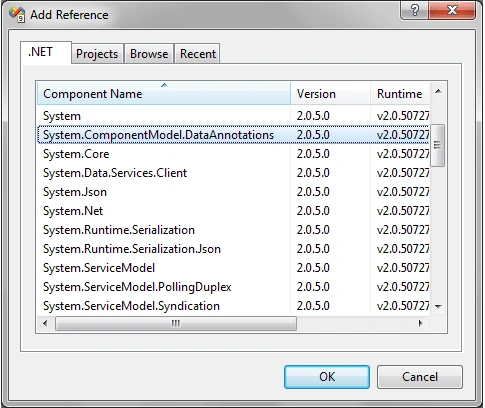
As we are following the same user inputs, I am adding the same properites. Follow the code below:
public class UserInfo
{
#region UserName
private string _UserName;
public string UserName
{
get { return _UserName; }
set { _UserName = value; }
}
#endregion
private string _EmailID;
public string EmailID
{
get { return _EmailID; }
set { _EmailID = value; }
}
#endregion
private string _Age;
public string Age
{
get { return _Age; }
set { _Age = value; }
}
#endregion
}
See the code below how User Name property is being validated. Add the code before the property.
[Required(ErrorMessage="User Name is Required")]
[StringLength(12,MinimumLength=6,ErrorMessage="User Name must be in between 6 to 12 Characters")]
[Required(ErrorMessage="User Name is Required")]
[StringLength(12,MinimumLength=6,ErrorMessage="User Name must be in between 6 to 12 Characters")]
public string UserName
{
get { return _UserName; }
set
{
Validator.ValidateProperty(value, new ValidationContext(this, null, null) { MemberName="UserName"});
_UserName = value;
}
}
Validator.ValidateProperty(value, new ValidationContext(this, null, null) { MemberName = "Age" });
_Age = value;
}
}
Remebmer you can add it in two ways, in C# code behind as well as in Xaml. In my last article I added like the following:
serInfo user = new UserInfo();
this.LayoutRoot.DataContext = user;
Now you can do the same thing in XAML too, add the namespace referrence and then do as follows:
xmlns:myData="clr-namespace:DataAnnotationsInSL3"
<Grid.DataContext>
<myData:UserInfo />
</Grid.DataContext>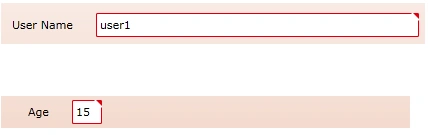
Enjoy Coding.

Data Annotations in Silverlight 3 Application
Join the conversation! Your thoughts help the community grow.
Sign in to leave a comment
It is the same account you read, post and publish with — and you will come straight back to this page.
Sathya KeditedPosted Mar 11, 2013, 5:07 AMEdited Mar 11, 2013, 5:09 AM
Hi, In my silverlight application I implemented water marked text box. I used your way to put validation for water marked text box. But it's not working. Is thr any way to proceed this validation for watermarked textbox??
Neeraj SinghPosted Aug 31, 2011, 1:14 PM
Hello Diptimaya, Good article. In addition I have a query for you.....how to display same data validation messages for a multilingual application. Please provide me either sample or any article. My email id is [email protected]
Mark KamoskiPosted Feb 11, 2011, 3:52 PM
Diptimaya - Please help. I am now facing a problem because the data-annotations are not being used by the DataForm in my project. I am using Silverlight 4, .NET Framework 4, Visual Web Developer 2010 Express. I have 1 WebApp project, which contains my DataService.svc and Model.edmx and my Self-Tracking-Entities generator Model.TT file, and the Default.aspx that hosts the Silverlight front-end. I have a custom Silverlight Class Library project that has a linked-file pointing to the Model.TT file to expose the classes in a Silverlight-consumable way. I have 1 Silverlight project that has a reference to my custom Silverlight Class Libary project (to be able to reference the entity types) and it has a reference to the DataService.svc and so on. The problem is, I think, is that the data-annotations are not being "carried over" to the Silverlight side-- but, I am not sure why. Must one tell the DataForm to use them in some way? What could be missing? Any help that you can provide is appreciated. Thank you. - Mark Kamoski
UwePosted Aug 6, 2009, 10:55 AM
Hello, is it somehow possible to use localized error message from a resource file or from the db? Setting error messages like "ErrorMessage="Age must be 18 ~ 40"" doesn't help for an international app. Thanks for your support Uwe