

Introduction
Databound controls are used to display data to the end-user within the web applications and using databound controls allows you to manipulate the data within the web applications very easily.
Databound controls are bound to the DataSource property. Databound controls are composite controls that combine other ASP.NET Controls like Text boxes, Radio buttons, Buttons and so on.
Frequently used Databound controls:
- Repeater
- DataList
- GridView
- List View
- Form View
- Repeater controls is a Databound control to just display data in the web application, using this we cannot manipulate the data; in other words, a Repeater is a read-only control.
- Repeater is very light-weight and faster to display data compared with other controls, so whenever you just want to display a repeated list of items then use a Repeater Control.
- Repeater control works by repeating using the data source.
- Repeater Control appearance is controlled by its templates
Alternatiningtemplate: Applies a background-color or border-styles to alternative rows in the Data Source collection
Headertemplate: HeaderTemplate is used to provide Headertext for the data source collection
Footertemplate: Display footer text to the Data Source.
Example to demonstrate Repeater Control:
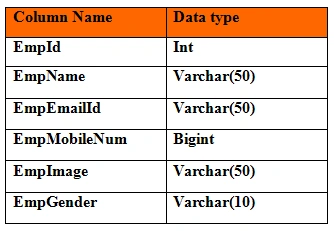
Employee.aspx
- <%@ Page Language="C#" AutoEventWireup="true" CodeFile="DataReapterDemo.aspx.cs" Inherits="DataReapterDemo" %>
- <!DOCTYPE html PUBLIC "-//W3C//DTD XHTML 1.0 Transitional//EN" "http://www.w3.org/TR/xhtml1/DTD/xhtml1-transitional.dtd">
- <html
- xmlns="http://www.w3.org/1999/xhtml">
- <head runat="server">
- <title></title>
- <style>
- tr {
- height:40px;
- }
- </style>
- </head>
- <body>
- <form id="form1" runat="server">
- <div>
- <center>
- <div style=" border: 2px solid red;text-align: left;border-radius: 2px;Padding-top: 3px;background-color: Lime;width: 500px;border-radius: 8px;font-size: 20px;">
- <asp:Repeater ID="rp1" runat="server">
- <HeaderTemplate>
- <table style="width:500px;padding-top:0px;Background-color:Gold" >
- <tr>
- <td style="font-size: 26px;
- text-align: center;
- height: 48px;">
- <asp:Label ID="lblhdr" runat="server" Text = "Student Profile"></asp:Label>
- </td>
- </tr>
- </table>
- </HeaderTemplate>
- <ItemTemplate>
- <table style="width:500px;">
- <tr>
- <td>
- <asp:Label ID="lblempid1" runat="server" Text="Employee ID:"></asp:Label>
- </td>
- <td>
- <asp:Label ID="lblempid2" runat="server" Text='<%# Eval("EmpId") %>'>
- </asp:Label>
- </td>
- <td rowspan="5">
- <asp:Image ID="img1" runat="server" Width="100px" ImageUrl= '
- <%#"~/images/" + Eval("EmpImage") %>'/>
- </td>
- </tr>
- <tr>
- <td>
- <asp:Label ID="lblempname1" runat="server" Text="Employee Name"></asp:Label>
- </td>
- <td>
- <asp:Label ID="lblempname2" runat="server" Text='<%# Eval("EmpName") %>'>
- </asp:Label>
- </td>
- </tr>
- <tr>
- <td>
- <asp:Label ID="lblempemailId1" runat="server" Text="Employee EmailId"></asp:Label>
- </td>
- <td>
- <asp:Label ID="lblempemailId2" runat="server" Text='<%# Eval("EmpEmailId") %>'>
- </asp:Label>
- </td>
- </tr>
- <tr>
- <td>
- <asp:Label ID="lblempmob1" runat="server" Text="Mobile Number"></asp:Label>
- </td>
- <td>
- <asp:Label ID="lblempmob2" runat="server" Text='<%# Eval("EmpMobileNum") %>'>
- </asp:Label>
- </td>
- </tr>
- <tr>
- <td>
- <asp:Label ID="lblempgen1" runat="server" Text="Gender"></asp:Label>
- </td>
- <td>
- <asp:Label ID="lblempgen2" runat="server" Text='<%# Eval("EmpGender") %>'>
- </asp:Label>
- </td>
- </tr>
- </table>
- </ItemTemplate>
- <FooterTemplate>
- <table>
- <tr>
- <td>
- @Developed by Abhishek Uppula
- </td>
- </tr>
- </table>
- </FooterTemplate>
- </asp:Repeater>
- </div>
- </center>
- </div>
- </form>
- </body>
- </html>
Employee.aspx.cs
- using System;
- using System.Web;
- using System.Web.UI;
- using System.Web.UI.WebControls;
- using System.Data.SqlClient;
- using System.Data;
- using System.Web.Configuration;
- public partial class DataReapterDemo : System.Web.UI.Page
- {
- SqlConnection con = new SqlConnection(WebConfigurationManager.ConnectionStrings["myconnection"].ConnectionString);
- protected void Page_Load(object sender, EventArgs e)
- {
- if (!IsPostBack)
- {
- Bind();
- } }
- public void Bind()
- {
- SqlCommand cmd = new SqlCommand("select * from Employee where EmpId = 1200",con);
- SqlDataAdapter da = new SqlDataAdapter(cmd);
- DataSet ds = new DataSet();
- da.Fill(ds, "Employee");
- rp1.DataSource = ds.Tables[0];
- rp1.DataBind();
- }
- }
RakeshPosted Apr 4, 2015, 7:41 PM
Good start Abhishek...Keep it up
Vijay SPosted Apr 4, 2015, 9:55 AM
Good work
NitinPosted Apr 4, 2015, 4:13 AM
Nice
Abhishek UppulaPosted Apr 3, 2015, 11:36 PM
Thank you! actually its typing mistake.
Afzaal Ahmad ZeeshanPosted Apr 3, 2015, 9:33 PM
Good one, but also mention that this is ASP.NET Web Forms... One more thing, remove the space between List and View and write it as ListView (identifiers don't allow space) and FormView. Thanks.