

In enterprise AI, the quality of a recommendation engine is rarely limited by the LLM’s reasoning capabilities. It is almost always limited by data representation. If your vector store treats products as flat text blobs and users as anonymous session IDs, no amount of agent orchestration will save you. This guide demonstrates how to architect a Semantic Procurement Advisor where products, users, and dynamic context are represented as distinct, interrelated entities within a unified LangGraph state machine backed by ChromaDB.
The Real-Time Use Case: Dynamic SaaS Procurement Portal
The Scenario: A global engineering firm with 5,000 employees needs an internal tool to recommend approved software vendors. The Complexity:
Products have technical specs, compliance tags, and licensing tiers.
Users have departmental budgets, security clearance levels, and historical preferences.
Context changes per query (e.g., "urgent" vs. "research," "team-wide" vs. "personal").
A naive RAG system retrieves "project management tools" when asked. An enterprise system retrieves "SOC2-compliant, Enterprise-tier PM tools under $50k/year that integrate with our existing Okta SSO, excluding vendors flagged in last quarter's audit."
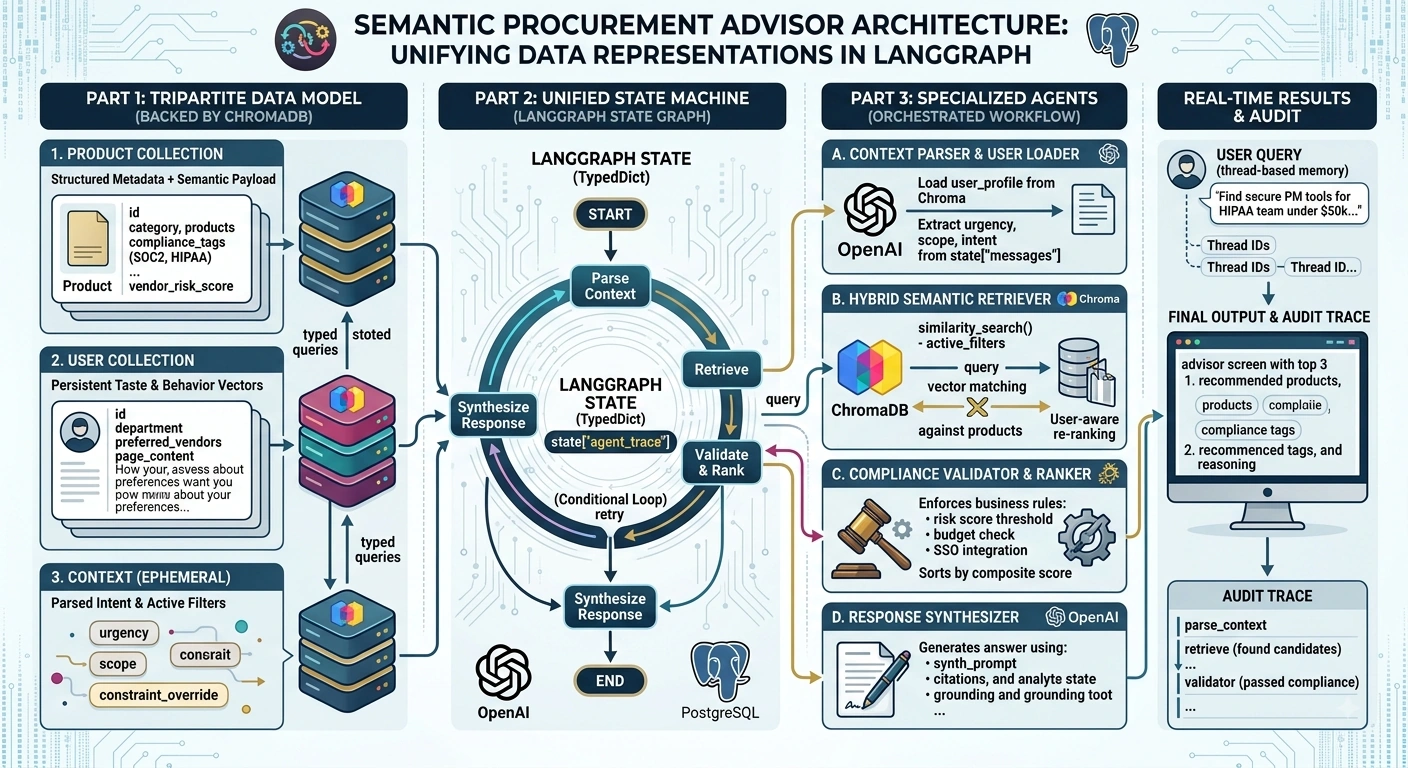
Part 1: The Tripartite Data Representation Model
Before writing agent code, we must define how data lives in ChromaDB. We use a Multi-Collection Architecture rather than stuffing everything into one index.
1. Product Representation: Structured Metadata + Semantic Payloads
Products are not just descriptions. They are structured objects where only specific fields are embedded.
# Product Schema Design
product_document = {
    "id": "prod_asana_ent",
    "page_content": "Asana Enterprise: Work management platform with advanced reporting,
                     workload balancing, and HIPAA-compliant data residency options.",
    "metadata": {
        "type": "product",
        "category": "project_management",
        "compliance_tags": ["SOC2", "HIPAA", "GDPR"],
        "price_tier": "enterprise",      # Enables range filtering
        "integration_ecosystem": ["okta", "slack", "jira"],
        "approved_depts": ["engineering", "product"],
        "last_audit_date": "2026-07-15",
        "vendor_risk_score": 0.12         # Numeric for weighted scoring
    }
}
Key Design Decision: Embed only the page_content and user-facing features. Never embed metadata like price or risk scores—these drift and should be filtered/sorted at query time via Chroma’s where clauses.
2. User Representation: Persistent Preference Vectors
Users are stored in a separate collection. Their embeddings represent taste and behavior, not biographical facts.
# User Profile Document (Updated asynchronously after interactions)
user_document = {
    "id": "user_jdoe_eng",
    "page_content": "Prefers minimalist UI over feature density. Prioritizes API-first tools
                     with CLI support. Has rejected Microsoft ecosystem tools 3 times.
                     Frequently searches for open-source alternatives.",
    "metadata": {
        "type": "user_profile",
        "department": "engineering",
        "clearance_level": "L3",
        "budget_authority_usd": 75000,
        "preferred_vendors": ["linear", "notion"],
        "banned_categories": ["ad_tracking"]
    }
}
3. Context Representation: Ephemeral State Injection
Context is never stored in ChromaDB. It exists solely in the LangGraph State object and modifies retrieval queries dynamically. This prevents stale context from polluting long-term memory.
# Context is parsed from the current message + thread history
ephemeral_context = {
    "urgency": "high",           # Boosts recency in ranking
    "scope": "team_wide",        # Triggers volume licensing filter
    "constraint_override": None, # Temporary policy exception
    "conversation_intent": "comparison" # vs. "discovery" or "purchase"
}
Part 2: End-to-End Multi-Agent Implementation
Step 1: Define the Unified State Schema
The state acts as the shared workspace between agents, carrying all three representations through the pipeline.
from typing import Annotated, List, Dict, Optional, Literal
from typing_extensions import TypedDict
from langgraph.graph.message import add_messages
from langchain_core.documents import Document

class RecommendationState(TypedDict):
    messages: Annotated[List, add_messages]

    # === USER REPRESENTATION ===
    user_id: str
    user_profile: Optional[Document]       # Loaded from Chroma at start

    # === CONTEXT REPRESENTATION ===
    parsed_intent: Dict[str, any]          # Extracted by Router Agent
    active_filters: Dict[str, any]         # Dynamically built filters

    # === PRODUCT REPRESENTATION ===
    candidate_products: List[Document]     # Raw retrieval results
    ranked_recommendations: List[Dict]     # Post-validation, scored results

    # === ORCHESTRATION STATE ===
    agent_trace: List[str]                 # Audit trail
    retry_count: int
Step 2: Initialize Multi-Collection ChromaDB
import chromadb
from langchain_chroma import Chroma
from langchain_openai import OpenAIEmbeddings

client = chromadb.PersistentClient(path="./chroma_enterprise")
embeddings = OpenAIEmbeddings(model="text-embedding-3-small")

# Separate collections prevent cross-contamination during search
product_store = Chroma(
    client=client,
    collection_name="products",
    embedding_function=embeddings
)

user_store = Chroma(
    client=client,
    collection_name="user_profiles",
    embedding_function=embeddings
)
Step 3: Build the Specialized Agents
Agent A: Context Parser & User Loader
This node runs first. It loads the persistent user representation and extracts ephemeral context from the query.
from langchain_openai import ChatOpenAI
from langchain_core.output_parsers import JsonOutputParser

llm = ChatOpenAI(model="gpt-4o-mini", temperature=0)

def context_parser_node(state: RecommendationState):
    # 1. Load User Representation
    user_docs = user_store.get(ids=[state["user_id"]], include=["documents", "metadatas"])
    user_profile = Document(
        page_content=user_docs["documents"][0],
        metadata=user_docs["metadatas"][0]
    ) if user_docs["ids"] else None

    # 2. Parse Ephemeral Context from latest message
    parser = JsonOutputParser()
    intent_prompt = f"""Extract structured context from this query:
    '{state['messages'][-1].content}'
    Return JSON with keys: urgency, scope, intent, budget_hint."""

    parsed = llm.invoke(intent_prompt)

    # 3. Build Active Filters (Merging User + Context)
    filters = {"approved_depts": {"$in": [user_profile.metadata["department"]]}}
    if user_profile and user_profile.metadata.get("banned_categories"):
        filters["category"] = {"$nin": user_profile.metadata["banned_categories"]}

    return {
        "user_profile": user_profile,
        "parsed_intent": parsed,
        "active_filters": filters,
        "agent_trace": ["context_parser: loaded user + parsed intent"]
    }
Agent B: Hybrid Semantic Retriever
Join the conversation! Your thoughts help the community grow.