The other form is the searched CASE which evaluates a set of Boolean expressions to determine the result. The syntax is shown in Listing 8.
Let's illustrate this syntax with an example which transforms the code in the Listing 7 (see Listing 9).
There are other control of flow mechanisms such as RETURN, WHILE and WAITFOR.
RETURN statement is used to exit the current scope of a program block (Listing 10).
waitfor delay '00:00:10'
begin
select *
from Production.Product;
end;
Listing 14.
Oracle PL/SQL
PL/SQL is a procedural language. The smallest group of logic code is named block which provides an execution and variable scope as well as exception handling. There are two types of blocks: anonymous and named blocks.
A block has up to four different sections: Block Header, Declaration Section, Execution Section, Exception Section (see Figure 1).
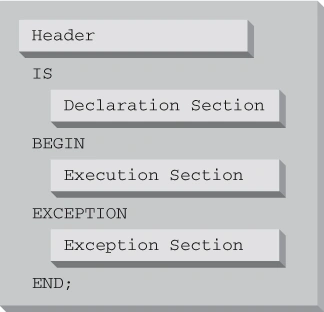
Figure 1.
The Block Header is used only for named blocks and contains the type of unit, the name of the unit and any parameter used by the unit. The main syntax is program_type name ([parameter_name IN/OUT/IN OUT parameter_type specs],...) were program_type can be either function, procedure, or package. A parameter is used to pass information to the unit and get information back from the unit. Each parameter has a data type assigned and a direction specification such as IN to indicate passing objects to the unit, OUT to get objects from the unit and IN OUT in both directions. You can declare a not null, null value and default value.
The Declaration Section allows declaring variables which are referenced in the execution and exception blocks. The name of the variable is unique identifier and the underlying data type is standard Oracle data type. The constant keyword allows identifying a variable that doesn't change during the execution of the program.
The Execution Section is where the business logic is specified. This section begins with the keyword begin and ends with the keyword end followed by a semi-colon (;). This section is the only mandatory section in PL/SQL.
The Exception Section is the final section of the block. It handles exceptions during the execution of the business logic. The exception handling syntax is as follows (see Listing 15):
EXCEPTION
WHEN exception_name
THEN
Error handling code
[WHEN OTHERS
Generic error handling code]
Listing 15.
The other type of block is anonymous block and its syntax is as follows (see Listing 16):
DECLARE
BEGIN
[EXCEPTION]
END;
Listing 16.
Anonymous blocks can be used in various environments where the PL/SQL programs need to be executed directly or enclosed in some program such as triggers and command or script files.
A variable is content holder and it must be declared on the Declare Section. Whenever you like to declare a variable, you must assign a name and a data type. The keyword (:=) and the SELECT INTO statement can be used to provide a value to a variable (see Listing 17).
declare
v_my_name varchar(20);
v_ename varchar2(10);
v_sal number(7,2);
v_deptno number (2);
begin
v_my_name := 'John Charles';
select ename, sal, deptno
into v_ename, v_sal, v_deptno
from emp
where empno=7499;
dbms_output.put_line('v_ename is '||v_ename||' v_sal is '||v_sal||' and v_deptno is '||v_deptno);
end;
Listing 17.
In PL/SQL, you can also declare constants (see Listing 18).
declare
c_My_Name constant varchar(20) default 'John Charles';
begin
dbms_output.put_line('The constant value is '||c_My_Name);
end;
Listing 18.
Unlike T-SQL, in PL/SQL you can also specify that the variable must be NOT NULL. If you run the code in Listing 19, then an exception is raised.
declare
v_Test_Not_Null int not null default 10;
begin
v_Test_Not_Null := null;
end;
Listing 19.
Let's talk about conditional and sequential control. Almost every piece of code you write uses this kind of sentence.
IF...THEN...ELSE statement is the basic construct in PL/SQL allows designing conditional logic. There are three forms of this statement (see Table 1).
| IF condition THEN business logic END IF; |
The condition determines whether the business logic is executed or not. |
| IF condition THEN primary business logic ELSE alternative business logic END IF; |
If the condition is true, then the primary business logic is executed otherwise the alternative business logic. |
| IF condition THEN primary business logic ELSIF other condition THEN secondary business logic ELSE alternative business logic END IF; |
If the condition is true, then the primary business logic is executed, else if the other condition is true then the secondary business logic is executed (and so on), other the alternative business logic is executed. |
Table 1.
It's remarkable to say that the condition might evaluate to TRUE, FALSE, or NULL. Only when the condition is TRUE the underlying business logic is executed.
Let's illustrate the concepts by implementing a requirement associated to complete bonus logic (see Listing 20).
Declare
rSal number(7,2);
begin
select sal into rSal
from emp
where empno=7783;
if rSal between 1000 and 2000
then
rSal := rSal+500;
elsif rSal between 100 and 999
then
rSal := rSal+200;
else
rSal := rSal+50;
end if;
update emp set sal=rSal
where empno=7783;
commit;
end;
Listing 20.
The CASE statement allows you to choose which several sequences of PL/SQL is executed based on the results of the expressions. The syntax is shown in Listing 21.
case selector
when condition1 then business logic 1
when condition2 then business logic 2
else alternative business logic
end case;
Listing 21.
The selector is a variable to determine which when to choose. The conditions determine the value of the variable to determine the when to choose. Let's see an example (see Listing 22).
Declare
v_nOrigValue int;
v_nTransValue int;
begin
v_nOrigValue := 100;
case v_nOrigValue
when 100 then
v_nOrigValue := 100;
v_nTransValue := v_nOrigValue-10;
when 1000 then
v_nOrigValue := 1000;
v_nTransValue := v_nOrigValue+10;
end case;
dbms_output.put_line('Original value is '||v_nOrigValue||' Tranformed value is '||v_nTransValue);
end;
Listing 22.
Sometimes the selector may be skipped and it's equivalent to a CASE TRUE clause. This type of CASE is named SEARCHED CASE.
Let's transform the former listing in order to illustrate the SEARCHED CASE syntax using an example (see Listing 23).
declare
v_nOrigValue int;
v_nTransValue int;
begin
v_nOrigValue := 101;
case
when v_nOrigValue between 1 and 100 then
v_nTransValue := v_nOrigValue-10;
v_nOrigValue := 100;
when v_nOrigValue between 101 and 1000 then
v_nTransValue := v_nOrigValue+10;
v_nOrigValue := 1000;
end case;
dbms_output.put_line('Original value is '||v_nOrigValue||' Tranformed value is '||v_nTransValue);
end;
Listing 23.
There is another form of CASE statement: the CASE expression. This type of CASE is similar to the SQL Server CASE. It's similar to normal CASE statement, except that it's evaluated as single expression within another expression. This expression returns the value takes the place of the expression, thus we don't need to write the semicolon after each when (see Listing 24).
declare
v_vcState varchar2(50);
v_nStateCode int;
begin
v_nStateCode := 2;
v_vcState :=
case v_nStateCode
when 1 then 'CA'
when 2 then 'MD'
when 3 then 'NY'
else 'Other'
end;
dbms_output.put_line('The state code is '||v_nStateCode||' and its value is '||v_vcState);
end;
Listing 24.
You can also use CASE expressions inside SQL statements (see Listing 25).
select ename, case when ename='JONES' then 'This is Jones' else 'This is not JONES' end
from emp;
Listing 25.
In PL/SQL, we have three alternatives to execute logic repeatedly: simple or infinite loop, FOR loop, and WHILE loop. The loop consists of LOOP and END LOOP keywords and the body which must contain at least one statement. You can terminate the LOOP using the EXIT keyword, although I recommend not to use this approach. Let's see an example (see Listing 26).
declare
v_nCounter int;
begin
v_nCounter := 0;
loop
dbms_output.put_line('The counter value is '||v_nCounter);
dbms_lock.sleep(5);
if v_nCounter = 6
then
exit;
end if;
v_nCounter := v_nCounter+1;
end loop;
end;
Listing 26.
The WHILE loop is a conditional loop that continues executing as long as the Boolean condition is true. The syntax is shown below (see Listing 27).
while condition
loop
executable statement(s)
end loop;
Listing 27.
Let's see an example below (see Listing 28).
declare
v_nCounter int;
begin
v_nCounter := 0;
while v_nCounter<6
loop
v_nCounter := v_nCounter + 1;
dbms_output.put_line('The counter value is '||v_nCounter);
end loop;
end;
Listing 28.
In PL/SQL we have a numeric FOR loop which can used to for numeric loop and cursor loops. The numeric FOR loop is like the traditional FOR in C, Java and C#.
The syntax is shown below (see Listing 29).
for loop index in [reverse] lower_limit..upper_limit
loop
executable statement(s)
end loop;
Listing 29.
Let's see an example (see Listing 30).
begin
for v_nCounter in 1..5
loop
dbms_output.put_line('The counter value is '||v_nCounter);
end loop;
end;
Listing 30.
The Cursor FOR loop is a loop that is associated with an explicit cursor or a select statement incorporated directly within the loop boundary. I recommend using SQL statements whenever possible to implement your business logic and when you don't have any other option then you should use cursors to fetch and process every row in a result set. Using cursor to work directly with result sets is very expensive.
Let's see an example of Cursor FOR loop (see Listing 31).
Declare
cursor v_cur_emp is
select empno, ename, job from emp;
begin
for emp_row in v_cur_emp
loop
dbms_output.put_line('The emp number '||emp_row.empno||' is '||emp_row.ename||' and his job is '||emp_row.job);
end loop;
end;
Listing 32.
Conclusion
In this article, I explained the main constructs of T-SQL and PL/SQL which allow extending the basic SQL language in order to implement your business logic effectively inside your database management systems. After you read this article, you're able to apply these concepts and techniques to your business scenario.


Join the conversation! Your thoughts help the community grow.