

Introduction
XAML is a markup language that is currently very popular. We develop applications on all platforms, Windows, web and mobile or Tablets. Every platform control, action or behavior is nearly the same. Also supported are 2d, 3d and so many features. When designing XAML I consider customizing the controls, in other words a developer can customize a control based on his business or user requirements. It's very flexible and comfortable. Obviously this concept comes from Windows application custom controls and web applications, before WPF or XAML we also customized our controls but not a flexibly as with WPF or XAML because we did not use any markup for customization. Instead customization was based on our code, here you can customize a control of any shape and easily use it. It’s very simple and sweeter.
In this article I‘ll try to explain DataTemplates in XAML (WPF, Windows Phone, Silverlight or Windows 8) with some cool examples.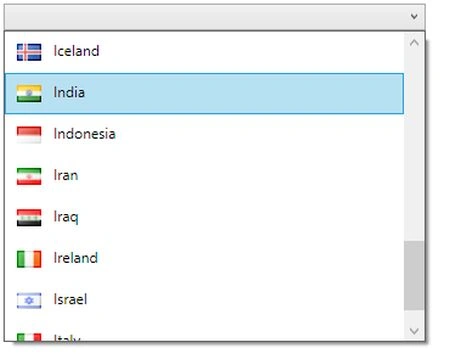
The preceding is an image of a simple ComboBox with country. It’s very good and simple for understanding from the user point of view but think of doing it with a normal Windows Form, it’s a bit complicated and you‘ll have a horrible experience, at least that is my personal experience.
And the same thoughts result from doing it with XAML. It’s just a few hours task, anybody can easily do it like this.
My target shows how different it is for a normal Windows Forms application and an XAML application. In short, before WPF or after WPF. After XAML our control becomes more powerful, simple and flexible. The Datatemplate displays a collection of data, the preceding was a simple Combobox example of a datatemplate.
What a DataTemplate is
A DataTemplate helps us to display a Collection of data in a customized format or based on business requirements. In simpler terms, a DataTemplate provides you great flexibility to define the presentation of your data on the user interface.
For example, one common use of binding is to display data in a list. For example a combobox or listbox. Whether retrieving data from a database or using some static or list and collection of data, it’s useful to the display. The data is shown one item at a time. As I already explained above, in the combobox country with respective country image, here the binding of two items. You can easily do this using XAML tools with the DataTemplate Concept.
I will do that above example step-by-step.
In the preceding sample, I am binding a list of countries in a Combobox with respective country images. For that I am using an Entity class for store country information with respective Country picture.
- public class Entity
- {
- public string country { get; set; }
- public string Image { get; set; }
- public static ObservableCollection<Entity> ListOfCountry()
- {
- string ImageUrl = AppDomain.CurrentDomain.BaseDirectory + "Images\\Countries\\";
- ObservableCollection<Entity> country = new ObservableCollection<Entity>()
- {
- new Entity{ country="Afghanistan", Image=ImageUrl+"AF.png"},
- new Entity{ country="Albania" ,Image=ImageUrl+"AL.png" },
- new Entity{ country="Algeria" ,Image=ImageUrl+"DZ.png" },
- new Entity{ country="American Samoa" ,Image=ImageUrl+"AS.png" },
- new Entity{ country="Andorra" ,Image=ImageUrl+"AD.png" },
- new Entity{ country="Angola" ,Image=ImageUrl+"AO.png" },
- new Entity{ country="Anguilla" ,Image=ImageUrl+"AI.png"},
- new Entity{ country="Antarctica" ,Image=ImageUrl+"AQ.png"},
- new Entity{ country="Argentina" ,Image=ImageUrl+"AR.png" },
- new Entity{ country="Belgium" ,Image=ImageUrl+"BE.png" },
- new Entity{ country="Belize" ,Image=ImageUrl+"BZ.png" },
- new Entity{ country="Benin" ,Image=ImageUrl+"BJ.png" },
- new Entity{ country="Bermuda" ,Image=ImageUrl+"BM.png"},
- new Entity{ country="Bhutan" ,Image=ImageUrl+"BT.png" },
- new Entity{ country="Bolivia" ,Image=ImageUrl+"BO.png"},
- new Entity{ country="Botswana" ,Image=ImageUrl+"BW.png" },
- new Entity{ country="Brazil" ,Image=ImageUrl+"BR.png" },
- new Entity{ country="Hong Kong" ,Image=ImageUrl+"HK.png" },
- new Entity{ country="Hungary" ,Image=ImageUrl+"HU.png" },
- new Entity{ country="Iceland" ,Image=ImageUrl+"IS.png" },
- new Entity{ country="India" ,Image=ImageUrl+"IN.png" },
- new Entity{ country="Indonesia" ,Image=ImageUrl+"ID.png"},
- new Entity{ country="Iran" ,Image=ImageUrl+"IR.png" },
- new Entity{ country="Iraq" ,Image=ImageUrl+"IQ.png" },
- new Entity{ country="Ireland" ,Image=ImageUrl+"IE.png"},
- new Entity{ country="Israel" ,Image=ImageUrl+"IL.png" },
- new Entity{ country="Italy" ,Image=ImageUrl+"IT.png" }
- };
- return country;
- }
In the page load event I am loading country data because it’s a small sample. That’s why I did not create a separate view model but in the code behind I define one collection, the ListOfCountry list. This will store all country information with respective images. Here is also the assigning of the datacontext for the view, like this:
- public partial class MainWindow : Window
- {
- public MainWindow()
- {
- InitializeComponent();
- _CountryEntity = Entity.ListOfCountry();
- this.DataContext = this;
- }
- public ObservableCollection<Entity> _CountryEntity;
- public ObservableCollection<Entity> ListofCountry
- {
- get
- {
- return _CountryEntity;
- }
- set
- {
- _CountryEntity = value;
- }
- }
- }
In the view I define one simple XAML control.
- <ComboBox Name="CountryCombo"
- ItemsSource="{Binding ListofCountry}" Margin="42,13.895,55,29" Grid.Row="1" >
- <ComboBox.ItemTemplate>
- <DataTemplate>
- <StackPanel Orientation="Horizontal">
- <Image Width="20" Height="20" Margin="5" Source="{Binding Image}"/>
- <TextBlock Margin="5" Text="{Binding country}"/>
- </StackPanel>
- </DataTemplate>
- </ComboBox.ItemTemplate>
- </ComboBox>
In the preceding I am binding a combobox. For that define an ItemSource, this ‘ll indicate the source of the data or this will indicate the data link for the respective control.
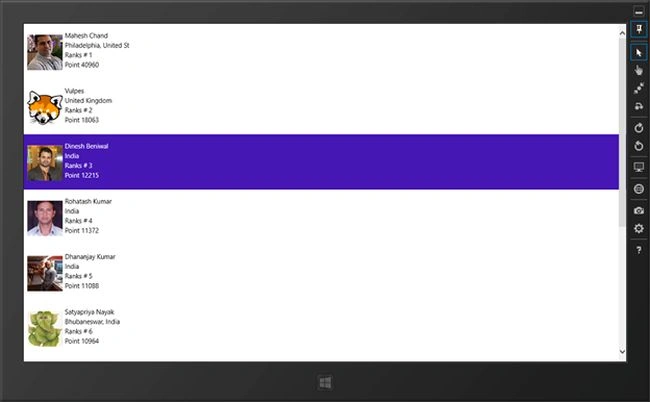
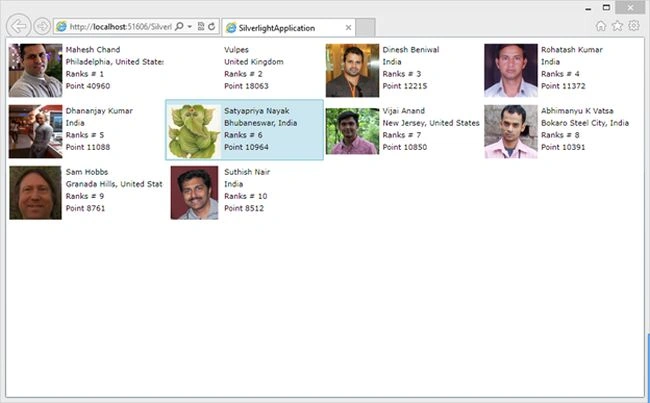
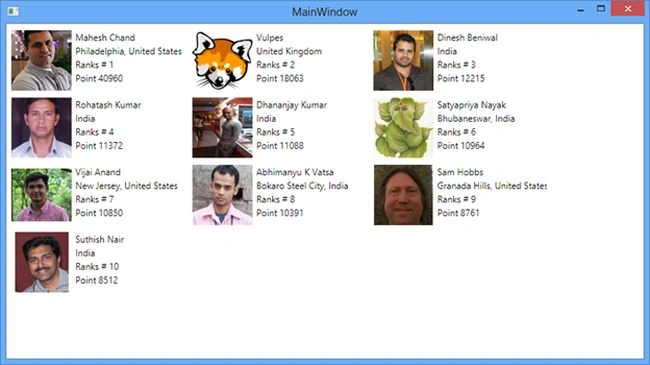

ajay kumarPosted Mar 15, 2015, 2:19 AM
hai! i am getting namespace error somthing. this is my error: Error 3 The type or namespace name 'ObservableCollection' could not be found (are you missing a using directive or an assembly reference? Documents\Visual Studio 2013\Projects\ocean\ocean\loginpage.xaml.cs 42 16 ocean ..............can u plz help me
deepz513 .Posted May 23, 2014, 10:40 AM
awesome:-)
dimoPosted May 14, 2014, 8:53 AM
Hi! How can be done for Windows Phone 8 let say to colorize in red all users from India and make their names bold? I mean dynamic listbox template change, based on property values.
Vishnujeet KumarPosted Dec 29, 2013, 3:46 PM
Thanks Abhishek !!
Abhishek Kumar RaviPosted Dec 29, 2013, 12:11 PM
Great read,