Introduction
In this article, we perform various operations on dates and times using DateTime. A DateTime structure represents dates and times. We use DateTime to work with dates, times, and both. The DateTime type in the C# language provides useful methods and properties for computing these values. DateTime represents a date and time of the day. For example, there are methods to find important days, such as yesterday, tomorrow, the first of the year, and the last day.
1. To find today's date
Console.WriteLine("Today: {0}", DateTime.Today);
Console.WriteLine("Now: {0}", DateTime.Now);
Difference between Today and Now property
- Today: This displays today's date. The time value is 12:00:00.
- Now: This displays the current date and time of the system, expressed as the local time. In other words, the Now property returns a DateTime object that has the date and time values for right now.
2. To find yesterday's date
using System;
class Program
{
    static DateTime YesterdayDate()
    {
        return DateTime.Today.AddDays(-1);
    }
    static void Main(string[] args)
    {
        DateTime yesterday = YesterdayDate();
        Console.WriteLine("Yesterday was: {0}", yesterday);
    }
}
3. To find tomorrow's date
using System;
class Program
{
    static DateTime TomorrowDate()
    {
        return DateTime.Today.AddDays(1);
    }

    static void Main(string[] args)
    {
        DateTime tomorrow = TomorrowDate();
        Console.WriteLine("Tomorrow date is: {0}", tomorrow);
    }
}
4. To find the First day in the year
using System;
class Program
{
    static DateTime FirstDayOfYear()
    {
        return FirstDayOfYear(DateTime.Today);
    }
    static DateTime FirstDayOfYear(DateTime y)
    {
        return new DateTime(y.Year, 1, 1);
    }
    static void Main(string[] args)
    {
        DateTime m = new DateTime(1999, 6, 1);
        Console.WriteLine("First day of 1999: {0}", FirstDayOfYear(m));
    }
}
5. Adding DateTime values
DateTime theDate = DateTime.Parse("2 Jan 2007 20:15:00");
TimeSpan addDuration = TimeSpan.Parse("1.01:01:01");
theDate = theDate.Add(addDuration);
6. Subtracting DateTime values
DateTime theDate = DateTime.Parse("2 Jan 2007 20:15:00");
TimeSpan addDuration = TimeSpan.Parse("1.01:01:01");
theDate = theDate.Subtract(addDuration);
Console.WriteLine("Subtracted date is: {0}", theDate);
Other DateTime Properties
7. DayOfWeek
// Create a DateTime object for June 21, 2011, at 7:10:24 AM
DateTime findwyd = new DateTime(2011, 6, 21, 7, 10, 24);
// Retrieve and print the day of the week
Console.WriteLine("Day of Week: {0}", findwyd.DayOfWeek);
// Retrieve and print the day of the year
Console.WriteLine("Day of Year: {0}", findwyd.DayOfYear);
// Retrieve and print the time of day
Console.WriteLine("Time of Day: {0}", findwyd.TimeOfDay);
8. DayOfYear
// Create a DateTime object for June 21, 2011, at 7:10:24 AM
DateTime findwyd = new DateTime(2011, 6, 21, 7, 10, 24);
// Retrieve and print the day of the year
Console.WriteLine("Day of Year: {0}", findwyd.DayOfYear);
9. TimeOfDay
The TimeOfDay property returns the time element from a DateTime.
// Create a DateTime object for June 21, 2011, at 7:10:24 AM
DateTime findwyd = new DateTime(2011, 6, 21, 7, 10, 24);
// Retrieve and print the time of day
Console.WriteLine("Time of Day: {0}", findwyd.TimeOfDay);
Example
using System;
namespace datetime_function
{
    class Program
    {
        static DateTime Yesterdaydate()
        {
            return DateTime.Today.AddDays(-1);
        }
        static DateTime Tomorrowdate()
        {
            return DateTime.Today.AddDays(1);
        }
        static DateTime FirstDayOfYear()
        {
            return FirstDayOfYear(DateTime.Today);
        }
        static DateTime FirstDayOfYear(DateTime y)
        {
            return new DateTime(y.Year, 1, 1);
        }
        static void Main(string[] args)
        {
            DateTime findwyd = new DateTime(2011, 6, 21, 7, 10, 24);
            Console.WriteLine("Today: {0}", DateTime.Today);
            Console.WriteLine("Now: {0}", DateTime.Now);
            DateTime yes = Yesterdaydate();
            Console.WriteLine("Yesterday was: {0}", yes);
            DateTime d = Tomorrowdate();
            Console.WriteLine("Tomorrow date is: {0}", d);
            DateTime m = new DateTime(1999, 6, 1);
            Console.WriteLine("First day of 1999: {0}", FirstDayOfYear(m));
            DateTime theDate = DateTime.Parse("2 Jan 2007 20:15:00");
            TimeSpan addduration = TimeSpan.Parse("1.01:01:01");
            theDate = theDate.Add(addduration);
            Console.WriteLine("Added date is: {0}", theDate);
            theDate = theDate.Subtract(addduration);
            Console.WriteLine("Subtracted date is: {0}", theDate);
            Console.WriteLine("Day of Week: {0}", findwyd.DayOfWeek);
            Console.WriteLine("Day of Year: {0}", findwyd.DayOfYear);
            Console.WriteLine("Time of Day: {0}", findwyd.TimeOfDay);
        }
    }
}
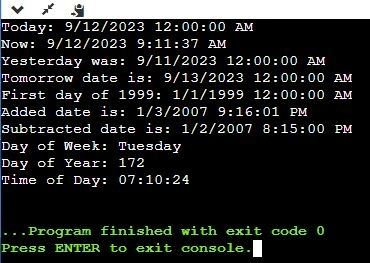
Output


Raja TPosted May 28, 2020, 9:37 PM
Nice Thanks for sharing....
Mat MartinPosted Mar 3, 2020, 8:59 AM
In the "What is DateTimeOffset" section, you give an example which says "Here “1/9/2016 2:27:00 PM” is datetime and “+05:30” (5 hours 30 minutes) is your Offset value. Means if you add offset value to date time (1/9/2016 2:27:00 PM) you will get UTC time." I think this is the wrong way round. The offset tells you what to do to UTC in order to get to the DateTime in the DateTimeOffset. So in your example, you would add 5.5 hrs to UTC to get 2:27PM. This would make the UTC time 9:57AM.
Pankajkumar PatelPosted Aug 30, 2019, 12:57 AM
Nice article
CMS SOLVEPosted Apr 3, 2019, 12:35 PM
Sir, How to configure indian datetime in asp.net website bcoz when i insert the current indian set time data insert when show the message do not insert next date in godaddy server.
Bimal NayakPosted Oct 9, 2018, 3:00 AM
String dateFormat = System.Threading.Thread.CurrentThread.CurrentUICulture.DateTimeFormat.ShortDatePattern; I am always getting the result as M/dd/yyyy even if I am changing the system date time format.
Bimal NayakPosted Oct 9, 2018, 2:59 AM
Manas how can I get the system Datetime format.
Jaipal ReddyPosted Jul 19, 2016, 10:59 AM
Good One Manas.
Narayan pandeyPosted Jul 19, 2016, 2:54 AM
This is really helpful.
Shobana JPosted Jul 19, 2016, 2:46 AM
Nice one
kalu singh raoPosted Jul 19, 2016, 1:28 AM
Nice...
Vignesh ManiPosted Jul 18, 2016, 6:21 PM
Nice one