

The following is the table design from where I am fetching employee records.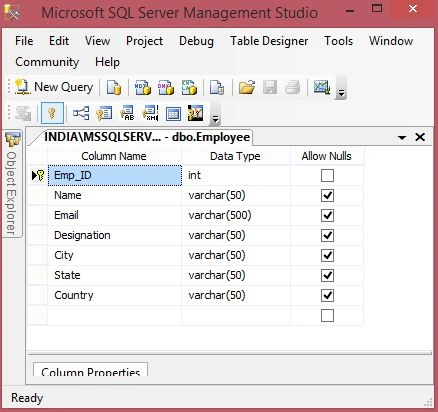
Image 1.
- CREATE TABLE [dbo].[Employee](
- [Emp_ID] [int] IDENTITY(1,1) NOT NULL,
- [Name] [varchar](50) NULL,
- [Email] [varchar](500) NULL,
- [Designation] [varchar](50) NULL,
- [City] [varchar](50) NULL,
- [State] [varchar](50) NULL,
- [Country] [varchar](50) NULL,
- CONSTRAINT [PK_Employee] PRIMARY KEY CLUSTERED
- (
- [Emp_ID] ASC
- )WITH (PAD_INDEX = OFF, STATISTICS_NORECOMPUTE = OFF, IGNORE_DUP_KEY = OFF, ALLOW_ROW_LOCKS = ON, ALLOW_PAGE_LOCKS = ON) ON [PRIMARY]
- ) ON [PRIMARY]
- GO
The following is the data in my table: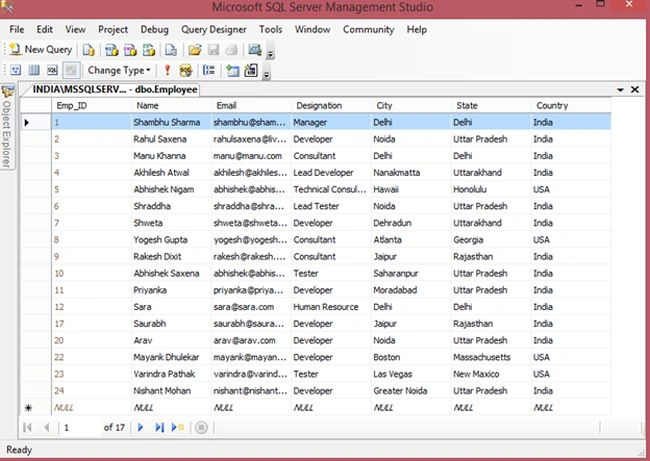
Image 2.
Now my aspx is:
- <%@ Page Language="C#" AutoEventWireup="true" CodeFile="Default.aspx.cs" Inherits="_Default" %>
- <!DOCTYPE html PUBLIC "-//W3C//DTD XHTML 1.0 Transitional//EN" "http://www.w3.org/TR/xhtml1/DTD/xhtml1-transitional.dtd">
- <html xmlns="http://www.w3.org/1999/xhtml">
- <head runat="server">
- <title>Delete Multiple Records In Grid View Using Check Box in ASP.NET C#</title>
- </head>
- <body>
- <form id="form1" runat="server">
- <div>
- <table style="border: solid 15px blue; width: 100%; vertical-align: central;">
- <tr>
- <td style="padding-left: 50px; padding-top: 20px; padding-bottom: 20px; background-color: skyblue;
- font-size: 20pt; color: orangered;">
- Delete Multiple Records In Grid View Using Check Box in ASP.NET C#
- </td>
- </tr>
- <tr>
- <td style="text-align: left; padding-left: 50px; border: solid 1px red;">
- <asp:GridView ID="GridViewEmployee" runat="server" DataKeyNames="Emp_ID" AutoGenerateColumns="False"
- Width="90%" BackColor="White" BorderColor="#3366CC" BorderStyle="None" BorderWidth="1px"
- CellPadding="4" GridLines="Both">
- <Columns>
- <asp:TemplateField HeaderText="Select">
- <ItemTemplate>
- <asp:CheckBox ID="chkSelect" runat="server" />
- </ItemTemplate>
- </asp:TemplateField>
- <asp:BoundField DataField="Name" HeaderText="Employee Name" />
- <asp:BoundField DataField="Email" HeaderText="Email" />
- <asp:BoundField DataField="Designation" HeaderText="Designation" />
- <asp:BoundField DataField="City" HeaderText="City" />
- <asp:BoundField DataField="State" HeaderText="State" />
- <asp:BoundField DataField="Country" HeaderText="Country" />
- </Columns>
- <FooterStyle BackColor="#99CCCC" ForeColor="#003399" />
- <HeaderStyle BackColor="#003399" Font-Bold="True" ForeColor="#CCCCFF" />
- <PagerStyle BackColor="#99CCCC" ForeColor="#003399" HorizontalAlign="Left" />
- <RowStyle BackColor="White" ForeColor="#003399" />
- <SelectedRowStyle BackColor="#009999" Font-Bold="True" ForeColor="#CCFF99" />
- </asp:GridView>
- </td>
- </tr>
- <tr>
- <td align="right">
- <asp:Button ID="btnDeleteRecords" Text="Delete Records" OnClick="btnDeleteRecords_Click"
- runat="server" />
- </td>
- </tr>
- </table>
- </div>
- </form>
- </body>
- </html>
My aspx.cs code is:
- using System;
- using System.Collections.Generic;
- using System.Linq;
- using System.Web;
- using System.Web.UI;
- using System.Web.UI.WebControls;
- using System.Data;
- using System.Data.SqlClient;
- public partial class _Default : System.Web.UI.Page
- {
- SqlDataAdapter da;
- DataSet ds = new DataSet();
- DataTable dt = new DataTable();
- protected void Page_Load(object sender, EventArgs e)
- {
- if (!Page.IsPostBack)
- this.BindGrid();
- }
- private void BindGrid()
- {
- SqlConnection con = new SqlConnection();
- ds = new DataSet();
- con.ConnectionString = @"Data Source=INDIA\MSSQLServer2k8; Initial Catalog=EmployeeManagement; Uid=sa; pwd=india;";
- SqlCommand cmd = new SqlCommand("SELECT * FROM EMPLOYEE", con);
- da = new SqlDataAdapter(cmd);
- da.Fill(ds);
- con.Open();
- cmd.ExecuteNonQuery();
- con.Close();
- if (ds.Tables[0].Rows.Count > 0)
- {
- GridViewEmployee.DataSource = ds.Tables[0];
- GridViewEmployee.DataBind();
- }
- }
- protected void btnDeleteRecords_Click(object sender, EventArgs e)
- {
- DataTable dt = new DataTable();
- dt.Columns.AddRange(new DataColumn[2] { new DataColumn("Name", typeof(string)),
- new DataColumn("Email",typeof(string)) });
- foreach (GridViewRow row in GridViewEmployee.Rows)
- {
- if ((row.FindControl("chkSelect") as CheckBox).Checked)
- {
- int Emp_ID = Convert.ToInt32(GridViewEmployee.DataKeys[row.RowIndex].Value);
- using (SqlConnection con = new SqlConnection(@"Data Source=INDIA\MSSQLServer2k8; Initial Catalog=EmployeeManagement; Uid=sa; pwd=india;"))
- {
- con.Open();
- SqlCommand cmd = new SqlCommand("DELETE FROM Employee WHERE Emp_ID=" + Emp_ID, con);
- cmd.ExecuteNonQuery();
- con.Close();
- }
- }
- }
- this.BindGrid();
- }
- }
Now run the application: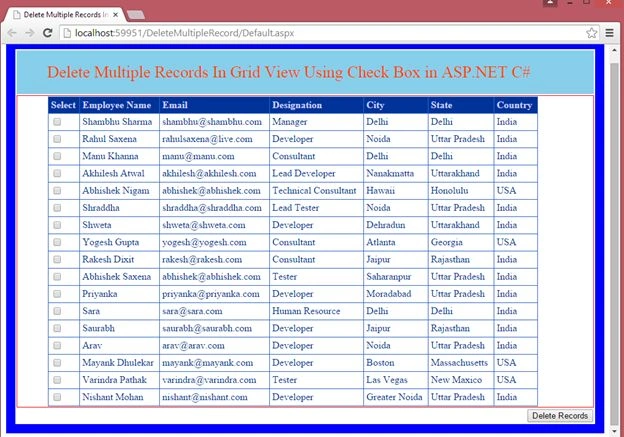
Image 3
Now select some records using the checkboxes and click on the "Delete Records" button.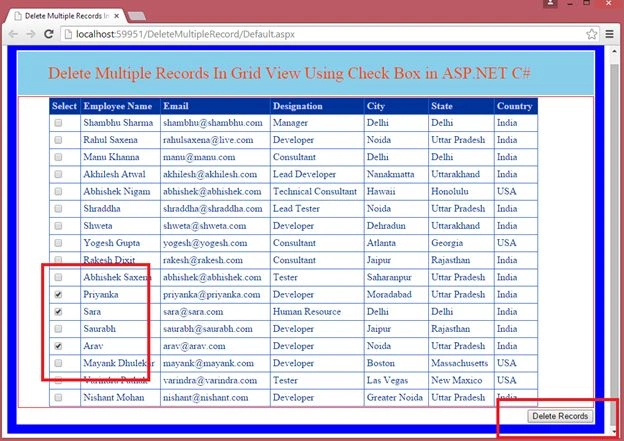
Image 4.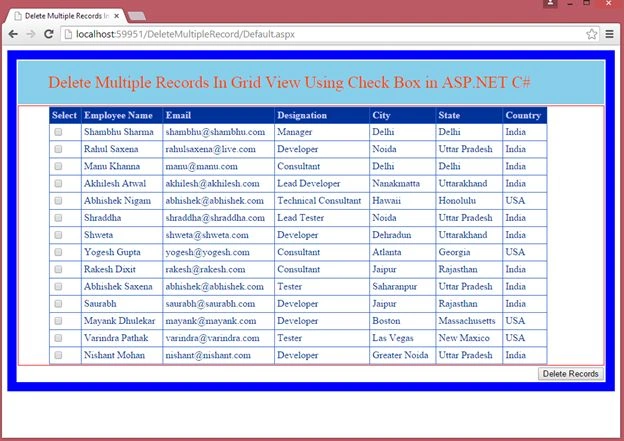
Image 5.
Rahul Kumar SaxenaPosted Feb 24, 2015, 7:44 AM
Hi Pankkaj ... yes it will work same as Praveen explained...
Rahul Kumar SaxenaPosted Feb 24, 2015, 7:43 AM
Exactly... Same well said Praveen Kumar
Praveen KumarPosted Feb 19, 2015, 10:56 PM
Pankaj Choudhary It will execute smoothly because when we delete any rows from database these identity will deleted also. Only the position of row is shifted but their identity never change
Pankaj Kumar ChoudharyPosted Feb 19, 2015, 12:25 PM
Sir this article is very Good. But i have a confusion that you set EMP_ID Identity . It will be run correct for first attempt.After first attempt it can generate some problem mean suppose that in first attempt you deleted 2nd row where employee_name is 'rahul saxena' then a query in database will execute that " DELETE FROM Employee WHERE Emp_ID=2" now page will refresh and now at second position Employee is 'Manu khana' now if will delete 'manu khana' then a new query " DELETE FROM Employee WHERE Emp_ID=2" will execute in Database . where Emp_Id=2 does not exist which is already deleted from database and now delete operation will perform. I did not execute this code in visual studio only i read this code so. if I am wrong then please tell me..... Because i orally execute this code...