
Introduction:
In this article we'll see how to delete the records of a DataGrid based on a column value in the database table.
Scenario:
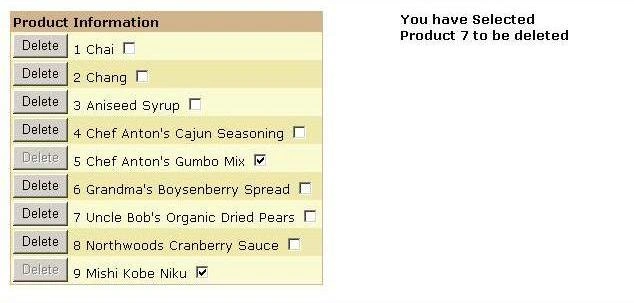
Let consider Table which has details about some products (for sample we'll consider the Northwind Database and the Products Table). The data is as below:

The last field is Discontinued which is 0/1. The administrator should be able to delete a record only if the field is 0 (in this case assuming that the Product is no longer used).
There are various ways this can be done. But the simplest way is to disable the Delete button in case the field Discontinued has the value as "0".
So lets see check out solution for this.
Solution:
Design View
<
asp:datagrid id="DataGrid1" runat="server" AutoGenerateColumns="False" OnItemCommand="DeleteItem" BorderColor="Tan" BorderWidth="1px" BackColor="LightGoldenrodYellow" CellPadding="2" GridLines="None" ForeColor="Black" Font-Names="Verdana" Font-Size="Smaller"><SelectedItemStyle ForeColor="GhostWhite" BackColor="DarkSlateBlue">
</SelectedItemStyle>
<AlternatingItemStyle BackColor="PaleGoldenrod"></AlternatingItemStyle>
<HeaderStyle Font-Bold="True" BackColor="Tan"></HeaderStyle>
<FooterStyle BackColor="Tan"></FooterStyle>
<PagerStyle HorizontalAlign="Center" ForeColor="DarkSlateBlue" BackColor="PaleGoldenrod"></PagerStyle><Columns >
<asp:TemplateColumn HeaderText ="Product Information" >
<ItemTemplate >
<asp:Button CommandName="Delete" Text ="Delete" Runat =server
Enabled =<%#CheckStatus(Convert.ToBoolean(DataBinder.Eval(Container.DataItem,"Discontinued")))%> ID="Button1" ></asp:Button>
<asp:Label ID="lblID" Runat=server text=<%#DataBinder.Eval(Container.DataItem , "ProductID")%>></asp:Label>
<asp:Label ID="lblName" Runat=server text=<%#DataBinder.Eval(Container.DataItem , "ProductName")%>></asp:Label>
<asp:CheckBox id="chk1" Runat =server checked=<%#DataBinder.Eval(Container.DataItem,"Discontinued")%>></asp:CheckBox>
</ItemTemplate>
</asp:TemplateColumn>
</Columns>
</asp:datagrid>
<asp:label id="Label1" style="Z-INDEX: 102; LEFT: 400px; POSITION: absolute; TOP: 15px" runat="server" BackColor="White" ForeColor="Black" Font-Bold="True" Font-Names="Verdana" Font-Size="X-Small" Width="182px" Height="15px">
</asp:label>
Join the conversation! Your thoughts help the community grow.