

Introduction
In this article, I am going to demonstrate how to create , configure and run sample SQL queries in Microsoft Azure portal using the SQL database. It consists of three segments,
In this article, I am going to demonstrate how to create , configure and run sample SQL queries in Microsoft Azure portal using the SQL database. It consists of three segments,
- Create an Azure SQL Database.
- Configuring the Firewall for the server.
- Execute Sample Queries .
Prerequisite
Microsoft Azure Subscription. If you don't have a subscription go to this link to Free Trial!!!
What is Azure SQL?
SQL (pronounced "ess-que-el") stands for Structured Query Language. SQL is used to communicate with a database. According to ANSI (American National Standards Institute), it is the standard language for relational database management systems.SQL Azure is Microsoft's cloud database service. Based on SQL Server database technology and built on Microsoft's Windows Azure cloud computing platform, SQL Azure enables organizations to store relational data in the cloud and quickly scale the size of their databases up or down as business needs change.
Follow these steps to create an Azure SQL Database
Sign-in into the Azure portal.

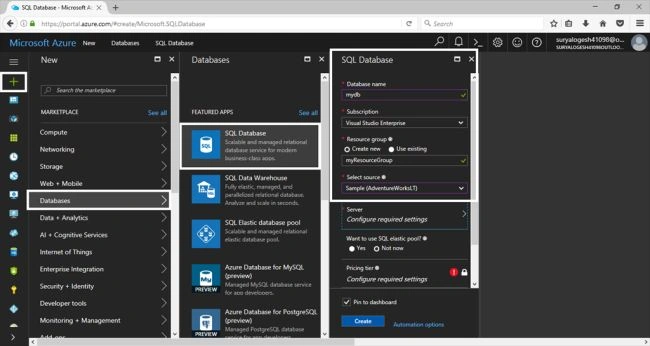
In the Azure portal , choose "+" then navigate to the "Databases" and then chose the "SQL Database" . It opens the SQL Database creation blade and fill the required details in the desired fields.
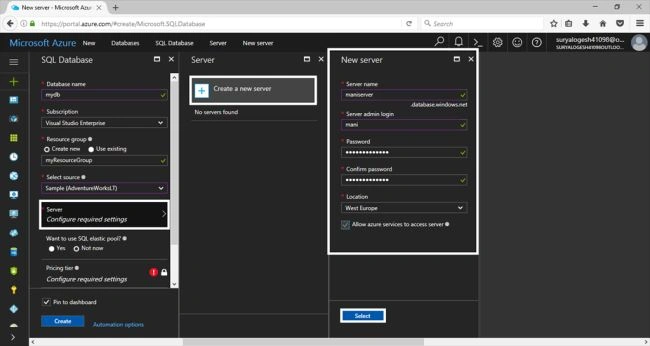
For creating the new server, choose the server in the blade, then it opens the server blade and then you may choose the server or create the new server. Give the necessary details to create the server and then press "select" to create the server.
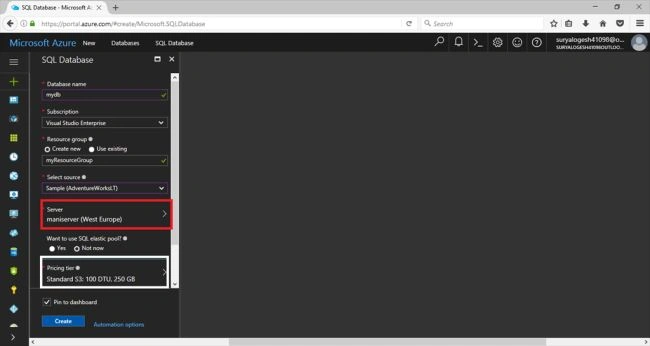
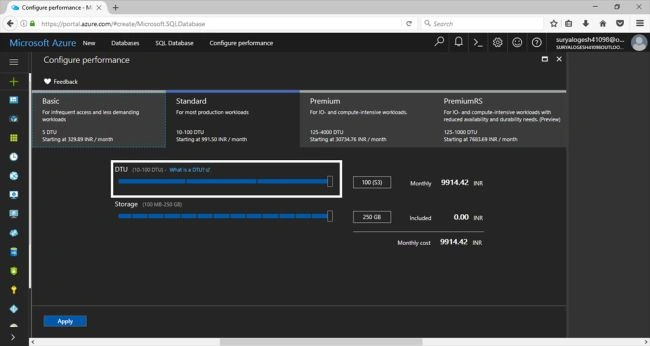
Choose the desired pricing tier for the usage of the disks and for the performance of our Database by DTU and press "Apply" to ensure the pricing tier.
What is DTU?
A DTU is a unit of measurement for the performance of a service tier and is a summary of several database characteristics. Each service tier has a certain number of DTUs assigned to it as an easy way to compare the performance level of one tier versus another. (Database Throughput Unit ) DTUs provide a way to describe the relative capacity of a performance level of Basic, Standard, and Premium databases. DTUs are based on a blended measure of CPU, memory, reads, and writes. As DTUs increase, the power offered by the performance level increases.
Then Choose the Database to pin in the dashboard and also press the "create" button to create the Database by filling the above details.
Microsoft Azure Subscription. If you don't have a subscription go to this link to Free Trial!!!
What is Azure SQL?
SQL (pronounced "ess-que-el") stands for Structured Query Language. SQL is used to communicate with a database. According to ANSI (American National Standards Institute), it is the standard language for relational database management systems.SQL Azure is Microsoft's cloud database service. Based on SQL Server database technology and built on Microsoft's Windows Azure cloud computing platform, SQL Azure enables organizations to store relational data in the cloud and quickly scale the size of their databases up or down as business needs change.
Follow these steps to create an Azure SQL Database
Sign-in into the Azure portal.
In the Azure portal , choose "+" then navigate to the "Databases" and then chose the "SQL Database" . It opens the SQL Database creation blade and fill the required details in the desired fields.
For creating the new server, choose the server in the blade, then it opens the server blade and then you may choose the server or create the new server. Give the necessary details to create the server and then press "select" to create the server.
Choose the desired pricing tier for the usage of the disks and for the performance of our Database by DTU and press "Apply" to ensure the pricing tier.
What is DTU?
A DTU is a unit of measurement for the performance of a service tier and is a summary of several database characteristics. Each service tier has a certain number of DTUs assigned to it as an easy way to compare the performance level of one tier versus another. (Database Throughput Unit ) DTUs provide a way to describe the relative capacity of a performance level of Basic, Standard, and Premium databases. DTUs are based on a blended measure of CPU, memory, reads, and writes. As DTUs increase, the power offered by the performance level increases.
Then Choose the Database to pin in the dashboard and also press the "create" button to create the Database by filling the above details.
Join the conversation! Your thoughts help the community grow.