

Introduction
In this article, we will learn more about the following features of Google App Engine.
- What is Google App Engine
- Features of GAE
- Compute engine vs GAE comparsion
- App Engine Environments
- App Engine scaling
- Deploy .NET 6 workloads to GAE
What is App Engine
Google App Engine lets app developers build scalable web and mobile backends in any programming language on a fully managed serverless platform.
Supports
- GO,Java,.NET Node JS, Python, and Ruby using pre-configured Runtime.
- Use custom runtime(Containers) and write code in any language.
- Easy connectivity with cloud services (Cloud SQL etc.)
No Usage Charges
Pay for use(Automatically scales depending on app traffic)
Features
- Automatic load balancing and Auto scaling
- Managed platform updates and application health monitoring
- Application versioning
- Traffic Splitting
Compute Engine Vs. App Engine
Compute Engine
- IAAS
- More flexibility
More Responsibility
- Choose Image,
- Hardware,
- Availability
- Fine grain access controls
App Engine
- PAAS
- Serverless
- Lesser Responsibility
- Lesser Flexibility
App Engine Environments
Standard - Application runs in language specific runtime
- Complete isolation from OS.DISK
V1:Java,Python,PHP,GO(Older versions)
Restricted network access for python and PHP runtime
V2:Java,Python,PHP,GO(newer versions)
Full network access and no restrictions.
Flexible: Run Application instances as Docker containers
- Makes use of compute engine VM in
- Supports any runtime with built-in support for Python,Java,Node.js,Go,Ruby,PHP,.NET
App Engine Scaling Instances
Automatic - Scale based on Instance load
- Continuously running workloads
Auto Scale based on
- CPU Utilization
- Throughput utilization
- Concurrent Users
Basic - Instances are created when requests are received
- Instances are shut down to Zero When there is no traffic
- Not supported by APP Engine flexible
Manual - configure the number of Instances
Adjust number of instances manually over a period of time.
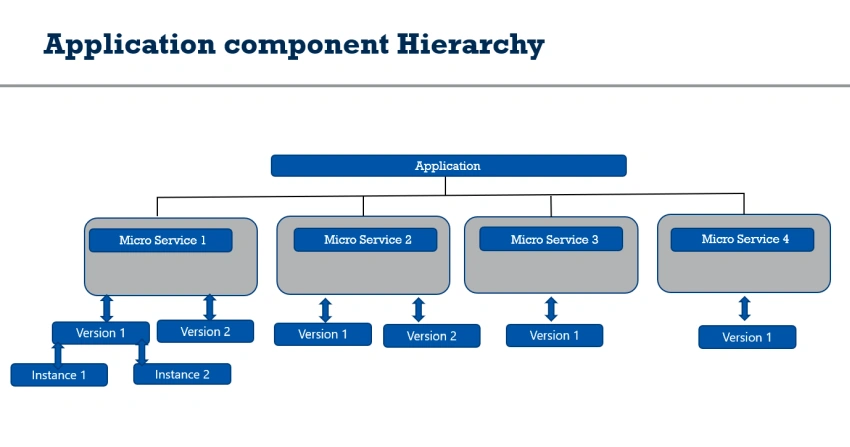
Deploying .NET 6 Workloads to GAE
Prerequisites
- Google free tier or paid account.
- Basic knowledge of using Google cloud services.
- Create Docker images and deploy them to the Google container registry https://www.c-sharpcorner.com/article/how-to-create-docker-image-of-net-6-workloads-and-push-it-to-google-container-r/
Deploy Application image to GAE
gcloud app deploy --image-url=gcr.io/buildcustomimage/custom-image:0.1
Note
Google app engine API and App Engine Admin API must be enabled. App engine account must have access to Google container Registry.
Navigate to the Google App engine, and you will see a new default service created,

To get Application Url
gcloud app browse.
Summary
In this article, we have learned how to flexibly deploy .NET 6 workloads to GAE.
In the upcoming articles, we will see how to deploy .NET 6 workloads to GKE.
Thanks a lot for reading. I hope you liked this article. Please share your valuable suggestions and feedback. Write in the comment box in case you have any questions. Have a good day!
Join the conversation! Your thoughts help the community grow.