

Content:
To install MonoAndroid in your system, navigate to http://mono-android.net/Installation.
Read the Installation Instruction and download in to your system.
Now whenever you make a MonoAndroid application through VS 2010 it will run on the MonoAndroid Simulator by default.
Here I will describe how to install your MonoAndroid application into a particular device.
This Article is for Non-Google phone deployment. For example Samsung Galaxy.
Now The Steps are
1. Run the "android.bat" application in the C:\android-sdk-windows\tools directory.
2. Now as in Figure 1, open the Android SDK and AVD Manager and install the "Usb Driver package, revision 3" (Marked in red).
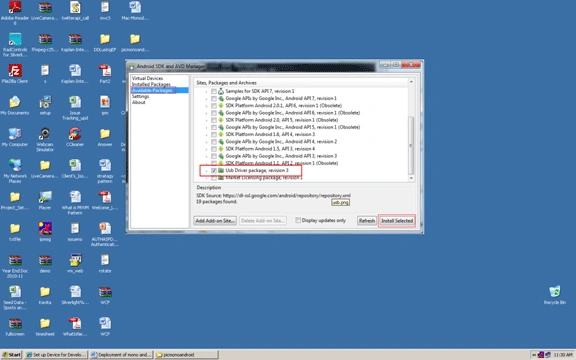
Figure:1
3. Now In your Android device (MobilePhone) you have to Enable USB debugging. For that you have to go to:
- Application Menu
- Settings
- Applications
- Development
- Check "USB debugging"
- Just Like Figure 2
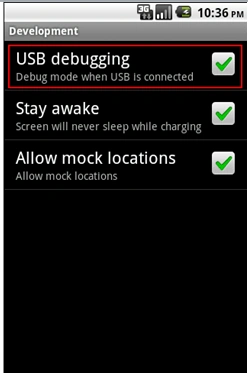
Figure 2:
4. Now Plug in your Device to your System. Initially Windows will likely not correctly detect your device.
For that You have to Open Control Panel -> Device Manager, right-click your unrecognized device, and choose "Update Driver Software" as in figure 3.
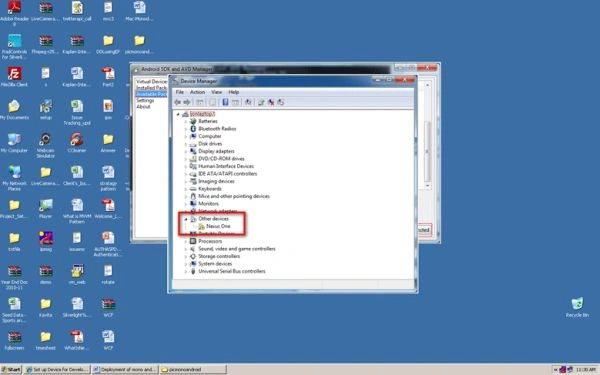
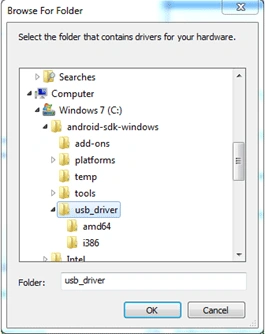
5. Browse for the driver software in C:\android-sdk-windows\usb_driver and choose OK, as in figure 5.
6. Now Click Install.
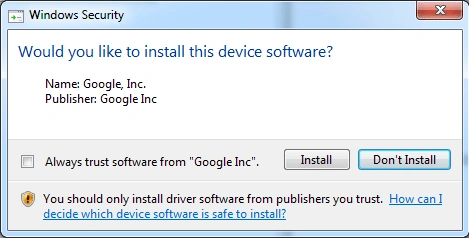
When Windows finishes installing the driver, your device should be ready to receive your application. It should now show up in the Device Chooser when you try to Run or Debug your application which you make by MonoAndroid Application.
Here I have attached a Sample Application that you can deploy to your Device.
vijay krishPosted Apr 20, 2013, 11:22 AM
hi..i did not found Android SDK and AVD Manager in my system..i am using mono for android 4.0 version...i have found AVD Manager and SDK Manager seperately in Android SDK Tools...in that two managers i did not found "Usb Driver package, revision 3" plz tell the solution asap...
karthick ragunathPosted Sep 7, 2011, 8:23 AM
hi nandi good job
Mahesh ChandPosted Jul 21, 2011, 10:46 AM
Good stuff. Keep it up.