

Deployment Slots in Azure Websites is a way to minimize the impact of broken deployments. Deployment Slots provide you wide variety of deployment workflows. When you create an Azure Website, you are directly provisioned the production slot. With deployment slots you can directly swap between production slot and non-production slot without any downtime.
There are few scenarios in Azure Websites deployment slots:
- Staged Deployment
When you are building a website then you might want to test it weather it is fully functional or not. You can do this in your non-production slot and when you are ready to make it production site you can swap the slots to interchange between non-production and production site.
- Incremental Deployment
If you want to make changes in the website without harming the production site you can create a non-production slot developed on it, test it and then swap between the slots.
- Rolling back deployment
After swapping the deployment you realize that your site is not working the way it should work then you would probably roll back the deployment to undo the changes you have made.
Creating new deployment slot:
- Login in to your Portal at http://manage.windowsazure.com then go to your site’s dashboard.
- Under Quick Glance , click on Add a new deployment slot (You must be in standard pricing tier.).
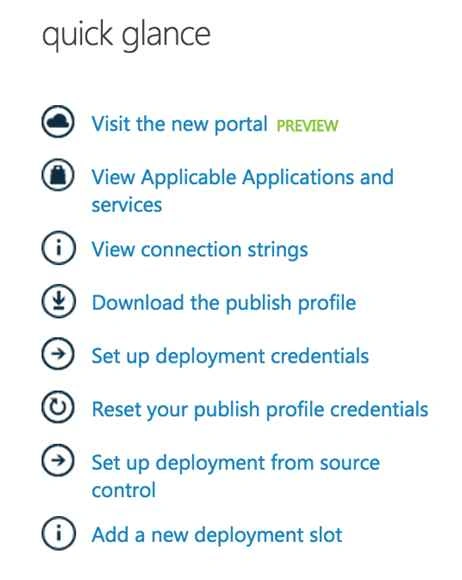
- In the dialog box that pops up, name your deployment slot. This name will be used to recognize your production and deployment slot. You can copy the same website from the production slot or create a new empty slot for it.
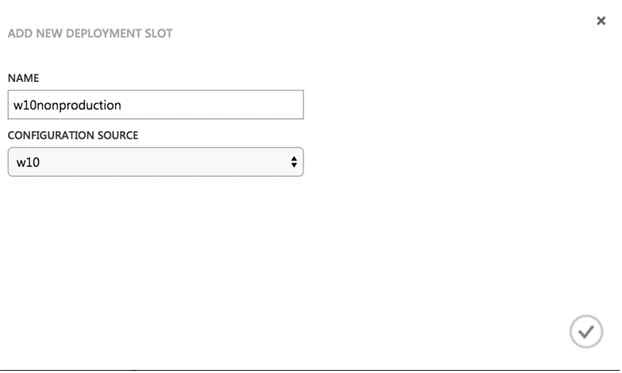
- Click the check mark and your new deployment slot is set for you.
Now that you have created your new deployment slot. You can get this on Dashboard of the Web Apps in Windows Azure as in the following screenshot:

You can use the slot similar to a new website (Let’s suppose) and deploy files to it.
You can swap between the slots by going to the Dashboard of the website and clicking on the SWAPbutton on the toolbar as in the following screenshot:

Stay tuned for more.
Nairisha ShresthaPosted Jan 19, 2016, 9:23 PM
good one Ravi.
Santhakumar MunuswamyPosted Sep 5, 2015, 4:01 AM
Thanks for nice share
Sumit JoshiPosted Sep 4, 2015, 11:54 AM
Thanks For sharing.
Pankaj Kumar ChoudharyPosted Sep 4, 2015, 6:50 AM
Nice Explain Sir.............
Ankit BansalPosted Sep 4, 2015, 5:04 AM
thanks for sharing...
Rajeesh MenothPosted Sep 4, 2015, 2:57 AM
Nice Share...
Karthikeyan KPosted Sep 4, 2015, 2:19 AM
Good one...Thanks for sharing