

A BMI (Body Mass Index) Calculator measures body fat based on weight and height, providing a numerical value to categorize individuals as underweight, normal weight, overweight, or obese. It’s widely used to assess health risks and guide lifestyle or medical decisions.
A BMI Calculator using JavaScript allows users to input their weight and height, then calculates and displays their Body Mass Index (BMI), helping assess whether they are underweight, normal weight, or overweight.
Formula
BMI = (weight) / (height * height)
// height in cms and weight in kgs
Example
Weight: 70 kg
Height: 170 cm
Height in meters = 170 cm / 100 = 1.7 m
BMI = 70 / (1.7 * 1.7)
BMI = 70 / 2.89
BMI ≈ 24.22
Approach
BMI is a number calculated from an individual's weight and height.
Collect height and weight from the user, stored in
heightandweightvariables.Compute BMI by dividing weight (kg) by the square of height (m²).
Use if-else statements to interpret the BMI result and determine the category.
Check for empty inputs; if any are missing, display messages to provide height or weight.
Use HTML for structure, CSS for styling, and JavaScript for input processing and output display.
In the JavaScript section, we are processing the taken input and after calculating, the respective output is printed.
Example: In this example, we will structure in the index.html file and implement the logic in the app.js file.
HTML
<!-- index.html file -->

<!DOCTYPE html>

<html lang="en">

<head>

<meta charset="UTF-8" />

<meta name="viewport" content="width=device-width, initial-scale=1.0" />

<title>BMI Calculator</title>

</head>

<body style="background-color: rgb(244, 255, 244)">

<div class="container">

<h1>BMI Calculator</h1>

<!-- Option for providing height

and weight to the user-->

<p>Height (in cm)</p>

<input type="text" id="height" />

<p>Weight (in kg)</p>

<input type="text" id="weight" />

<button id="btn">Calculate</button>

<div id="result"></div>

</div>

</body>

</html>
JavaScript
window.onload = () => {

let button = document.querySelector("#btn");

// Function for calculating BMI

button.addEventListener("click", calculateBMI);

};

function calculateBMI() {

/* Getting input from user into height variable.

Input is string so typecasting is necessary. */

let height = parseInt(document

.querySelector("#height").value);

/* Getting input from user into weight variable.

Input is string so typecasting is necessary.*/

let weight = parseInt(document

.querySelector("#weight").value);

let result = document.querySelector("#result");

// Checking the user providing a proper

// value or not

if (height === "" || isNaN(height))

result.innerHTML = "Provide a valid Height!";

else if (weight === "" || isNaN(weight))

result.innerHTML = "Provide a valid Weight!";

// If both input is valid, calculate the bmi

else {

// Fixing upto 2 decimal places

let bmi = (weight / ((height * height)

/ 10000)).toFixed(2);

// Dividing as per the bmi conditions

if (bmi < 18.6) result.innerHTML =

Under Weight : <span>${bmi}</span>;

else if (bmi >= 18.6 && bmi < 24.9)

result.innerHTML =

Normal : <span>${bmi}</span>;

else result.innerHTML =

Over Weight : <span>${bmi}</span>;

}

}
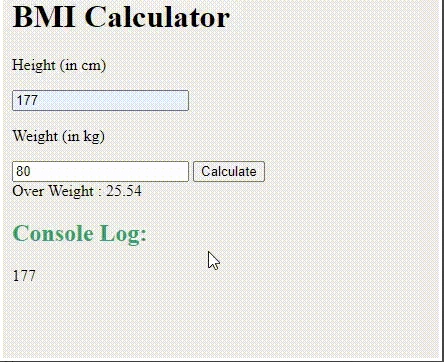
Output
Join the conversation! Your thoughts help the community grow.