

Introduction
The DetailsView Control enable us to work with a single data item at a time.
This control enable us to display, edit, insert, and delete data items such as
database records. Furthermore, it also enable us to page forward and backward
through a set of data items. The DetailsView control always renders each field
in a separate HTML table row.
Displaying Data in DetailsView
A DetailsView control renders an HTML table that displays the contents of a
single database record. The DetailsView supports both declarative and
programmatic databinding.
Declarative Databinding
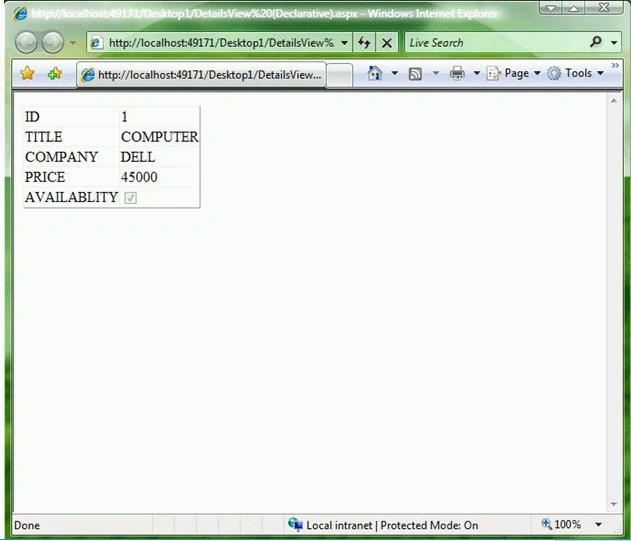
The example given below displays a record from the PRO_LIST database table,
using declarative databinding.
<%@
Page Language="VB"
AutoEventWireup="false"
CodeFile="DetailsView
(Declarative).aspx.vb" Inherits="_Default"
%>
<!DOCTYPE html PUBLIC "-//W3C//DTD XHTML 1.0 Transitional//EN" "http://www.w3.org/TR/xhtml1/DTD/xhtml1-transitional.dtd">
<script runat="server">
</script>
<html xmlns="http://www.w3.org/1999/xhtml" >
<head id="Head1" runat="server">
<title></title>
</head>
<body>
<form id="form1" runat="server">
<div>
<asp:DetailsView
id="dtlProducts"
DataSourceID="SqlDataSource1"
Runat="server" />
<asp:SqlDataSource ID="SqlDataSource1" runat="server" ConnectionString="<%$ ConnectionStrings:DatabaseConnectionString1 %>"
ProviderName="<%$ ConnectionStrings:DatabaseConnectionString1.ProviderName %>"
SelectCommand="SELECT [ID], [TITLE], [COMPANY], [PRICE], [AVAILABLITY] FROM [PRO_LIST]">
</asp:SqlDataSource>
</div>
</form>
</body>
</html>
In above example, the SQL Select statement associated with the SqlDataSource
control retrieves the first product from the PRO_LIST database table. The
DetailsView control is bound to the SqlDataSource control through its
DataSourceID property.
Programmatically Databinding
We also can bind a DetailsView control programmatically to a data source. The
page given below contains a DetailsView that is bound to a collection of
products.
<%@
Page Language="VB"
%>
<!DOCTYPE
html PUBLIC
"-//W3C//DTD XHTML 1.0 Transitional//EN"
"http://www.w3.org/TR/xhtml1/DTD/xhtml1-transitional.dtd">
Join the conversation! Your thoughts help the community grow.