

Introduction
Rainfall Detection is most commonly used in motor vehicles’ and home automation. In motor vehicles, when rainfall starts during traveling time, glass wipers are automatically switched on. In the home automation sector, during rainfall time if any of the windows are opened, then they're automatically closed.
Prerequisites for developing this system:
Hardware requirements:
| Hardwares | Nos |
| Arduino UNO | 1 |
| Rain Sensor | 1 |
| 10k ohm potentiometer | 1 |
| LCD crystal display | 1 |
| 220-ohm resistor | 1 |
| Breadboard | 1 |
| Connecting wires | - |
Software requirements
-
Arduino IDE (For uploading code to Arduino Microcontroller)
In this experiment, we have three stages of work to detect rainfall using Arduino:
- Connecting all hardware
- Write & upload code to Arduino board
- Test our developed system
Stage 1 [Connecting all hardware]
Step 1
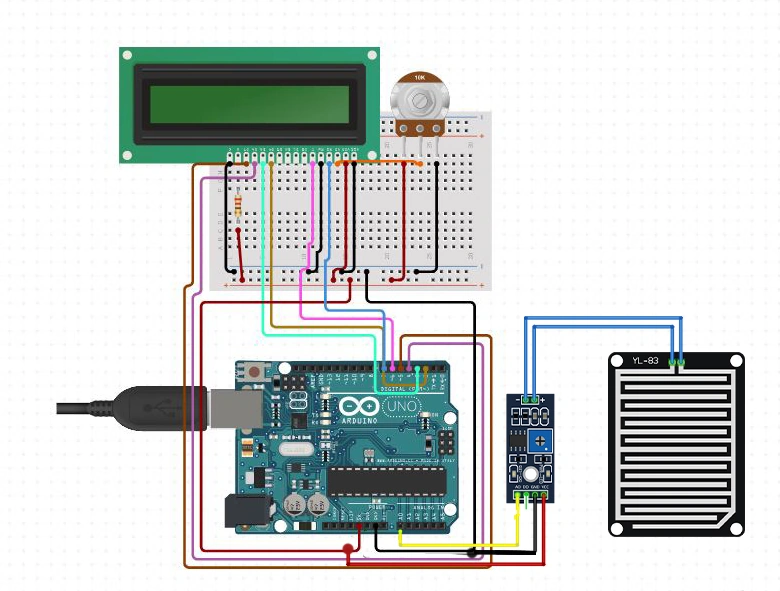
First, we can connect the LCD crystal display with the Arduino UNO board using Jumper wires. I am using a breadboard to extend power terminals for making this system.
Refer to the below LCD crystal pin diagram for making an easy connection with Arduino
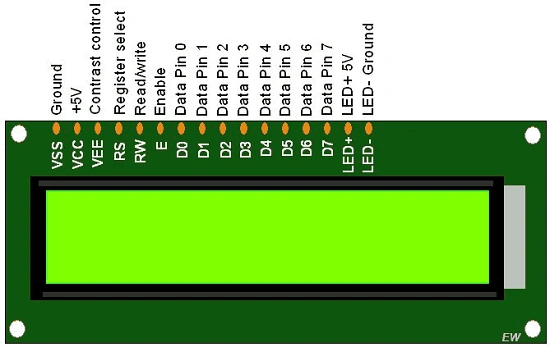
Place a 10K ohm potentiometer near the LCD crystal display. It can adjust the contrast of the LCD screen and create a power connection from Arduino +5V and GND right and left end of the potentiometer. Make a connection from the center terminal of the potentiometer to VEE (contrast control) LCD crystal display. (Refer to the connection diagram)
Pin Configuration
Arduino Breadboard LCD Crystal Display
Pin 2 ---------------------------------------------------------------------------> Data pin 4
Pin 3 ---------------------------------------------------------------------------> Data pin 5
Pin 4 ---------------------------------------------------------------------------> Data pin 6
Pin 5 ----------------------------------------------------------------------------> Data pin 7
Pin 7 ----------------------------------------------------------------------------> Register select
Pin 6 ----------------------------------------------------------------------------> Enable
+ 5V -----------------> Potentiometer Right Terminal------------------->Potentiometer Centre terminal ----> VEE (Contrast Control) LCD crystal
+5V ---------------------------> 220-ohm Resistor -----------------------> LED +5V pin [LCD Crystal]
GND ---------------------------------------------------------------------------->Potentiometer Left terminal, Ground pin & LED - Ground pin [Connect to both pin]
Join the conversation! Your thoughts help the community grow.