


Introduction
Supercharge your .NET MAUI projects with Devexpress Charts! This blog will explain to you how to implement the chart in .NET MAUI projects using Dev Express, a lifetime free plugin. This plugin has many customizations and will directly skip into the implementation part.
Quick Links
- Project Setup
- Install Plugin
- Implementation
- Demo
- Download Code
Project Setup
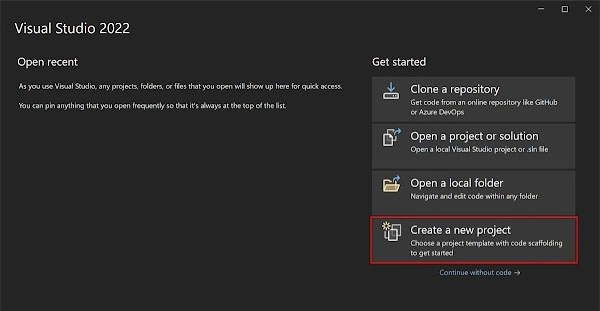
- Launch Visual Studio 2022, and in the start window click Create a new project to create a new project.
-
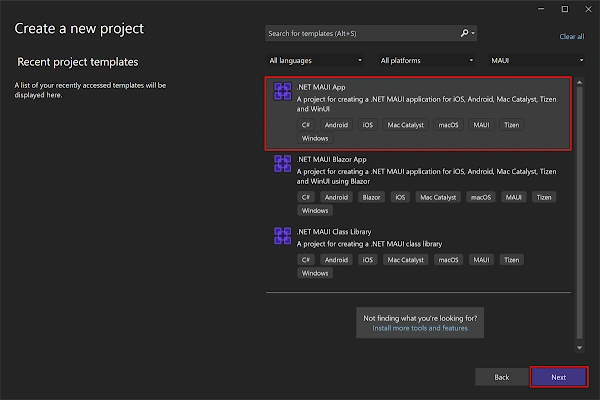
In the Create a new project window, select MAUI in the All project types drop-down, select the .NET MAUI App template, and click the Next button.
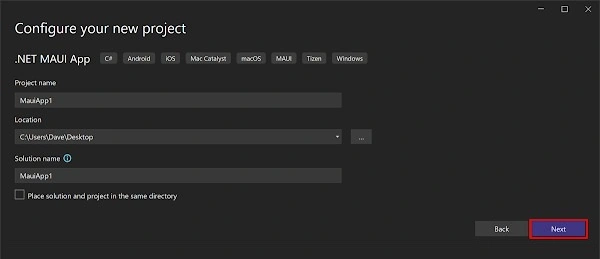
- In the Configure your new project window, name your project, choose a suitable location for it, and click the Next button.
-
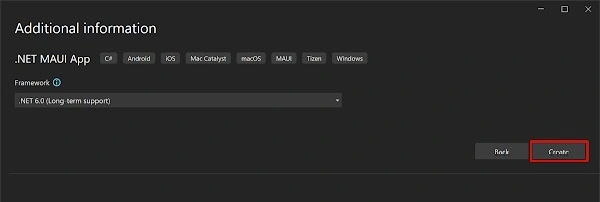
In the Additional Information window, click the Create button.
- Once the project is created, we can able to see the Android, iOS, Windows, and other running options in the toolbar. Press the emulator or run button to build and run the app.

Install Plugin
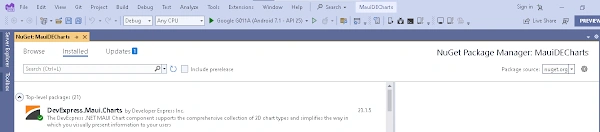
- Library Requirement: The Dev Express's Nuget link should be mapped as a package source and we need to install "DevExpress.Maui.Charts" into our project.
- Installation via NuGet: Obtain the Charts library by searching for "DevExpress.Maui.Charts" in the NuGet Package Manager.
- User Interface Guidance: Open the NuGet Package Manager interface to facilitate the installation process.
- Visual Confirmation: The library, once searched, should appear as "DevExpress.Maui.Charts" in the NuGet interface.
Join the conversation! Your thoughts help the community grow.