

This article explains the concept of dictionaries in C#, from the basics to the level afterwards I'll explain the concept of types of dictionaries and the concept of a hash table and it's related useful operations with their respective example.
Dictionaries
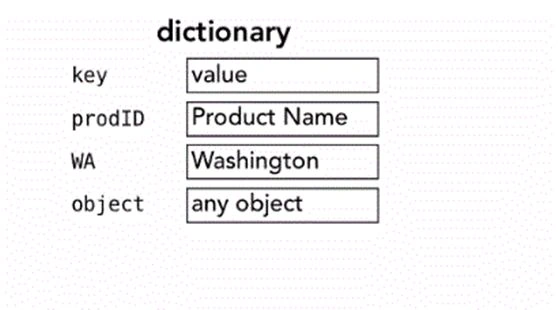
- Dictionaries are used to associate a specific key with a given value.
- Dictionaries are collection classes.
Functionality or access to the dictionary in C# is provided using: "using System.Collections;" - A dictionary uses KEYS, for their functioning.
- Dictionaries don't have any sense of order.
- Keys, works as lookups for table.
- A dictionary contains various sets of members in their declaration.
Now to explain hash tables.
Hash Table | Dictionaries
- A Hash Table is an example of a dictionary.
- Declared in the same fashion as you declare other classes in C#.
- Declared using this function Hashtable HT = new Hashtable();
- This will create a new hash table, in which you can add data and perform other operations.
Operations | Hash Table
The major operations of a hash table are: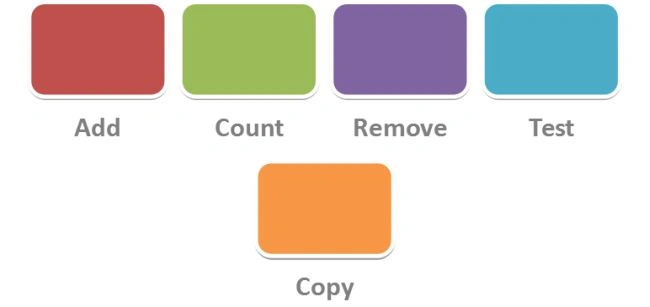
Add Operation | Hash Table
Adding Data to the Hash Table
There are two methods to add data to your hash table in C#, you can both use or any of them in your code. I'll show both methods with an example.
Method 1
In method 1 for adding data we use:
HT.Add("CShub", "cshub.somee.com");
HT.Add("GoogleSays", "jaiswalabhishek.blogspot.in");
HT.Add("Picmaniac", "picmaniac.brinkster.net");
Method 2
In method 2 we use:
HT["GoogleSays"] = "jaiswalabhishek.blogspot.in";
HT["CShub"] = "cshub.somee.com";
Example | Hash Table
using System;
using System.Collections;
using System.Collections.Generic;
using System.Linq;
using System.Text;
namespace Hello_Word
{
class Program
{
static void Main(string[] args)
{
Hashtable HT = new Hashtable();
HT.Add("CShub", "cshub.somee.com");
HT.Add("GoogleSays", "jaiswalabhishek.blogspot.in");
HT.Add("Picmaniac", "picmaniac.brinkster.net");
Console.WriteLine("Address for website {0} is {1} ", "GoogleSays", HT["GoogleSays"]);
Console.ReadLine();
}
}
}
The following is the second method for the same functionality.
using System;
using System.Collections;
using System.Collections.Generic;
using System.Linq;
using System.Text;
namespace Hello_Word
{
class Program
{
static void Main(string[] args)
{
Hashtable HT = new Hashtable();
// HT.Add("CShub", "cshub.somee.com");
// HT.Add("GoogleSays", "jaiswalabhishek.blogspot.in");
// HT.Add("Picmaniac", "picmaniac.brinkster.net");
HT["GoogleSays"] = "jaiswalabhishek.blogspot.in";
HT["CShub"] = "cshub.somee.com";
Console.WriteLine("Address for website {0} is {1} ", "GoogleSays", HT["GoogleSays"]);
Console.ReadLine();
}
}
}
Count Operation | Hash Table
As in other languages, in C# count is used for counting the total number of data values available in the hash table.
There is no sense of order in the hash table for this operation.
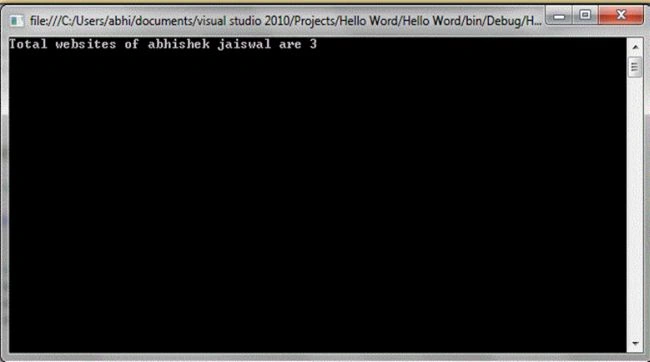
A count operation is performed by: Console.WriteLine("Total websites of abhishek jaiswal are {0}", HT.Count);
Example | Count
using System;
using System.Collections;
using System.Collections.Generic;
using System.Linq;
using System.Text;
namespace Hello_Word
{
class Program
{
static void Main(string[] args)
{
Hashtable HT = new Hashtable();
HT.Add("CShub", "cshub.somee.com");
HT.Add("GoogleSays", "jaiswalabhishek.blogspot.in");
HT.Add("Picmaniac", "picmaniac.brinkster.net");
// Console.WriteLine("Address for website {0} is {1} ", "GoogleSays", HT["GoogleSays"]);
Console.WriteLine("Total websites of abhishek jaiswal are {0}", HT.Count);
Console.ReadLine();
}
}
}
Remove Operation | Hash Table
A Remove operation is used for removing data entries from your hash table. This is simply performed using:
HT.Remove("GoogleSays");
Example | Remove
using System;
using System.Collections;
using System.Collections.Generic;
using System.Linq;
using System.Text;
namespace Hello_Word
{
class Program
{
static void Main(string[] args)
{
Hashtable HT = new Hashtable();
HT.Add("CShub", "cshub.somee.com");
HT.Add("GoogleSays", "jaiswalabhishek.blogspot.in");
HT.Add("Picmaniac", "picmaniac.brinkster.net");
HT.Remove("GoogleSays");
if (HT.ContainsKey("GoogleSays"))
{
Console.WriteLine("Address for website {0} is {1} ", "GoogleSays", HT["GoogleSays"]);
// Console.WriteLine("Total websites of abhishek jaiswal are {0}", HT.Count);
}
Console.ReadLine();
}
}
}
Abhishek JaiswalPosted Apr 1, 2014, 11:45 PM
okay... got it sir! :)
Sam HobbsPosted Apr 1, 2014, 3:45 PM
Actually a hash table is not the same as a dictionary. A dictionary stores items by the key but a hash table stores items by a hash. It is possible for an item to have a hash value the same as another item and then a sequential search (of the bucket) is necessary. Every hash table must have a hash function and the hash function can have a major affect on efficiency. Hash tables were most useful when the amount of memory was much more limited than it is now.