SQL Server char data types can be confusing if you are not an experience developer. You may also get to ask a question in an interview, what is the difference between char and varchar in SQL Server? SQL Server has char, varchar, nchar, and nvarcar data types that all are used for storing character data. In this article, learn the difference between CHAR, VARCHAR, NCHAR and NVARCHAR data types. Actually it is simple but sometimes people get confused.
To store data as characters, numeric values and special characters in a database, there are 4 data types that can be used. So what is the difference among all 4 of these data types?
- CHAR vs VARCHAR
- NCHAR vs NVARCHAR
Considering an example, we will look into each one of them.
- DECLARE @string CHAR(20)
- SET @string = 'Robin'
- SELECT @string AS 'String', DATALENGTH(@string) AS 'Datalength' , LEN(@string) AS 'Len'
Note: The LEN() method provides the length of a character excluding trailing blanks stored in the string expression whereas the DATALENGTH() method provides the number of byte spaces occupied by the characters in a string expression.
As you know we represent the character values within single quotes, for example 'Robin'. But do you know we can represent these same characters within double quotes similar to programming languages representing a string, for example “Robin”? This can be done by setting the value:
- SET QUOTED_IDENTIFIER OFF
By default, it is set to ON
CHAR vs VARCHAR
Talking about the CHAR data type:
- It is a fixed length data type
- Used to store non-Unicode characters
- Occupiers 1 byte of space for each character
If the value provided to a variable of CHAR data type is shorter than the length of a column of declared the size of the variable, then the value would be right-padded with blanks to match the size of column length.
- DECLARE @string CHAR(20)
- SET @string = 'Robin'
- SELECT @string AS 'String', DATALENGTH(@string) AS 'Datalength' , LEN(@string) AS 'Len'

As you can see above, the bytes occupied by the variable are 20 even though the length of the characters is 5. That means that irrespective of the character stored in the column, it will occupy all bytes to store the value.
About the VARCHAR data type:
- It is a variable length data type
- Used to store non-Unicode characters
- Occupies 1 byte of space for each character
- DECLARE @string VARCHAR(20)
- SET @string = 'Robin'
- SELECT @string AS 'String', DATALENGTH(@string) AS 'Datalength' , LEN(@string) AS 'Len'
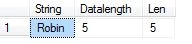
As you can see above, it is showing DATALENGTH as 5 which means it will use only the number of bytes equal to the number of characters. This will allow me to avoid wasting database space.
Note: If SET ANSI_PADDING is OFF when CREATE TABLE or ALTER TABLE is executed, a CHAR column defined as NULL is considered as VARCHAR.
When to use what?
If you are sure about the fixed length of the data that would be captured for any specific column then go for CHAR data type and if the data may vary then go for VARCHAR.
NCHAR vs NVARCHAR
Similar to CHAR data type, the NCHAR data type:
- Is a fixed length data type
- Used to store Unicode characters (for example the languages Arabic, German and so on)
- Occupies 2 bytes of space for each character
- DECLARE @string NCHAR(20)
- SET @string = 'Robin'
- SELECT @string AS 'String', DATALENGTH(@string) AS 'Datalength' , LEN(@string) AS 'Len'
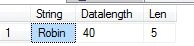
As you can see above, the data length column shows 40 bytes even though the size declared is 20. It's because NCHAR holds 2 bytes of space for each character.
About the NVARCHAR data type:
- It is a variable-length data type
- Used to store Unicode characters
- Occupies 2 bytes of space for each character
- DECLARE @string NVARCHAR(20)
- SET @string = 'Robin'
- SELECT @string AS 'String', DATALENGTH(@string) AS 'Datalength' , LEN(@string) AS 'Len'
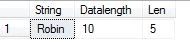
As in the output above, you will observe DATALENGTH column is showing only 10 as a value. That is because it occupies 2 bytes of space for each character and the data length is only 5 characters, therefore it will occupy 10 bytes of space in the database.
When to use what?
If your column will store a fixed-length Unicode characters like French, Arabic and so on characters then go for NCHAR. If the data stored in a column is Unicode and can vary in length, then go for NVARCHAR.
Querying to NCHAR or NVARCHAR is a bit slower then CHAR or VARCHAR. So don't go for NCHAR or NVARCHAR to store non-Unicode characters even though this data type supports that.
Conclusion
This article explains the differences between CHAR, VARCHAR, NCHAR and NVARCHAR data types. All of these data types are used to store characters, numbers or special characters. I hope you like this small article and will that it will be helpful to you at some point of time. Leave your comments whether its good or bad. Sharing is valuable no matter what :)
C# Corner has a set of interview questions and answers for software developers.


Gautam NagrajPosted Jul 26, 2025, 1:51 PM
Very nice explanation with details, Thank you for this post
Radhe GuptaPosted Dec 8, 2021, 9:13 AM
Superb article and Nice Explanation . Thanks for this post
Larry CoatesPosted Mar 16, 2020, 10:52 AM
Pradeep, Great article that was straight forward and very clear in the explanation! Many people will find this article to be very helpful. I also loved the "Extras" about the "SET QUOTED_IDENTIFIER OFF" and "SET ANSI_PADDING is OFF" SQL Server keywords... very goo to know info!
MANOJ APPosted Dec 10, 2019, 11:40 PM
Thank your for another useful article
rajesh vsPosted Jun 9, 2019, 1:18 AM
Supperb artcicle and Nice Explanation . Thanks for your post
Vishal PrajapatiPosted May 28, 2019, 12:06 AM
Awesome article.. Thanks for sharing.
Jignesh KumarPosted May 27, 2019, 11:11 PM
Nice one thanks for sharing
Jayesh AgrawalPosted May 27, 2019, 9:37 PM
Nice article... it would be make it perfect if you can add performance measurements in this article while using char, nchar, varchar, varchar(max), nvarchar.
prabhat kumarPosted May 1, 2019, 6:51 AM
Nice Article ...sir
Ketan ShindePosted Jan 29, 2019, 4:46 AM
Good........
Sourav MukherjeePosted Dec 4, 2018, 11:04 PM
Nice Article..Pradeep.
Amita GuptaPosted Nov 14, 2018, 5:25 AM
Thanx pardeep. its really useful.
Pravin LalgePosted Jul 24, 2018, 3:24 AM
Really good efforts..
Amol KumbhkarnaPosted May 8, 2018, 6:41 AM
You made my day Bro...!!! It is very useful as I face same question in my recent interview..!! Thanks for sharing it.
Tamheed KhanPosted Feb 24, 2018, 9:10 AM
Awsum artical Pradeep
Rahul shindePosted Jan 17, 2018, 12:44 PM
Nice explaination than u
Hamid KhanPosted Jan 15, 2018, 1:29 AM
Great and helpful............
Dennis ThomasPosted Jan 12, 2018, 7:36 AM
Nicely explained Pradeep. Thank you!
Insaf MohammadPosted Dec 19, 2017, 12:01 AM
Concept cleared now
Sagar PrakashPosted Nov 26, 2017, 8:42 AM
Good article..Thank you
Pavan SinghPosted Aug 9, 2017, 1:32 PM
It's really a good share for fresher as well as experienced.
Sivaiah DevaraPosted Mar 27, 2017, 11:07 PM
Very clear explanation, thank u ...
Rahul ParabPosted Mar 24, 2017, 5:39 AM
Awesomeeeeeeeeee explanation. Thanks :)
Nigel FernandesPosted Dec 7, 2016, 11:05 PM
Good article, Useful .......
Neeraj PalPosted Oct 19, 2016, 12:30 AM
Excellent ..Easy to learn
Vaibhav DeshmukhPosted Sep 21, 2016, 8:52 AM
Superb... Easy to learn.
SubashPosted Sep 16, 2016, 12:31 AM
Nice share
kalu singh raoPosted Jul 3, 2016, 9:16 AM
Nice...
Vignesh ManiPosted Jun 29, 2016, 4:03 AM
Good one
Aniket NarvankarPosted Jun 3, 2016, 7:39 AM
Very useful and nice Article
Roland WalesPosted Jun 5, 2015, 2:57 PM
A warning about using fixed char: if the actual length of the data is ever less than the fixed length of the field, if statements may not work as expected. If Field1 = 'ABC' will not be true if a 4 character field is 'ABC '. You need the trailing space in the if statement. This is a reason why some of us always use varchar.
pankaj kumarPosted Jun 2, 2015, 5:49 AM
Very helpful
Napo VPosted May 27, 2015, 6:01 AM
well explained
Khargesh RajputPosted May 14, 2015, 10:24 PM
Thnx
Nitin PatilPosted May 3, 2015, 10:04 PM
good one..
Subrat PandaPosted Dec 31, 2014, 2:21 AM
can varchar supports unicode character???
Abhijit KakadePosted Nov 26, 2014, 6:02 AM
Very good explanation pradeep.. its very useful.
Manish Kumar ChoudharyPosted Nov 24, 2014, 2:49 AM
nice Pradeep Shet sir..
Cyril JacobPosted Nov 24, 2014, 1:08 AM
Very informative & so simple even for a beginner
Niraj SinghPosted Oct 5, 2014, 8:12 AM
thanks sir
Hemant SrivastavaPosted Jul 11, 2014, 3:08 PM
useful information!
Archana KharatPosted Jul 8, 2014, 6:21 AM
nice article sir
Ramdas BhosalePosted Jul 8, 2014, 12:44 AM
Its very useful for beginners.
Pankaj BajajPosted Jul 7, 2014, 3:43 AM
Thanks Pradeep..very well explained in a simple way.
Prerana TiwariPosted Jul 6, 2014, 11:26 PM
Nice article..........
johnson yuanPosted Jul 6, 2014, 1:25 PM
I think you put the wrong image order at the beginning, when DECLARE @string VARCHAR(20), the DATALENGTH should be 5, and ECLARE @string CHAR(20), the DATALENGTH shoule be 20, but you put the wrong order.
Sai SherlekarPosted Jul 6, 2014, 5:49 AM
padeep, what is the difference between varchar(1) and char(1)?
Mahesh ChandPosted Jul 6, 2014, 4:00 AM
Very good Pradeep. I like the point "When to use what".
Joginder BangerPosted Jul 5, 2014, 10:30 AM
Good bro....it's very use full ...for any one
Jasminder SinghPosted Jul 5, 2014, 2:15 AM
Good one for the beginners...!!!