

Just take a simple html page and write the code which is mentioned below in the image, and you will easily understand the difference between live and bind function of jQuery.
- Add a jQuery library reference in your page so that you can write jQuery code.
Script File,
- <script src="http://ajax.googleapis.com/ajax/libs/jquery/1.7/jquery.min.js" type="text/javascript"></script>
- Now add the below mentioned code in your page, and then run the page to understand the difference between live and bind.
Script
Now if you see the code you can clearly see that we are just adding an event handler to a DOM element which is <p> tag.- <style>
- p{border:1px solid Black;}
- </style>
- <p>This is a p tag</p>
- <script src="http://ajax.googleapis.com/ajax/libs/jquery/1.7/jquery.min.js" type="text/javascript"></script>
- <script>
- $("p").bind("click", function () { alert("P tag is clicked from bind function.") });
- $("p").live("click", function () { alert("P tag is clicked from live function.") });
- $("body").append("<p>This is a future p tag.</p>")
- </script>
- Why do we actually use these two methods, what is the working of these methods, why do we need them?
This question must come to your mind -- these functions allow us to add event handler to any DOM object, so that we can do the changes in according to our need, for example, I want to add a click event to any p tag in my page, so how could I do that if I don't have any on-click event in p? So for that purpose we use these methods.
- What is the difference between them?
Bind method works only for the present tags in the page, which means the already existing DOM elements, not for the tags which are getting added after this method or in the future. For example,
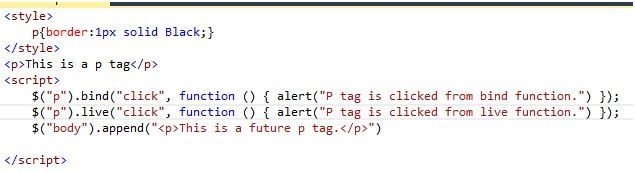
Check this image, you can see we have a <p> tag with the text (This is a p tag) which means its already exists.
If we click on p tag it will give me an alert message first ( P tag is clicked from bind function) and then ( P tag is clicked from live function), Now we added a new p tag in the body but after bind method, so basically dynamically, and this p tag will append in the body at run time.
So in the output now we have two tags,

Now if you click on the <p> tag which we appended at run time, it will just alert the Live function, not the bind function.
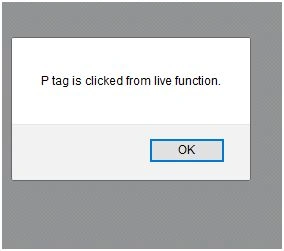
So the difference is clear: Bind method does not work for the future tag added in the page, where live does work for that.
İsmail Hakkı ŞenPosted Jul 11, 2016, 1:43 AM
After jQuery 1.7 "live" method is deprecated. "on" method should be used.
Harinder KumarPosted Jul 1, 2016, 2:28 PM
That is damn good sir...i appreciate and would like to read some more articles from you..keep it up :) :)
Omid NasriPosted Jul 1, 2016, 9:38 AM
Thanks
Santhakumar MunuswamyPosted Jun 30, 2016, 12:42 AM
Thank you for nice article
Rohit AiriPosted Jun 30, 2016, 12:34 AM
Great article..keep it on
RajaPosted Jun 30, 2016, 12:24 AM
Good One...
kalu singh raoPosted Jun 29, 2016, 10:58 PM
Nice...