

Introduction
In this article we will learn about some SQL functions Row_Number() ,Rank(), and Dense_Rank() and the difference between them.
Creating a table in SQL Server
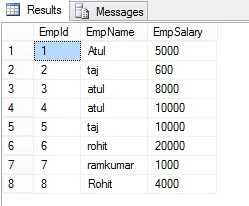
Here I have an Employe table, the following is the sample data for the Employe Table.
ROW_NUMBER() Function without Partition By clause
Row_number plays a very important role in SQL server. Row_Number function can help to perform more complex ordering of row in the report format that allow the over clause in SQL standard.
Syntax
ROW_NUMBER () OVER ([PARTITION BY value_exp, ... [ n ]] ORDER BY_clause)
Here we will play with the above Employe table. Let's see how we can use Row_Number() function.
Over specified the order of the row and Order by sort order for the record. By default order by sort in ascending order.
Example
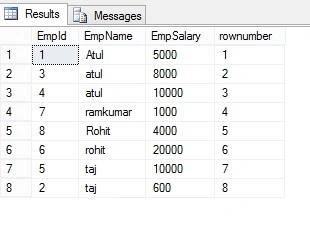
- select *, ROW_NUMBER() over(order by EmpName) as rownumber from Employe
The following is the output of the above query.
ROW_NUMBER() Function with Partition By clause
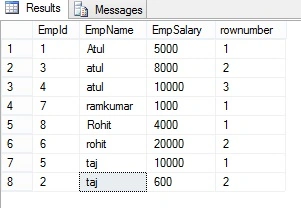
If we want to add row number to each group, and it is reset for every group, let's take a look at the Employe table
Example
- Select *, ROW_NUMBER() over(partition by Empname order by Empname ) as rownumber from Employe
The following is the OUTPUT of the above query
Rank() Function in SQL Server
This function will assign a unique value to each distinct Row, but it leaves a group between the groups.
Example
- SELECT EmpName, EmpSalary ,rank() over(order by EmpName) as rankID from Employe
The following is the OUTPUT of the above query.
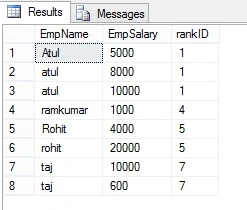
Gap represents number of occurrence example - EmpName="atul" is repeated 3 times and has rank "1", the next rank will be 1+3=4 and same with the next value.
Dense_Rank() Function in SQL Server
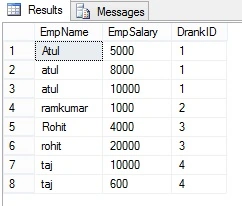
Dense_Rank() Function is similar to Rank with only difference, this will not leave gaps between groups.
Example
- SELECT EmpName ,EmpSalary ,DENSE_RANK() over(order by EmpName) as DrankID from Employe
The following is the OUTPUT of the above query:
Summary
In this article we learned Row_Number() ,Rank(), and Dense_Rank() in SQL Server.
Dharamvir SinghPosted Oct 21, 2020, 3:31 PM
Nicely explain.. thanks
Samiran DeyPosted Feb 10, 2020, 6:30 AM
Really good explanation...Thanks
Sachin KaliaPosted Jul 5, 2018, 1:19 AM
Its really simple and ease to udnerstand the concept .majorly while you are giving an interview this is one the FAQ..Thanks Atul Ji
Prakash ChasiyaPosted Jun 22, 2018, 8:00 AM
Nice........
Shamim AnsariPosted Jan 30, 2018, 12:34 AM
WITH CTE AS( select *,ROW_NUMBER() over(partition by Designation order by salary desc) as RN from Employee ) SELECT EmpName, Salary,Designation FROM CTE WHERE RN < 3
Shyamsunder KashyapPosted Dec 15, 2017, 1:57 AM
Nice explanation in so easy way.........Thanks
charu upadhyayPosted Sep 14, 2017, 5:29 AM
Very easily explained
SubashPosted Aug 21, 2016, 3:09 AM
Good xplanation
Upendra Pratap ShahiPosted Oct 29, 2015, 4:56 AM
nice one...
Humayun Kabir MamunPosted Sep 29, 2015, 7:18 AM
Nice...
Nilesh JadavPosted Sep 29, 2015, 12:25 AM
Great Article
Shridhar SharmaPosted Sep 28, 2015, 3:06 PM
nice post Atul
Santhakumar MunuswamyPosted Sep 28, 2015, 2:05 PM
Good one
Sujeet SumanPosted Sep 28, 2015, 10:35 AM
Nice Article.............
Pankaj Kumar ChoudharyPosted Sep 28, 2015, 9:35 AM
Nice Explain Atul Sir....... Why you left Ntile function it will be better if you also provided information about NTile function.......
Muhammad Aqib ShehzadPosted Sep 28, 2015, 5:58 AM
fantastic approach used for better understanding. thanks for sharing.
Sibeesh VenuPosted Sep 28, 2015, 5:42 AM
Nice Share
Vipul MalhotraPosted Sep 28, 2015, 5:08 AM
nice share
Priyaranjan K SPosted Sep 28, 2015, 4:43 AM
Good One .
RakeshPosted Sep 28, 2015, 4:41 AM
Good Information share
Harshad PansuriyaPosted Sep 28, 2015, 4:18 AM
Nice One