

Generally, a developer face the scenario many times ,where he required to limit the data set that is retrieving from the query. There are many methods through which he can limit the result set. Today, I will explain different methods that will help us to limit the result set. Let’s start today’s session.
Firstly, we create a table
- CREATE TABLE[dbo].[Student_Information]
- (
- [College_Id][nvarchar](10) NOT NULL, [Student_Name][nvarchar](max) NOT NULL, [Father_Name][nchar](10) NOT NULL, [Address][nvarchar](max) NOT NULL, [Branch_Id][int] NOT NULL
- )
- GO
- INSERT[dbo].[Student_Information]([College_Id], [Student_Name], [Father_Name], [Address], [Branch_Id]) VALUES(N '1210038', N 'Pankaj', N 'Suresh ', N 'Alwar', 1)
- INSERT[dbo].[Student_Information]([College_Id], [Student_Name], [Father_Name], [Address], [Branch_Id]) VALUES(N '1210039', N 'Priya', N 'Ram ', N 'Mathura', 1)
- INSERT[dbo].[Student_Information]([College_Id], [Student_Name], [Father_Name], [Address], [Branch_Id]) VALUES(N '1310048', N 'Rahul', N 'Sambhu ', N 'Alwar', 3)
- INSERT[dbo].[Student_Information]([College_Id], [Student_Name], [Father_Name], [Address], [Branch_Id]) VALUES(N '1310078', N 'Neeraj', N 'Nathu ', N 'Jaipur', 5)
- INSERT[dbo].[Student_Information]([College_Id], [Student_Name], [Father_Name], [Address], [Branch_Id]) VALUES(N '1210047', N 'Sandeep', N 'Om Parkash', N 'Alwar', 1)
- INSERT[dbo].[Student_Information]([College_Id], [Student_Name], [Father_Name], [Address], [Branch_Id]) VALUES(N '1210048', N 'Sanjeev', N 'Omi ', N 'Delhi', 2)
- INSERT[dbo].[Student_Information]([College_Id], [Student_Name], [Father_Name], [Address], [Branch_Id]) VALUES(N '1210040', N 'Sonu', N 'Suresh ', N 'Alwar', 1)
- INSERT[dbo].[Student_Information]([College_Id], [Student_Name], [Father_Name], [Address], [Branch_Id]) VALUES(N '1310041', N 'Monu', N 'Sambhu ', N 'Alwar', 3)
- INSERT[dbo].[Student_Information]([College_Id], [Student_Name], [Father_Name], [Address], [Branch_Id]) VALUES(N '1210042', N 'Divyanshu', N 'Om Parkash', N 'Alwar', 1)
- INSERT[dbo].[Student_Information]([College_Id], [Student_Name], [Father_Name], [Address], [Branch_Id]) VALUES(N '1210043', N 'Saniya', N 'Ram ', N 'Mathura', 1)
- INSERT[dbo].[Student_Information]([College_Id], [Student_Name], [Father_Name], [Address], [Branch_Id]) VALUES(N '1310044', N 'Bupesh', N 'Nathu ', N 'Jaipur', 5)
- INSERT[dbo].[Student_Information]([College_Id], [Student_Name], [Father_Name], [Address], [Branch_Id]) VALUES(N '1210045', N 'Manjeet', N 'Omi ', N 'Delhi', 2)
- SELECT * FROM dbo.Student_Information AS STU
Output
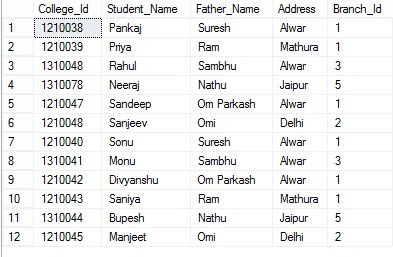
Select Top Statement
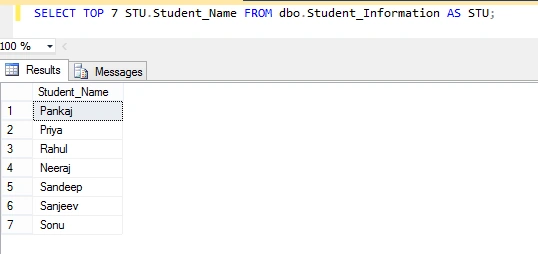
The SQL SELECT TOP statement is used to retrieve records from one or more tables in a database and limit the number of records returned based on a fixed value or percentage. When TOP statement is used with the ORDER BY clause, the result set is limited to the first N number of ordered rows; otherwise, it returns the first N number of rows in an undefined order.
Example 1: (Top using Numeric Value)
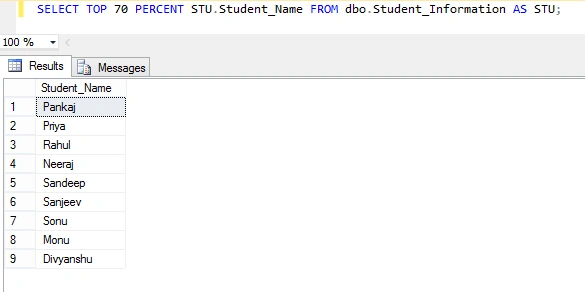
Example 2: (Top using Percent value)
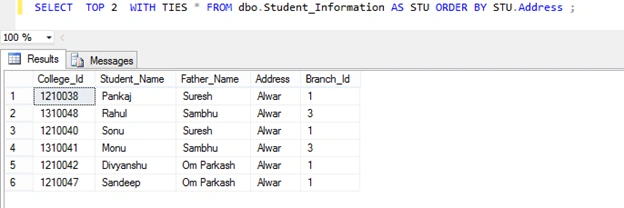
Example 3: (Top WITH TIES Option)
WITH TIES specifies that additional rows be returned from the base result set with the same value in the ORDER BY columns appearing as the last of the TOP n (PERCENT) rows. Used WITH TIES when you want to return two or more rows that tie for last place in the limited results set.
WITH TIES specifies that additional rows be returned from the base result set with the same value in the ORDER BY columns appearing as the last of the TOP n (PERCENT) rows. Used WITH TIES when you want to return two or more rows that tie for last place in the limited results set.
Simple Without Ties
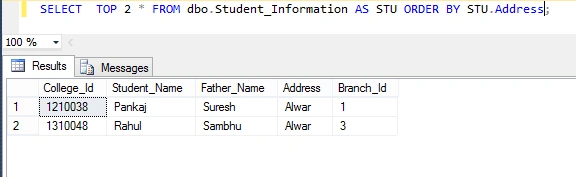
TOP WITH TIES
Limit Result Set Using ROW_NUMBER() WITH CTE
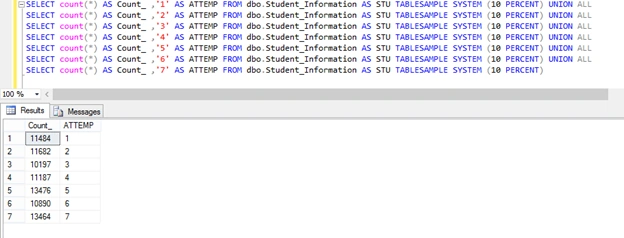
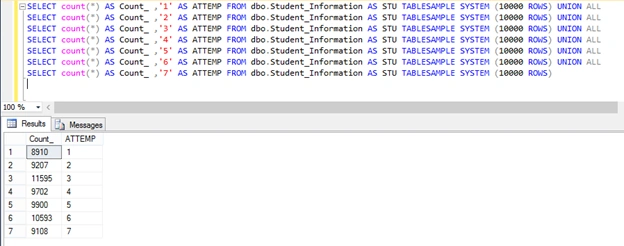
We can limit the result set by using the ROW_NUMBER() function with CTE (Common Table Expression). ROW_NUMBER() is a rank function, returns the sequential number of a row within a partition of a result set, starting at 1 for the first row in each partition.
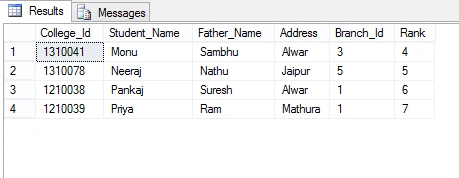
Example 4
- WITH CTE AS
- (
- SELECT * , ROW_NUMBER() OVER(ORDER BY STU.Student_Name) AS 'Rank'
- FROM dbo.Student_Information AS STU
- )
- SELECT * FROM CTE
- WHERE CTE.Rank BETWEEN 4 AND 7;
sreenivasa kPosted Jan 27, 2016, 12:28 PM
really good
Pankaj Kumar ChoudharyPosted Jan 27, 2016, 9:32 AM
Thanks Raja T...........
Pankaj Kumar ChoudharyPosted Jan 27, 2016, 9:31 AM
Thanks Ankit Bansal Sir.........
Pankaj Kumar ChoudharyPosted Jan 27, 2016, 9:31 AM
Thanks Shubham Kumar Sir.......
Pankaj Kumar ChoudharyPosted Jan 27, 2016, 9:30 AM
Thanks Debasis Saha Sir........
Pankaj Kumar ChoudharyPosted Jan 27, 2016, 9:30 AM
Thanks Yashwant Vishwakarma Sir.......
Pankaj Kumar ChoudharyPosted Jan 27, 2016, 9:30 AM
Thanks Aqib Shehzad........
Raja TPosted Jan 27, 2016, 8:04 AM
Nice, Thanks for sharing
Ankit BansalPosted Jan 27, 2016, 6:16 AM
Nice share..thanks..
Shubham KumarPosted Jan 27, 2016, 2:47 AM
nice info :)
Debasis SahaPosted Jan 26, 2016, 11:37 PM
Good one..
Yashwant VishwakarmaPosted Jan 26, 2016, 11:07 PM
Awesome dude, thanks for sharing !!
Muhammad Aqib ShehzadPosted Jan 26, 2016, 1:51 PM
very good info, thanks for sharing