

Introduction
This article introduces how to display bootstrap alerts dynamically from an ASP.NET Core 3.1 MVC Application.
Bootstrap provides us with an easy way to create predefined alerts. Bootstrap alerts are available for any length of text, as well as an optional close button. An example of a bootstrap alert is given below.
- <div class="alert alert-success alert-dismissible">
- <a href="#" class="close" data-dismiss="alert" aria-label="close">×</a>
- <strong>Success!</strong> This alert box could indicate a successful or positive action.
- </div>
Let's follow the below steps to show the alerts dynamically from a simple ASP.NET Core 3.1 MVC Application.
Step 1
Create an ASP.NET Core 3.1 MVC Web App.
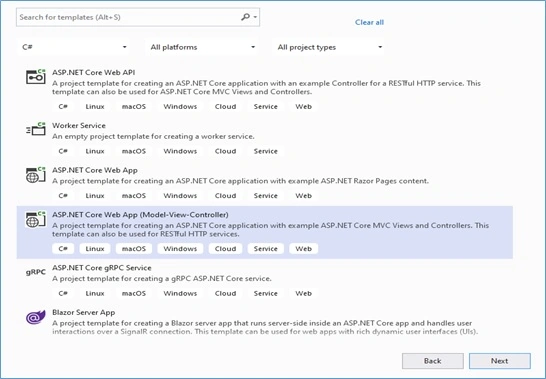
Step 2
Add a new folder and add an Enum into that folder and give a suitable name like this.
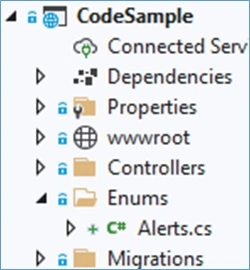
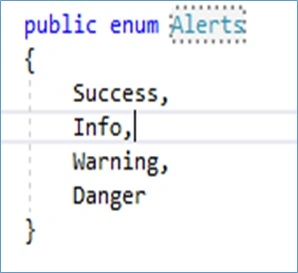
Step 3
Now create a common service like this.
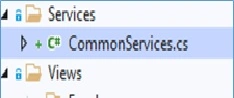
The code snippet for the CommonServices.cs class is given below. A new static method ‘ShowAlert’ is added here which takes two parameters and returns html as string.
- public class CommonServices {
- public static string ShowAlert(Alerts obj, string message) {
- string alertDiv = null;
- switch (obj) {
- case Alerts.Success:
- alertDiv = "<div class='alert alert-success alert-dismissable' id='alert'><button type='button' class='close' data-dismiss='alert'>×</button><strong> Success!</ strong > " + message + "</a>.</div>";
- break;
- case Alerts.Danger:
- alertDiv = "<div class='alert alert-danger alert-dismissible' id='alert'><button type='button' class='close' data-dismiss='alert'>×</button><strong> Error!</ strong > " + message + "</a>.</div>";
- break;
- case Alerts.Info:
- alertDiv = "<div class='alert alert-info alert-dismissable' id='alert'><button type='button' class='close' data-dismiss='alert'>×</button><strong> Info!</ strong > " + message + "</a>.</div>";
- break;
- case Alerts.Warning:
- alertDiv = "<div class='alert alert-warning alert-dismissable' id='alert'><button type='button' class='close' data-dismiss='alert'>×</button><strong> Warning!</strong> " + message + "</a>.</div>";
- break;
- }
- return alertDiv;
- }
- }
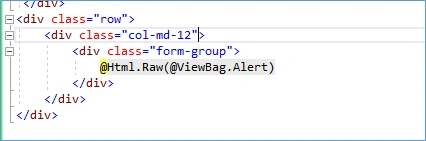
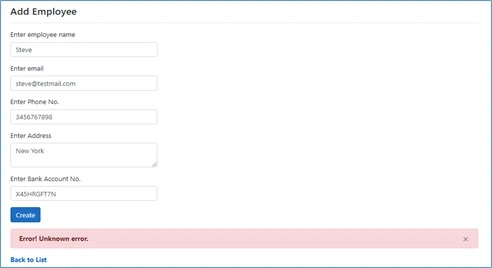
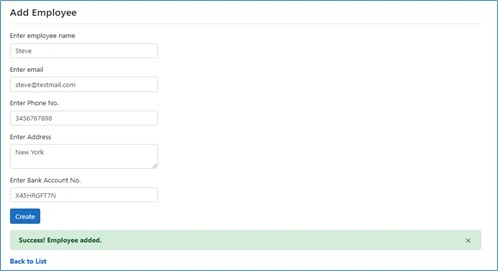
Now let’s call this method from a controller which is saving records in the database. The following is the code snippet for the controller.
- // POST: EmployeeController/Create
- [HttpPost]
- [ValidateAntiForgeryToken]
- public ActionResult Create([FromForm] EmployeeViewModel collection) {
- try {
- int result = 0;
- if (ModelState.IsValid) {
- Employee objEmp = new Employee();
- objEmp.EmpName = collection.EmpName;
- objEmp.Address = collection.Address;
- objEmp.Email = collection.Email;
- objEmp.Phone = collection.Phone;
- objEmp.BankAccountNo = collection.BankAccountNo;
- objEmp.CreatedOn = DateTime.Now;
- objEmp.CreatedBy = "SYSTEM";
- objEmp.ModifiedOn = null;
- objEmp.ModifiedBy = null;
- result = _empRepo.Add(objEmp).Result;
- //return RedirectToAction("Index");
- if (result > 0) {
- ViewBag.Alert = CommonServices.ShowAlert(Alerts.Success, "Employee added");
- } else ViewBag.Alert = CommonServices.ShowAlert(Alerts.Danger, "Unknown error");
- }
- return PartialView("_Create");
- } catch {
- return View();
- }
- }
Toan TranPosted Feb 26, 2022, 5:48 AM
Thank you very much
Partheepan RamalingamPosted May 12, 2021, 6:01 PM
Pretty good explanation and grasp the info easily ...!