

Introduction
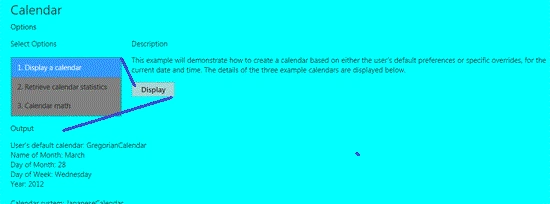
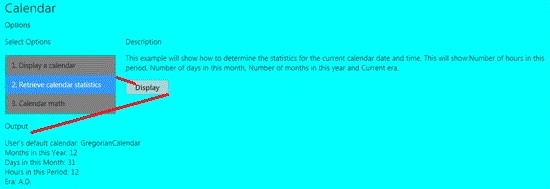
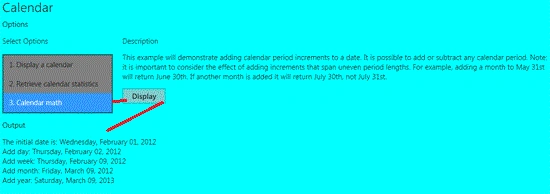
In this article, I will discuss how to display a calendar in a Windows 8 Metro Application. This example will demonstrate how to create a calendar based on either the user's default preferences or specific overrides, for the current date and time. The second displayed example shows how to determine the statistics for the current calendar date and time. This will show a number of hours in this period, Number of days in this month, Number of months in this year and Current era. This example will demonstrate adding calendar period increments to a date. It is possible to add or subtract any calendar period. For example, adding a month to May 31st will return June 30th. If another month is added it will return July 30th, not July 31st.
So, we will use the following steps to make this application.
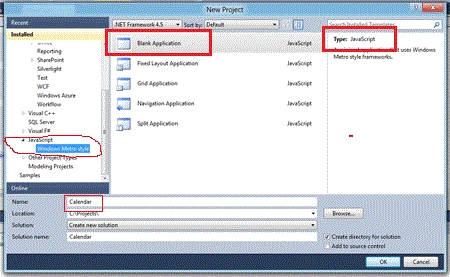
Step 1 : First of all create a new Metro Style Application. Here, I will share screens to create a new application.
- Open Visual Studio 2011
- File -> New -> Project
- Choose Template -> JavaScript-> Windows Metro Style -> Application
- Rename this Application
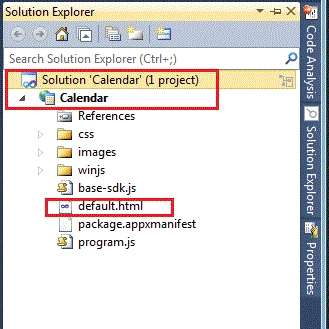
Step 2 : In the Solution Explorer there are various folders and files. We will primarily work with a default.html and default.js files.
Step 3 : The default.html page looks like as below.
Code : Let us see the code as given below.
<!DOCTYPE html>
<html>
<head>
<title>CalendarSample</title>
<!-- WinJS references -->
<link href="winjs/css/ui-light.css" rel="stylesheet" type="text/css" />
<script type="text/javascript" src="WinJS/js/base.js"></script>
<script type="text/javascript" src="WinJS/js/ui.js"></script>
<script type="text/javascript" src="WinJS/js/wwaapp.js"></script>
<!-- Base references -->
<link rel="stylesheet" type="text/css" href="css/base-sdk.css" />
<script type="text/javascript" src="base-sdk.js"></script>
<!-- references -->
<link rel="stylesheet" type="text/css" href="css/program.css" />
<script type="text/javascript" src="program.js"></script>
</head>
<body role="application" style="background-color:#0ff">
<div id="rootGrid">
<div id="header" role="contentinfo"></div>
<div id="content">
<h1 id="featureLabel">Calendar</h1>
<h2 id="inputLabel">Options</h2>
<div id="input" role="main" aria-labelledby="inputLabel">
<div class="options">
<h3 id="listLabel" >Select Options</h3>
<select size="3" id="Sections" aria-labelledby="listLabel" style="background-color:#808080">
<option selected="selected" value="1">1. Display a calendar</option>
<option value="2">2. Retrieve calendar statistics</option>
SubashPosted Sep 19, 2016, 8:43 AM
Good