

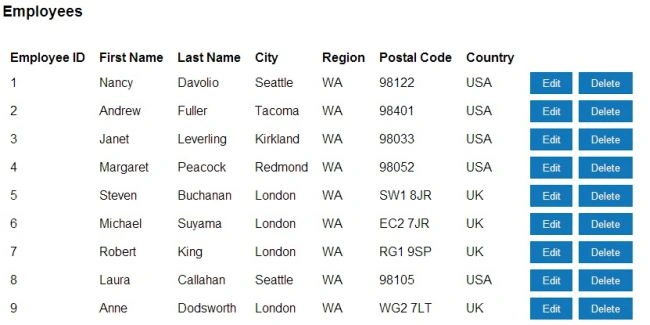
This article explains how to get started with Knockout and how to display data using Knockout MVC 4.
Intro: Knockout is a JavaScript library that helps you to create rich, responsive displays and editor user interfaces with a clean underlying data model. Read more here http://knockoutjs.com/.
Getting Started: First of all create a new ASP.NET MVC 4 Application and select the basic template and Razor View Engine.
Now work on the model. Create a new class in models.
Employee.cs
public class Employee
{
public int EmployeeID { get; set; }
public string LastName { get; set; }
public string FirstName { get; set; }
public string City { get; set; }
public string Region { get; set; }
public string PostalCode { get; set; }
public string Country { get; set; }
}
EmployeeRepository.cs
public class EmployeeRepository : KnockoutSample.Models.IEmployeeRepository
{
private List<Employee> employeeList = new List<Employee>();
private int _nextId = 1;
public EmployeeRepository()
{
// Add employees records to display
Add(new Employee { EmployeeID = 1, FirstName = "Nancy", LastName = "Davolio", City = "Seattle", Region = "WA", PostalCode = "98122", Country = "USA" });
Add(new Employee { EmployeeID = 2, FirstName = "Andrew", LastName = "Fuller", City = "Tacoma", Region = "WA", PostalCode = "98401", Country = "USA" });
Add(new Employee { EmployeeID = 3, FirstName = "Janet", LastName = "Leverling", City = "Kirkland", Region = "WA", PostalCode = "98033", Country = "USA" });
Add(new Employee { EmployeeID = 4, FirstName = "Margaret", LastName = "Peacock", City = "Redmond", Region = "WA", PostalCode = "98052", Country = "USA" });
Add(new Employee { EmployeeID = 5, FirstName = "Steven", LastName = "Buchanan", City = "London", Region = "WA", PostalCode = "SW1 8JR", Country = "UK" });
Add(new Employee { EmployeeID = 6, FirstName = "Michael", LastName = "Suyama", City = "London", Region = "WA", PostalCode = "EC2 7JR", Country = "UK" });
Add(new Employee { EmployeeID = 7, FirstName = "Robert", LastName = "King", City = "London", Region = "WA", PostalCode = "RG1 9SP", Country = "UK" });
Add(new Employee { EmployeeID = 8, FirstName = "Laura", LastName = "Callahan", City = "Seattle", Region = "WA", PostalCode = "98105", Country = "USA" });
Add(new Employee { EmployeeID = 9, FirstName = "Anne", LastName = "Dodsworth", City = "London", Region = "WA", PostalCode = "WG2 7LT", Country = "UK" });
}
public IEnumerable<Employee> GetAll()
{
// Code to get the list of all the records in database
return employeeList;
}
}
IEmployeeRepository.cs
interface IEmployeeRepository
{
System.Collections.Generic.IEnumerable<Employee> GetAll();
}
Now add a new controller in the controller folder.
using KnockoutSample.Models;
namespace KnockoutSample.Controllers
{
public class EmployeeController : Controller
{
static readonly IEmployeeRepository repository = new EmployeeRepository();
//
// GET: /Employee/
public ActionResult Employee()
{
return View();
}
//
// GET: /Employees/
public JsonResult GetAllEmployees()
{
return Json(repository.GetAll(), JsonRequestBehavior.AllowGet);
}
}
}
Now add a new view and add the following scripts.
<script src="~/Scripts/jquery-1.8.2.min.js"></script>
<script src="~/Scripts/knockout-2.2.0.js"></script>
<script src='@Url.Content("~/Scripts/knockout-2.2.0.debug.js")' type="text/javascript"></script>
Zeeshan AzimPosted Mar 14, 2016, 2:52 AM
@Mahesh Alle: You need to check your knockout javascript references
Gowtham RajamanickamPosted Apr 25, 2015, 5:58 AM
good
Mahesh AllePosted Sep 30, 2013, 11:03 AM
I am facing some difficulty. I have done the same thing and my grid is empty. Can you tell why? Also there is error in you code and I have change you code from Add(new Employee.... to employeeList.Add(new Employee {.... Can you give me any idea?