

Xamarin uses the Keyboard class to show various virtual keyboards depending upon the user request. It contains several static properties to create various kinds of virtual keyboards. Xamarin displays the Default Keyboard, if nothing is specified.
Keyboard for Chatting
- MainPage = new ContentPage()
- {
- Content = new StackLayout()
- {
- Children =
- {
- new Entry()
- {
- Keyboard = Keyboard.Chat
- }
- }
- }
- };
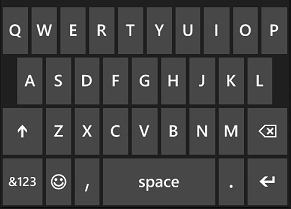
It opens up the default virtual keyboard in the device that would be convenient for chatting, having a few extra keys.
Keyboard for Email entry
- MainPage = new ContentPage()
- {
- Content = new StackLayout()
- {
- Children =
- {
- new Entry()
- {
- Keyboard = Keyboard.Email
- }
- }
- }
- };
Keyboard for Numeric input
- MainPage = new ContentPage()
- {
- Content = new StackLayout()
- {
- Children =
- {
- new Entry()
- {
- Keyboard = Keyboard.Numeric
- }
- }
- }
- };
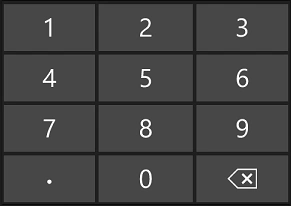
It opens the numeric virtual keyboard in the device. It assists in entering numbers and decimals in the entry field.
Keyboard for Telephone number input
- MainPage = new ContentPage()
- {
- Content = new StackLayout()
- {
- Children =
- {
- new Entry()
- {
- Keyboard = Keyboard.Telephone
- }
- }
- }
- };
This opens up the numeric virtual keyboard in the device with some additional keys like +, *, #, – and so on to help the user to enter a telephone number.
Keyboard for Text input
- MainPage = new ContentPage()
- {
- Content = new StackLayout()
- {
- Children =
- {
- new Entry()
- {
- Keyboard = Keyboard.Text
- }
- }
- }
- };
It opens a very similar keyboard as the Default one.
Keyboard for URL input
- MainPage = new ContentPage()
- {
- Content = new StackLayout()
- {
- Children =
- {
- new Entry()
- {
- Keyboard = Keyboard.Url
- }
- }
- }
- };
The keyboard opened by this method is the same as the Email one.
Keyboard to make the first letter of the sentence capitalized
- MainPage = new ContentPage()
- {
- Content = new StackLayout()
- {
- Children =
- {
- new Entry()
- {
- Keyboard = Keyboard.Create(KeyboardFlags.CapitalizeSentence)
- }
- }
- }
- };
It opens the same Default keyboard but makes the first letter of the sentence capitalized automaticly.
Keyboard for spell checking
- MainPage = new ContentPage()
- {
- Content = new StackLayout()
- {
- Children =
- {
- new Entry()
- {
- Keyboard = Keyboard.Create(KeyboardFlags.Spellcheck)
- }
- }
- }
- };
It opens the same Default keyboard but checks the spelling during typing.
Keyboard to auto suggest the word
- MainPage = new ContentPage()
- {
- Content = new StackLayout()
- {
- Children =
- {
- new Entry()
- {
- Keyboard = Keyboard.Create(KeyboardFlags.Suggestions)
- }
- }
- }
- };
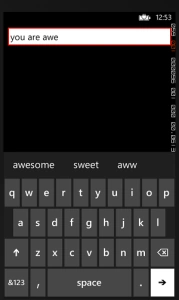
It opens the same Default keyboard but suggests the words to the user during typing.
Happy coding.
Gowtham RajamanickamPosted Mar 14, 2015, 4:39 AM
great...
Vithal WadjePosted Mar 13, 2015, 3:06 PM
great start keep it up
Gowtham RajamanickamPosted Mar 13, 2015, 1:16 AM
good...
Ganesh SarafPosted Mar 12, 2015, 7:10 AM
Correct.I have also used Xamrin.Forms