Introduction
Everybody knows that technology is changing rapidly. There are many things that we can integrate together. In this article, we are going to see, how to integrate the data table with SharePoint.
So, what is a data table?
As per Data Table’s official site definition:
“Data Table is a plug-in for the jQuery JavaScript library. It is a highly flexible tool, based upon the foundations of the progressive enhancement and will add the advanced interaction controls to any HTML table.”
Scenario
We are starting our scenario.
Before starting with this post, we must have some basic knowledge of the following:
- HTML Tables
- Rest API in SharePoint
- JavaScript Objects
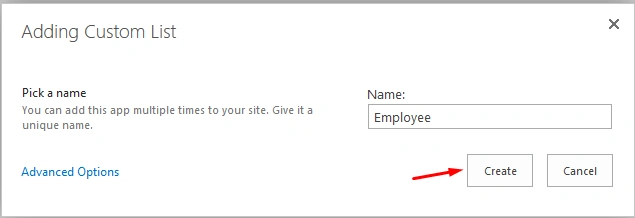
First of all, create a SharePoint list, where we are going to retrieve our data and display it in our data table. For this, go to your SPO site and create a custom list. In my case, my list name is Employee, given below:
Now, add some columns to display in our list.
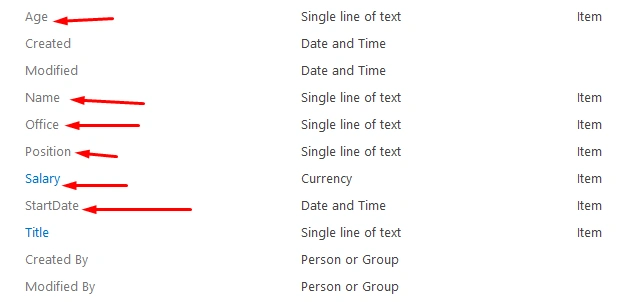
Some of the default columns are always there, when we add our custom columns to the list. Now, add some dummy data to our list, as shown below:

Note: Change the list view as per your requirement.
Now, we move to the functionality part, that suggests how we can get the data from SharePoint list. For this, we need two files; one is HTML file to render the data and another one is JS file to get the data from SharePoint list.
Go to Data Table CDN to get the required JS and CSS files.
We need to follow CDN scripts, that are required to be used in our functionality,
Now, create the HTML file in a text editor (In our case, we are using Sublime Text 3).
- <!DOCTYPE html>
- <html>
-
- <head>
- <title>WiFi Home</title>
- <script type="text/javascript" src="https://cdnjs.cloudflare.com/ajax/libs/jquery/3.0.0/jquery.min.js"></script> //External js file to get data from SharePoint List
- <script type="text/javascript" src="/SiteAssets/GetData_Wifi.js"></script>
- <link rel="stylesheet" type="text/css" href="https://cdn.datatables.net/1.10.12/css/jquery.dataTables.min.css">
- <link rel="stylesheet" type="text/css" href="https://cdnjs.cloudflare.com/ajax/libs/datatables/1.10.12/css/dataTables.jqueryui.min.css">
- <script type="text/javascript" src="https://cdn.datatables.net/1.10.12/js/jquery.dataTables.min.js"></script>
- </head>
-
- <body>
- <table id="table_id" class="display" cellspacing="0" width="100%">
- <thead>
- <tr>
- <th>Name</th>
- <th>Position</th>
- <th>Office</th>
- <th>Age</th>
- <th width="18%">Start date</th>
- <th>Salary</th>
- </tr>
- </thead>
- <tfoot> </tfoot>
- </table>
- </div>
- </body>
-
- </html>
Now, we have to create JavaScript file (GetData_Wifi.js) to get the data from SharePoint list
For this, write a function to get the data, using REST API.
- function loadMyItems() {
- var siteUrl = _spPageContextInfo.siteAbsoluteUrl;
- var oDataUrl = siteUrl + "/_api/web/lists/getbytitle('Employee')/items?$select=Name,Position,Office,Age,StartDate,Salary";
- $.ajax({
- url: oDataUrl,
- type: "GET",
- dataType: "json",
- headers: {
- "accept": "application/json;odata=verbose"
- },
- success: mySuccHandler,
- error: myErrHandler
- });
- }
Now, the next thing is how to bind this data to our view (HTML) via data table?
For this, let's put our success code in mySuccessHandler function (this is a part of asynchronous programming).
- function mySuccHandler(data) {
- try {
- var dataTableExample = $('#table_id').DataTable();
- if (dataTableExample != 'undefined') {
- dataTableExample.destroy();
- }
- dataTableExample = $('#table_id').DataTable({
- scrollY: 300,
- "aaData": data.d.results,
- "aoColumns": [{
- "mData": "Name"
- }, {
- "mData": "Position"
- }, {
- "mData": "Office"
- }, {
- "mData": "Age"
- }, {
- "mData": "StartDate",
- "render": function(mData) {
- var date = new Date(mData);
- var month = date.getMonth() + 1;
- return (month.length > 1 ? month : "0" + month) + "/" + date.getDate() + "/" + date.getFullYear();
- }
- }, {
- "mData": "Salary",
- "render": function(mData) {
- var sal = new Object(mData);
- var commaSep = mData.toString().split(".");
- commaSep[0] = commaSep[0].replace(/\B(?=(\d{3})+(?!\d))/g, ",");
- sal.rup = "<span>₹</span>";
- return ((sal.rup) + " " + commaSep.join("."));
- }
- }]
- });
- } catch (e) {
- alert(e.message);
- }
- }
-
- function myErrHandler(data, errMessage) {
- alert("Error: " + errMessage);
- }
Our final JS file will look, as follows:
- $(document).ready(function() {
- loadMyItems();
- });
-
- function loadMyItems() {
- var siteUrl = _spPageContextInfo.siteAbsoluteUrl;
- var oDataUrl = siteUrl + "/_api/web/lists/getbytitle('Employee')/items?$select=Name,Position,Office,Age,StartDate,Salary";
- $.ajax({
- url: oDataUrl,
- type: "GET",
- dataType: "json",
- headers: {
- "accept": "application/json;odata=verbose"
- },
- success: mySuccHandler,
- error: myErrHandler
- });
- }
-
- function mySuccHandler(data) {
- try {
- var dataTableExample = $('#table_id').DataTable();
- if (dataTableExample != 'undefined') {
- dataTableExample.destroy();
- }
- dataTableExample = $('#table_id').DataTable({
- scrollY: 300,
- "aaData": data.d.results,
- "aoColumns": [{
- "mData": "Name"
- }, {
- "mData": "Position"
- }, {
- "mData": "Office"
- }, {
- "mData": "Age"
- }, {
- "mData": "StartDate",
- "render": function(mData) {
- var date = new Date(mData);
- var month = date.getMonth() + 1;
- return (month.length > 1 ? month : "0" + month) + "/" + date.getDate() + "/" + date.getFullYear();
- }
- }, {
- "mData": "Salary",
- "render": function(mData) {
- var sal = new Object(mData);
- var commaSep = mData.toString().split(".");
- commaSep[0] = commaSep[0].replace(/\B(?=(\d{3})+(?!\d))/g, ",");
- sal.rup = "<span>₹</span>";
- return ((sal.rup) + " " + commaSep.join("."));
- }
- }]
- });
- } catch (e) {
- alert(e.message);
- }
- }
-
- function myErrHandler(data, errCode, errMessage) {
- alert("Error: " + errMessage);
- }
Now, move to SharePoint part. First, upload the above JavaScript and HTML file to Site Assets library of SharePoint or whatever library you want.
Create a Webpart Page (Named DataTable) and store it in the pages or the site pages library.
Add a content editor to DataTable Page. Now, give HTML file reference to the content editor into Content Editor.
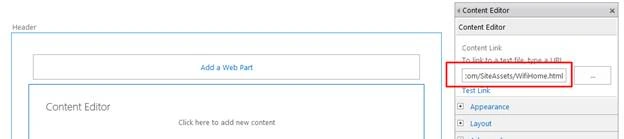
Click OK and save the page.
Now, our final output is shown below:
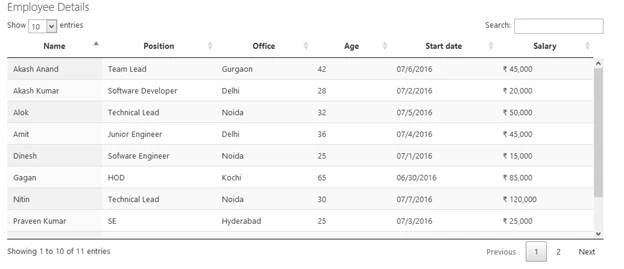
It’s Cool!
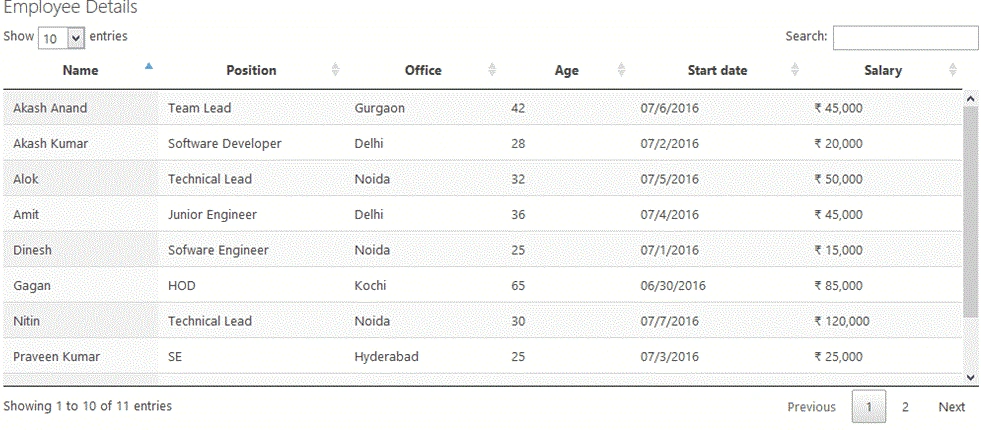
Now, play with the UI, provided by the data table plugin.
Conclusion: Thus, in this way, we see how we can work with DataTables and SharePoint together.
Did I miss anything that you may think is required? Maybe this is useful for someone. I hope you like it. Please share your valuable suggestions and feedback.


sujaa pasamPosted Mar 29, 2019, 2:13 PM
Hi Vipin, If i need to display value in TD.. can use id for the td and use this var dataTableExample = $('#table_id').DataTable(); ??? to continue??
Rajkiran SwainPosted Dec 16, 2018, 1:19 PM
Getting error "Cannot set property 'nTf' of undefined" in 1st time ,
akshay patilPosted Sep 28, 2018, 3:19 AM
How to add export [excel,PDF] buttons on it .
Aditya KulkarniPosted Aug 24, 2018, 5:10 PM
Hello, How can I use this for a Picture field?
Sahadev PatroPosted Jul 16, 2018, 1:44 AM
Hello. I have used the same code. However, sometime (when I do ctrl+f5 to refresh the content) it says 'DataTable() is not a function'. And sometimes it is working fine. Can anyone please help me in this?
Pratik HajarePosted Jun 27, 2018, 1:17 AM
How can we show itemContexMenu and Ribbon for this table ?
Shail SPosted Jun 21, 2018, 6:23 AM
I am passing a people field in the following rest api url- /_api/web/lists/getbytitle('LeaveRequest')/items?$select=StartDate,EndDate,HalfDay,LeaveType,Approver/Title,ReasonForLeave,ApproverComments,RequestDays,ApprovalStatus&$expand=Approver. But no data is getting displayed in the datatable. Please help..
Daniel GashawPosted May 10, 2018, 10:38 PM
Var table = $('#example').DataTable({ "filter": true, "bDestroy": true, "bProcessing": true, "aaData": data.d.results, "aoColumns": [ { "mData": "ID" }, { "mData": "Title" },{ "mData": "lookupfield" },]
Daniel GashawPosted May 10, 2018, 10:37 PM
How can we refer to LookUp field value in DtatTables {"mData": "LookUp field value"}
vishnu jalagamPosted Apr 4, 2018, 5:23 PM
Hi, By default It's getting sorted by first column , is there any way can we avoid it ??
Mahmoud AlgoulPosted Jan 16, 2018, 1:36 AM
Hi I have solved Link with Query String issue as following: {"mData": "Title","mRender": function ( data, type, row ) {return '<a href=LinkPage.aspx?ID='+row.Id+'&Source=IfNeeded>'+data+'</a>';} },
Mahmoud AlgoulPosted Jan 10, 2018, 5:57 AM
Hi, how to add a link to a column.
Kukdai DPosted Dec 11, 2017, 1:33 PM
Hey i am trying to do the similar thing. In one column i have to put a data from another column how do i do that. let's say i have a Title and i need to build a link in that title that goes to the item. I am trying to get the id from the ID column and put it there but nothing i have tried worked so far how do you do that. here is my code **************************** dataTableExample = $('#tbl_jad').DataTable({ "aaData": data.d.results, "aoColumns": [ { "mData": "ID" }, { "mData": "Title", "render":function(mData){ var a = '<a href=/Library/Forms/DispForm.aspx?ID='+data.d.results["ID"].Id+'>'+mData+'</a>'; return a; } }] });
Sharon APosted Dec 7, 2017, 4:58 PM
Can I get data from 2 sources (SharePoint List) and combine them? I'm trying to create an in/out board. First data (main) is staff directory that includes their regular schedule, then another list (Absence Request). If staff A is out today (based on the absence request), the dataTable should indicate staff is out, otherwise, it should indicate IN and staff's regular schedule? Thanks for sharing.
Madhan ThuraiPosted Sep 27, 2017, 2:13 AM
Can i get this with edit,update,new options??
Zento MumPosted Sep 14, 2017, 2:38 PM
Hi.... How we can add dropdown filter in header in above example?
Neha GuptaPosted Sep 1, 2017, 4:37 AM
Awesome man! finally it worked. I am new to sharepoint and trying to pull data from last 3 days but unable to do so..finally your code helped me. some points i need to understand like "aaData": data.d.results, "aoColumns": [{ wat it means?
Aluri BalahariPosted Jun 21, 2017, 7:51 AM
Hii am using same script in my project ,but I am getting error "Error:Not found"
Prasetya WibawaPosted May 28, 2017, 9:39 PM
Hello i got this error " Requested for unknown parameter 0 for row 0, column 0". What is the cause of the error ?
Arshad KhanPosted May 13, 2017, 5:02 AM
I tried to implement and its working ..But I am getting only 100 item on page out of 132 items from share point list..
Vinodh NarayananPosted Sep 28, 2016, 12:56 AM
Good one
Vignesh ManiPosted Jul 8, 2016, 8:21 AM
Nice one
Shobana JPosted Jul 8, 2016, 4:20 AM
Good one
RajaPosted Jul 8, 2016, 2:15 AM
Good One...
kalu singh raoPosted Jul 8, 2016, 1:15 AM
Nice...