

As you all know, nowadays comments are part of a blog. We stored data in the database or XML file in the past. It is a big headache to handle the data maintenance and storage space, which is costly. To overcome this, we have an option in Disqus. It is a most trusted comments plugin and easy to use even without sound knowledge in the programming.
Background
Disqus is a blog comment hosting service that offers a platform for social integration, social networking, user profiles, analytics, mobile commenting and so on. It was founded in 2007 by Daniel Ha and Jason Yan as a Y Combinator startup. It’s simple and one can quickly learn and even non-techies can learn it. It is directly integrated with the most popular services like WordPress, Tumblr, Squarespace and so on.
Setting up Disqus Environment
First, we have to register an account and to log into the forum. If we can setup up Disqus on a new site with entering the site name, then one needs to choose unique Disqus URL, a category, and then click Next button.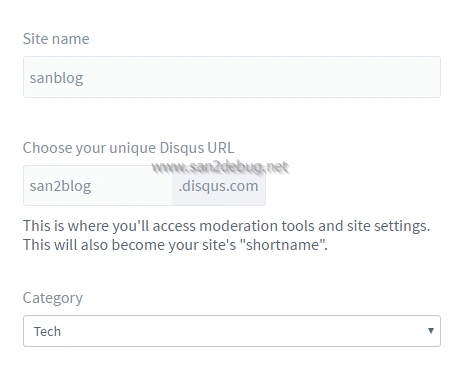
Once you have successfully created your own site on Disqus, you can choose your platform like “Universal Code”, as shown below in the screenshots:

If we select a universal code option, then you can learn the setup instructions for the universal code in the following steps:
Step 1
We can add the code, given below, where you’d like Disqus to load.
- <div id="disqus_thread"></div>
- <script>
- /**
- * RECOMMENDED CONFIGURATION VARIABLES: EDIT AND UNCOMMENT THE SECTION BELOW TO INSERT DYNAMIC VALUES FROM YOUR PLATFORM OR CMS.
- * LEARN WHY DEFINING THESE VARIABLES IS IMPORTANT: https://disqus.com/admin/universalcode/#configuration-variables
- */
- /*
- var disqus_config = function () {
- this.page.url = PAGE_URL; // Replace PAGE_URL with your page's canonical URL variable
- this.page.identifier = PAGE_IDENTIFIER; // Replace PAGE_IDENTIFIER with your page's unique identifier variable
- };
- */
- (function() { // DON'T EDIT BELOW THIS LINE
- var d = document, s = d.createElement('script');
- s.src = '//san2blog.disqus.com/embed.js';
- s.setAttribute('data-timestamp', +new Date());
- (d.head || d.body).appendChild(s);
- })();
- </script>
- <noscript>Please enable JavaScript to view the <a href="https://disqus.com/?ref_noscript" rel="nofollow">comments powered by Disqus.</a></noscript>
We are able to edit the recommended configuration variables section, using CMS or the platform’s dynamic values. You may want to learn why defining an identifier and a URL is important to prevent the duplicate threads.
How to display comment count
We can add the code, given below, before your site’s closing </body> tag
- <a href="http://example.com/bar.html#disqus_thread">Link</a>.
How to integrate the Disqus with Sample MVC Application
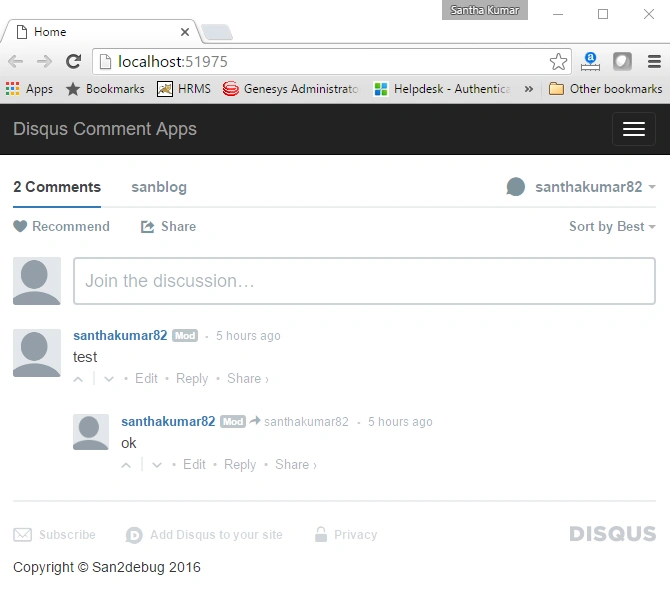
We are going to discuss how to integrate the Disqus commenting plugin with the sample Application and show the demo in MVC. We will see the step by step guidelines for the sample Application creation here.
Step 1
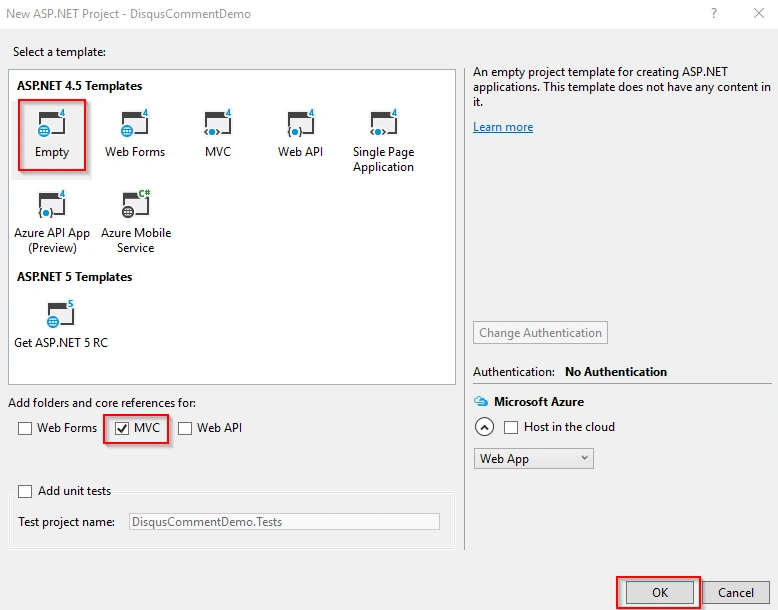
Open Visual Studio 2015, go to file menu, point to new and then click new project. New ASP.NET project window will open, you can select an ASP.NET Web Application and type Project Name DisqusCommentDemo. Choose the project location path and then click on the OK button.
A new ASP.NET project window will open, you can select an empty template and select an MVC folder with no authentication and then click OK button.
How to add Layout and ViewStart page,
Go to View folder, right click the View folder and point tto Add, followed by clicking the New Folder. Now, you can change new folder name as “Shared” folder.
Go to the shared folder and right click the shared folder and point Add, followed by clicking the MVC 5 Layout page. You can type the item name as _Layout and click OK button.
Go to View folder, right click the View folder, point Add, followed by clicking the Add View. You can type the view name as _ViewStart Template as leave it empty and click Add button.
Similarly, you can add HomeController.cs under the Controller folder and Index.cshtml under the View, inside a home folder.
Sami BaderPosted Jul 2, 2020, 1:42 AM
Great article
Boopathi SakthiPosted Aug 29, 2019, 1:39 AM
But it is pricing
Santhakumar MunuswamyPosted Jul 8, 2016, 9:26 AM
Thank you shobana
Shobana JPosted Jul 8, 2016, 4:26 AM
Nice share sir
Munesh SharmaPosted Jun 10, 2016, 1:05 AM
nice
Vignesh ManiPosted Jun 9, 2016, 5:18 AM
Good one Bro
Manish Kumar ChoudharyPosted Jun 8, 2016, 6:28 AM
Nice one
NitinPosted Jun 8, 2016, 3:28 AM
Excellent
Jayant TripathyPosted Jun 7, 2016, 11:36 PM
Thanks for sharing.