

Introduction
In my previous article, we have discussed the HTML in detail. In this article, we will learn the basics of CSS - Cascading Stylesheet with an example and coding. Apart from these, many other facts are discussed about CSS, which will help to build a professional Web application with Django Framework in Python.
CSS stands for Cascading Style Sheet
CSS describes how HTML elements are displayed on a page.
Styling can be affecting many things -- colors, fonts, sizes, borders, and many more properties of HTML.
While you can define styling inside of an HTML file, it is much more common to separate .css file and then link it to HTML file.
The basic syntax of a CSS is,
Syntax
selected tag{
property: value;
}
Example
h1{
color:blue;
}
Different ways to apply colors in CSS
- Using a color name like Blue, Green, Purple, Pink, etc, we can apply color in the CSS file.
- A developer can use the color name or HTML RGB color code or HEX code.
eg. #085401 is the green shade, which will define the red, green and blue colors
- Using F, C, B, E, and 0-zero are the different shades that will help to mix colors and create a color combination.
eg. #FF00FF is the Magenta color.
- One more, rgba (red, green, blue, alpha) defines the transparent and opaque in the form of 0 and 1 respectively. The alpha value is between 0 and 1 only.
eg. rgba (8,84,1,0.5) it is the light green shade, from the actual dark green color.
We can try any of these options to apply color to the particular tag value.
After creating an HTML file, we have to apply the styling with the help of the CSS file.
The CSS file is linked with HTML <link> tag, where href attribute contains the value of the path of the CSS file.
Selector
The selector, in general, is used to target the HTML element that we want to style.
We can use "ids" to target a single element. We can use "classes" to target a group of elements.
We can also use a combination of the selector tags to target a certain combination of elements. (JSON Sibling)
We can use a class name with .-Dot while approaching styling class elements.
Ex.
.firstclass{
color: blue;
}
Here, "firstclass" is the div class name in the HTML file. A class can be attached to multiple elements.
We can use ids with the #-hashtag sign.
Ex.
#signleout{
color: pink;
text-decoration: line-through;
}
Here, "singleout" is the id name for another tag <p>. An id is attached to a single element.
Another very uncommon selector is *-asterisk for every element on the page. With applying this selector all the selection is overwriting and only performs the styling which is included in *.
Ex.
*{
color: black;
}
JSON Selector
A concatenation of elements performs the styling to the web page elements using arithmetic operators.
Ex.
h3 + ul {
border: 4px solid black;
}
here, <h3> is a parent tag which has <ul> tag.
Let's learn all these features in this following example:
By default, our HTML page seems like this,
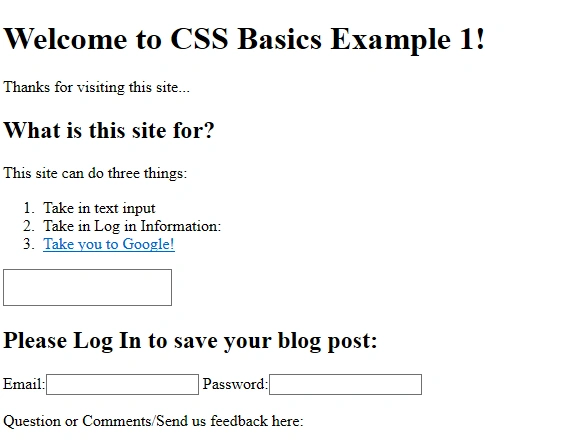
With performing different CSS basic concepts on this page it will look like this,
Check this image below,
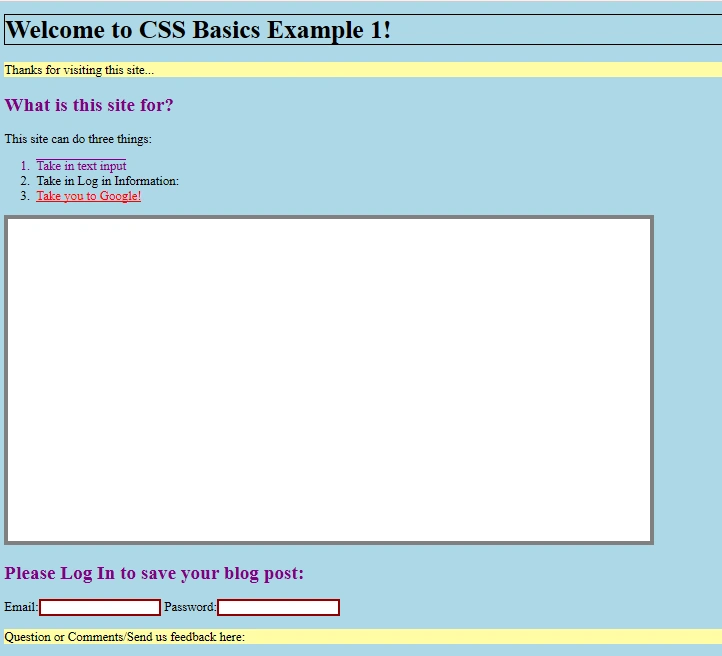
We can see there are different stylings on this page element.
We will create a normal HTML file.
Chaman GautamPosted Mar 13, 2020, 8:45 PM
Nice article