

Introduction
Xamarin is a platform to develop cross-platform and multi-platform apps (for example, Windows phone, Android, iOS).
In Xamarin platform, the code sharing concept is used. In Xamarin Studio, Visual Studio is also available.
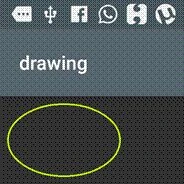
2D Graphics is called to draw the oval, circle, and line in Xamarin Android app.
Prerequisites
- Visual Studio 2015 Update 3.
The steps, mentioned below, are required to be followed in order to draw 2D graphics in Xamarin Android app, using Visual Studio 2015.
Step 1
Click File--> select New--> select Project. The project needs to be clicked after opening all the types of projects in Visual Studio or click (Ctrl+Shift+N).

Step 2
After opening the New Project, select Installed-->Templates-->Visual C#-->Android-->choose the Blank app (Android).
Now, give your Android app a name (Ex:sample) and give the path of your project. Afterwards, click OK.

Step 3
In this step, delete the Main.axml file. In this app, you do not require Main.axml file.
Now, Go to Solution Explorer-->Resource-->Layout-->Main.axml-->Right click-->Delete.
Step 4
In this step, add one Class file and it's name is MyOvealShape.cs.
Go to Solution Explorer-->Resource-->Right click-->Add-->New Item (Ctrl+shift+A).

Step 5
Now, select the class file, give the name MyOvelShape.cs and click add.

Step 6
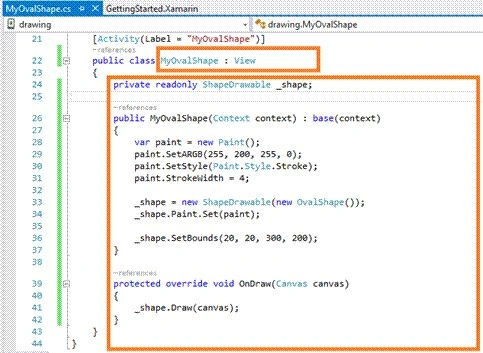
In this step, add Namespace in MyOvelShape.cs class file, as mentioned below.
MyOvalShape.cs
- using Android.Graphics;
- using Android.Graphics.Drawables;
- using Android.Graphics.Drawables.Shapes;



Konstantin FraunhoferPosted Feb 28, 2021, 1:48 PM
Thank you for the Easy tutorial.. ;-)