

Introduction
In this article we will discuss drawing features in Windows 8 Metro Style applications. Here we will discuss how to draw vector based graphics in our applications.
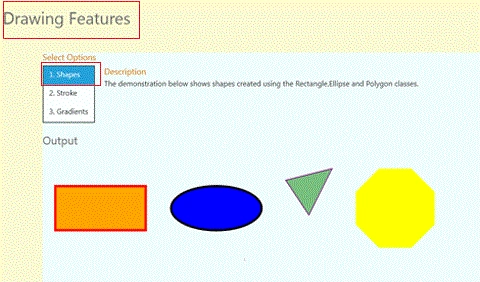
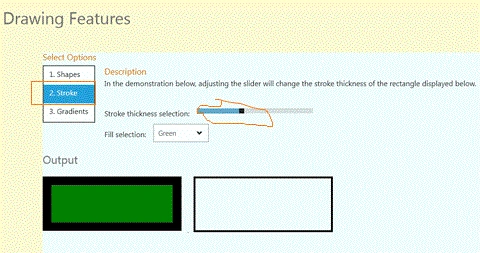
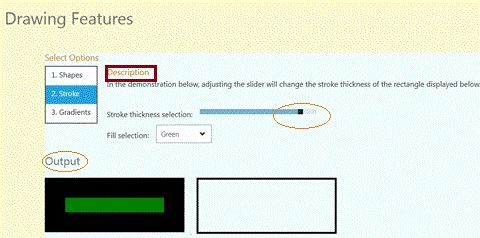
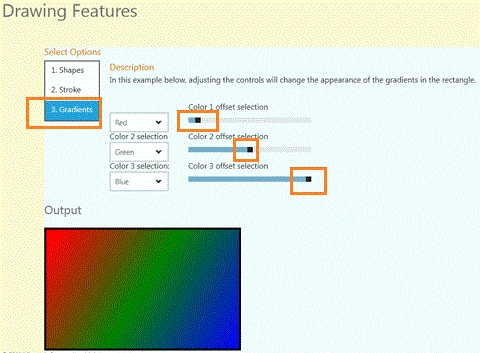
In this example we will explain different shapes of graphics, apply the strokes on a particular box, resizing accordingly and drawing gradients with different colors. We have to select an option from a given list and working with selected options. We have to set these colors with the color offset according to the choice. In the stroke option we adjust the thickness of the rectangle box and in the gradient option adjust the controls, which will change the appearance of the gradients in the rectangle. We use the different namespace.
Step 1 : First of all you have to create a new Metro Style Application; let us see the description with images of how you will create it.
- Open Visual Studio 2011
- File -> New -> Project
- Choose Template -> Visual C# -> Windows Metro Style -> Application
- Rename this Application
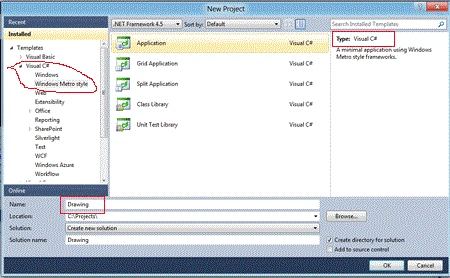
Step 2 : In the Solution Explorer there are two files that we will primarily work with; MainPage.xaml and MainPage.xaml.cs files. In the images folder add any image to the application.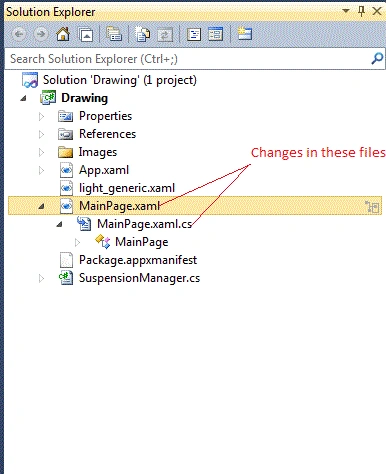
Step 3 : The MainPage.xaml file look like as below with the following code.
Code : Let us see the code which is given below.
<Grid x:Name="LayoutRoot" Background="LemonChiffon">
<!--App Orientation States-->
<VisualStateManager.VisualStateGroups>
<VisualStateGroup x:Name="OrientationStates">
<VisualState x:Name="Full"/>
<VisualState x:Name="Fill">
<Storyboard>
<ObjectAnimationUsingKeyFrames Storyboard.TargetProperty="(FrameworkElement.Margin)" Storyboard.TargetName="ContentRoot">
<DiscreteObjectKeyFrame KeyTime="0">
<DiscreteObjectKeyFrame.Value>
<Thickness>35,20,35,20</Thickness>
</DiscreteObjectKeyFrame.Value>
</DiscreteObjectKeyFrame>
</ObjectAnimationUsingKeyFrames>
<ObjectAnimationUsingKeyFrames Storyboard.TargetProperty="(StackPanel.Orientation)" Storyboard.TargetName="InputPanel">
<DiscreteObjectKeyFrame KeyTime="0">
<DiscreteObjectKeyFrame.Value>
<Orientation>Horizontal</Orientation>
</DiscreteObjectKeyFrame.Value>
</DiscreteObjectKeyFrame>
</ObjectAnimationUsingKeyFrames>
<ObjectAnimationUsingKeyFrames Storyboard.TargetProperty="(FrameworkElement.MaxWidth)" Storyboard.TargetName="Description">
<DiscreteObjectKeyFrame KeyTime="0" Value="700">
</DiscreteObjectKeyFrame>
</ObjectAnimationUsingKeyFrames>
</Storyboard>
</VisualState>
<VisualState x:Name="Portrait">
<Storyboard>
<ObjectAnimationUsingKeyFrames Storyboard.TargetProperty="(FrameworkElement.Margin)" Storyboard.TargetName="ContentRoot">
<DiscreteObjectKeyFrame KeyTime="0">
<DiscreteObjectKeyFrame.Value>
<Thickness>38,20,38,20</Thickness>
</DiscreteObjectKeyFrame.Value>
</DiscreteObjectKeyFrame>
</ObjectAnimationUsingKeyFrames>
<ObjectAnimationUsingKeyFrames Storyboard.TargetProperty="(FrameworkElement.MaxWidth)" Storyboard.TargetName="Description">
<DiscreteObjectKeyFrame KeyTime="0" Value="700">
</DiscreteObjectKeyFrame>
</ObjectAnimationUsingKeyFrames>
</Storyboard>
</VisualState>
<VisualState x:Name="Snapped">
<Storyboard>
<ObjectAnimationUsingKeyFrames Storyboard.TargetProperty="(FrameworkElement.Margin)" Storyboard.TargetName="ContentRoot">
<DiscreteObjectKeyFrame KeyTime="0">
<DiscreteObjectKeyFrame.Value>
<Thickness>20,20,20,20</Thickness>
</DiscreteObjectKeyFrame.Value>
</DiscreteObjectKeyFrame>
</ObjectAnimationUsingKeyFrames>
<ObjectAnimationUsingKeyFrames Storyboard.TargetProperty="(StackPanel.Orientation)" Storyboard.TargetName="InputPanel">
<DiscreteObjectKeyFrame KeyTime="0">
<DiscreteObjectKeyFrame.Value>
<Orientation>Vertical</Orientation>
</DiscreteObjectKeyFrame.Value>
</DiscreteObjectKeyFrame>
</ObjectAnimationUsingKeyFrames>
<ObjectAnimationUsingKeyFrames Storyboard.TargetProperty="(FrameworkElement.MaxWidth)" Storyboard.TargetName="Description">
<DiscreteObjectKeyFrame KeyTime="0" Value="250">
</DiscreteObjectKeyFrame>
</ObjectAnimationUsingKeyFrames>
<ObjectAnimationUsingKeyFrames Storyboard.TargetProperty="(FrameworkElement.Margin)" Storyboard.TargetName="LegalPanel">
<DiscreteObjectKeyFrame KeyTime="0">
<DiscreteObjectKeyFrame.Value>
<Thickness>0,0,10,0</Thickness>
</DiscreteObjectKeyFrame.Value>
</DiscreteObjectKeyFrame>
</ObjectAnimationUsingKeyFrames>
</Storyboard>
</VisualState>
</VisualStateGroup>
</VisualStateManager.VisualStateGroups>
Join the conversation! Your thoughts help the community grow.