

Introduction
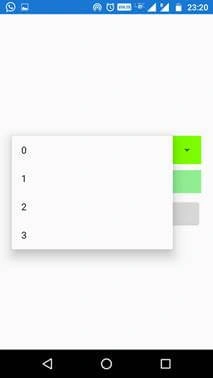
In this article, we will learn how to create a DropDown in Xamarin.Forms. By default, Android Platform has a dropdown called “Spinner”, but iOS Platform has no dropdowns like Android Spinner. In Xamarin.Forms, we have a control called Picker and we all have heard about this. We are going to create a custom dropdown to achieve control like Android Spinner in Xamarin.Forms.
Dropdown in Xamarin.Forms
As per the introduction, we already have a dropdown control called “Spinner” in Android Platform. Basically, Xamarin.Forms control is a wrapper to platform-specific controls. For example, Xamarin.Forms Entry is a wrapper of EditText in Android and UITextField in iOS.
We will go for View Renderer approach to have a new control to wrap a platform-specific control. Click the below link to know more about View Renderer.
Reference
https://docs.microsoft.com/en-us/xamarin/xamarin-forms/app-fundamentals/custom-renderer/view
Without much introduction, we will skip into the coding part of this article.
Coding Part
Here, I will explain the steps to create a DropDown in Xamarin.Forms.
- Step 1: Creating a new Xamarin.Forms Projects.
- Step 2: Creating a Dropdown view in Xamarin.Forms .NET Standard Project
- Step 3: Wrapping Spinner for Dropdown control in Android project.
- Step 4: Implementation of the dropdown and its demo for Android platform.
Step 1 - Creating a new Xamarin.Forms Project
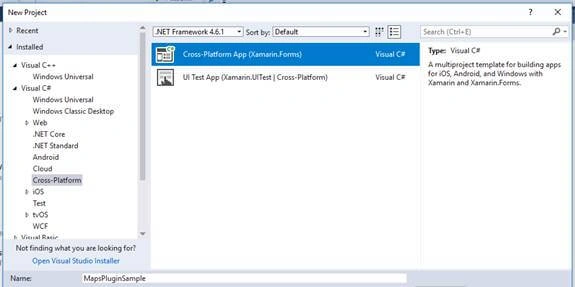
Create a new project by selecting New >> Project >> Xamarin Cross-Platform App and click OK.
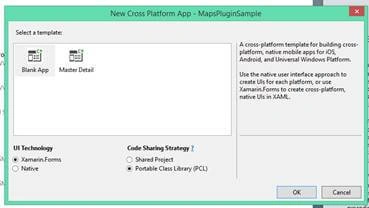
Select Android and iOS Platforms, as shown below with Code Sharing Strategy as PCL or .NET Standard and click OK.
Step 2 - Creating a Dropdown View in Xamarin.Forms .NET Standard Project
In this step, we will see how to create a dropdown view with the required properties.
- Create a class named “Dropdown” and inherit the Dropdown with “View”. That means the Dropdown is the child of View.
- public class Dropdown : View
- {
- //...
- }
- Then, we will create the required bindable properties. First, we will see what are all the properties and events required for dropdown.
- ItemsSource - To assign the list of data to be populated in the dropdown.
- SelectedIndex - To identify the index of selected values from the ItemsSource.
- ItemSelected - Event for performing an action when the item selected in the dropdown.
- Create a bindable property for the ItemsSource as shown in below.
- public static readonly BindableProperty ItemsSourceProperty = BindableProperty.Create(
- propertyName: nameof(ItemsSource),
- returnType: typeof(List<string>),
- declaringType: typeof(List<string>),
- defaultValue: null);
- public List<string> ItemsSource
- {
- get { return (List<string>)GetValue(ItemsSourceProperty); }
- set { SetValue(ItemsSourceProperty, value); }
- }
- Create a bindable property for the SelectedIndex, as shown below.
- public static readonly BindableProperty SelectedIndexProperty = BindableProperty.Create(
- propertyName: nameof(SelectedIndex),
- returnType: typeof(int),
- declaringType: typeof(int),
- defaultValue: -1);
- public int SelectedIndex
- {
- get { return (int)GetValue(SelectedIndexProperty); }
- set { SetValue(SelectedIndexProperty, value); }
- }
- Create a custom event ItemSelected for dropdown control and invoke the event, as shown below.
- public event EventHandler<ItemSelectedEventArgs> ItemSelected;
- public void OnItemSelected(int pos)
- {
- ItemSelected?.Invoke(this, new ItemSelectedEventArgs() { SelectedIndex = pos });
- }
- Here, ItemSelectedEventArgs is a child of EventArgs, as shown below.
- public class ItemSelectedEventArgs : EventArgs
- {
- public int SelectedIndex { get; set; }
- }
Full Code of Dropdown View
Here, we will see the full code for dropdown view.
- namespace XF.Ctrls
- {
- public class Dropdown : View
- {
- public static readonly BindableProperty ItemsSourceProperty = BindableProperty.Create(
- propertyName: nameof(ItemsSource),
- returnType: typeof(List<string>),
- declaringType: typeof(List<string>),
- defaultValue: null);
- public List<string> ItemsSource
- {
- get { return (List<string>)GetValue(ItemsSourceProperty); }
- set { SetValue(ItemsSourceProperty, value); }
- }
- public static readonly BindableProperty SelectedIndexProperty = BindableProperty.Create(
- propertyName: nameof(SelectedIndex),
- returnType: typeof(int),
- declaringType: typeof(int),
- defaultValue: -1);
- public int SelectedIndex
- {
- get { return (int)GetValue(SelectedIndexProperty); }
- set { SetValue(SelectedIndexProperty, value); }
- }
- public event EventHandler<ItemSelectedEventArgs> ItemSelected;
- public void OnItemSelected(int pos)
- {
- ItemSelected?.Invoke(this, new ItemSelectedEventArgs() { SelectedIndex = pos });
- }
- }
- public class ItemSelectedEventArgs : EventArgs
- {
- public int SelectedIndex { get; set; }
- }
- }
Step 3 - Wrapping Spinner for Dropdown control in Android Project
In this step, we will see how to wrap the Android Spinner Control for Dropdown View.
- Create a class file named as “DropdownRenderer” in your Android client project and add a View Renderer.
- public class DropdownRenderer : ViewRenderer<Dropdown, Spinner>
- {
- Spinner spinner;
- public DropdownRenderer(Context context) : base(context)
- {
- }
- // ...
- }
- Then, override the methods “OnElementChanged” and “OnElementPropertyChanged”. OnElementChanged method is triggered on element/control initiation. OnElementPropertyChanged method is called when the element property changes.
- Set Native Control to ViewRenderer using SetNativeControl() method in OnElementChanged override method as shown in below.
- protected override void OnElementChanged(ElementChangedEventArgs<Dropdown> e)
- {
- base.OnElementChanged(e);
- if (Control == null)
- {
- spinner = new Spinner(Context);
- SetNativeControl(spinner);
- }
- //...
- }
Chan HongPosted Oct 16, 2021, 1:54 PM
Hi, this is a great dropdown. Any update for IOS part? It would be great if ios support this too.
Steve FramePosted Oct 2, 2021, 10:24 AM
I also have the dropdown namespace issue. Instead of putting the code in the Page cs, it's with other code in the viewmodel. The XML renders fine, the namespaces are included, the page has a binding context to the Model, and was working fine. I have added two dropdowns, one call categories_dropdown and subcategories_dropdown. this are the x:Name values on the XML dropdown fields, but there doesn't seem to be anything binding them to viewmodel and will not show under context. Also, I need it to refresh after selection as the second dropdown is to populate after the first is selected. I have that all set up, but the context issue is stopping me.
Carlos León VeraPosted Aug 11, 2020, 12:57 PM
Hi, i have an issue in my xaml controller: The name 'dropdown' does not exist in the current contex, any idea to resolve it?
Rander LealPosted Apr 3, 2020, 10:26 AM
Hello! Excelent document ! Is possible implement font atributtes in list? Like color, bold...
vasanth PPosted Mar 24, 2020, 6:58 AM
Nice article Mr Mushtaq M A i need support how to give dynamic data?
Elayaraj PPosted Jul 9, 2019, 11:32 PM
Nice article Mr Mushtaq M A good job but i need iOS custom renderer also.