

Introduction
This article explains how to create a drop-down list, in other words, the select element of HTML in the ASP.Net MVC application. We create a subject list that will be shown in a dropdown list. So let's start.
Step 1. Right-click on the Model folder in Solution Explorer, then click on "Add New Item."
We get an Add New Item Window. Select "Class" and give a class name, like SubjectModel.cs, then click on the "Add" button.

The Model SubjectModel.cs class has a SubjectList property of List type and a constructor that initializes SubjectList so that a SelectListItem can be added to it.
using System.Collections.Generic;
using System.ComponentModel;
using System.Web.Mvc;

namespace MvcApplication.Models
{
    public class SubjectModel
    {
        public SubjectModel()
        {
            SubjectList = new List<SelectListItem>();
        }

        [DisplayName("Subjects")]
        public List<SelectListItem> SubjectList { get; set; }
    }
}
Step 2. Create a Controller (HomeController.cs) and define the action "result(Index())" in it. This action creates a list of subjects and passes it to the view.
using System.Web.Mvc;
using MvcApplication.Models;
using System.Collections.Generic;
namespace MvcApplication.Controllers
{
    public class HomeController : Controller
    {
        public ActionResult Index()
        {
            SubjectModel model = new SubjectModel();
            model.SubjectList.Add(new SelectListItem { Text = "Physics", Value = "1" });
            model.SubjectList.Add(new SelectListItem { Text = "Chemistry", Value = "2" });
            model.SubjectList.Add(new SelectListItem { Text = "Mathematics", Value = "3" });
            return View(model);
        }
    }
}
Step 3. Create a View (Index.aspx) that has a label and dropdown list. Our Index.aspx view design is.
<%@ Page Language="C#" Inherits="System.Web.Mvc.ViewPage<MvcApplication.Models.SubjectModel>" %>

<!DOCTYPE html PUBLIC "-//W3C//DTD XHTML 1.0 Transitional//EN" "http://www.w3.org/TR/xhtml1/DTD/xhtml1-transitional.dtd">

<html xmlns="http://www.w3.org/1999/xhtml">
<head runat="server">
    <title>Index</title>
</head>
<body>
    <%: Html.LabelFor(model => model.SubjectList) %>
    <%: Html.DropDownListFor(model => model.SubjectList, Model.SubjectList) %>
</body>
</html>
Now we take a look at the view code.
<%@ Page Language="C#" Inherits="System.Web.Mvc.ViewPage<MvcApplication.Models.SubjectModel>" %>
This line of code means the Page directory inherits the model SubjectModel on the view, so we can access data on the view through the model.
<%: Html.LabelFor(model=> model.SubjectList) %>
In this line, we are using the HTML Helper LabelFor method to create a label. We are using the SubjectList property of SubjectModel, so it shows the DisplayName of the property. It generates the following HTML code:
<label for="SubjectList">Subjects</label>
<%: Html.DropDownListFor(model => model.SubjectList, Model.SubjectList) %>
In this line, we are using the HTML Helper DropDownListFor method to create a drop-down list, in other words, an HTML select element. We are using the property SubjectList, which contains all list items of subjects that bind to it. It generates the following HTML code.
<select id="SubjectList" name="SubjectList">
    <option value="1">Physics</option>
    <option value="2">Chemistry</option>
    <option value="3">Mathematics</option>
</select>  <option value="4">
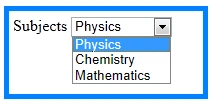
We can add "Select" as the first element in the dropdown list by passing "Select" as a parameter in the "DropDownListFor()" method of HTML Helper.
<%: Html.DropDownListFor(model => model.SubjectList, Model.SubjectList,"--Select--")%>

emy mathPosted Apr 9, 2020, 10:22 PM
Help i get this error "System.InvalidOperationException: 'There is no ViewData item of type 'IEnumerable<SelectListItem>' that has the key "
Jerry AguilarPosted Apr 9, 2020, 11:57 AM
How to use that value with C#? I mean how to set this value to a variable for further use on a button click event that fires a C# Function call?
Steve PattanodomPosted Apr 8, 2020, 12:48 AM
How to do Selected in your code?
Rishabha SinghPosted May 17, 2019, 2:15 AM
I want 'city' text as a first value in drop down list whose value is 0 and if user select that it shows error message like please select a city
hamza hasnaouiPosted Mar 24, 2019, 12:02 PM
Je pense y'aura un changement a la place de la methode "add " list.Add
hamza hasnaouiPosted Mar 24, 2019, 12:01 PM
Au lieu d'ajouter un formulaire je voudrais recuper? le choix selectionn? de la (ville) et recupere tout les enregistrement de la base de donne? li? au choix et le renvoy? a la vue comment comment puis-je faire?
Nabeel HassanPosted Nov 30, 2018, 4:49 AM
Can we show image in dropdownlist
Rashed MamunPosted Sep 14, 2018, 4:12 PM
When I am trying to save data then showing an error "System.InvalidOperationException: 'There is no ViewData item of type 'IEnumerable<SelectListItem>' that has the key 'City'.'". What is the reason for that, please help.
BehdadPosted Apr 11, 2018, 1:43 AM
What about other Field like Phonenumber and MemberName in Database?
vikram sandelaPosted Mar 6, 2018, 7:06 AM
How if i wanted to give another dropdown?? please help me
MarcoPosted Dec 23, 2017, 8:37 PM
Sample Code does not include the project. Can you include it in the download?
Ankur SohalPosted Dec 7, 2017, 1:17 AM
Nice and easy to understand .