

Step 1:
Create a new ASP.Net MVC 3 application with an empty web application. While creating the project, check the radio button for "UnitTest".
Step 2:
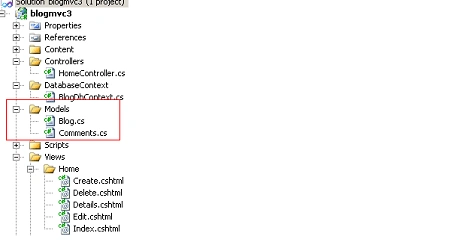
Now under the "Model" Folder create two classes.
- Blog
- Comments
Step 3:
Now In the Blog Class copy the following code:
public class Blog
{
[Key]
public int BlogId { get; set; }
[Required(ErrorMessage = "BlogName is required")]
public string BlogName { get; set; }
[Required(ErrorMessage = "Description is required")]
[StringLength(120, ErrorMessage = "Description Name Not exceed more than 120 words")]
public string Description { get; set; }
public string Body { get; set; }
public virtual List<Comments > Comments_List { get; set; }
}
See here we did the Validation of each property. And also hold the list of comments. That means 1 blog contains many posts. So that is a one to many relationship.
The "Virtual" keyword means it will make the relationship.
Step 4:
Now in the Comments class write the following code:
public class Comments
{
[Key ]
public int CommentId { get; set; }
public string Comment { get; set; }
//[ForeignKey]
public int BlogId { get; set; }
public virtual Blog Blog { get; set; }
}
See here also we have the object reference of the "Blog" class. Before that I have used the virtual keyword.
Step 5:
Now it's time to make the entity class by which the database and the table will create.
Create the "DatabaseContext" folder under the project. After that create a class named "BlogDbContext.cs" under the folder. This class is an entity class.
Step 6:
Now add a Reference for the Entity Framework by clicking "Add New Reference" under the project.
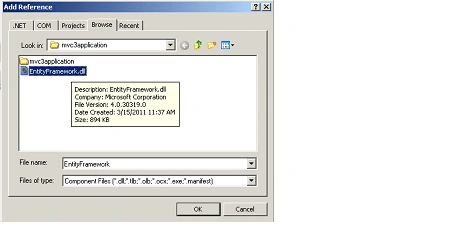
In my project I already added the reference. Without this dll the table will not be created in the database by object class mapping.
Now in the "BlogDbContext" class paste the following code:
using System;
using System.Collections.Generic;
using System.Linq;
using System.Web;
using System.Data.Entity;
using blogmvc3.Models;
namespace blogmvc3.DatabaseContext
{
public class BlogDbContext:DbContext
{
public DbSet<Blog> Blog { get; set; }
public DbSet<Comments> Comments { get; set; }
}
}
See here in the Dbset we are passing a blog class and comments class. The Dbset table will be created automatically with a relation in the database.
The Namespace "System.Data.Entity;" is very important for that.
Step 7:
Now we have to configure the "web.config" file for the connection string. The web.config file is under the Main Solution Project. Not the Project web.config file.
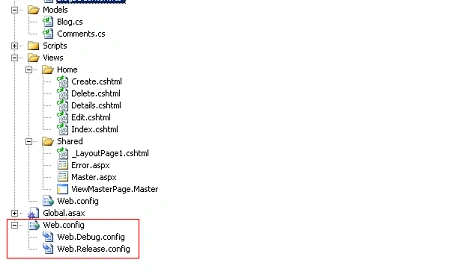
Now paste the following connection string into the web.config file.
<connectionStrings>
<add name="BlogDBContext" connectionString="data source=.;Database=Blogdb;Trusted_Connection=true;" providerName="System.Data.SqlClient" />
</connectionStrings>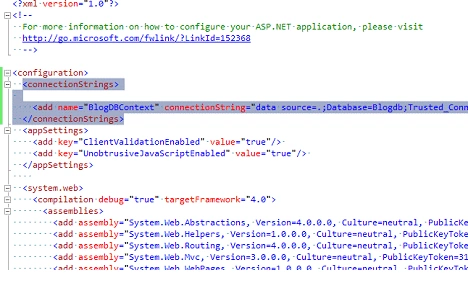
Step 8:
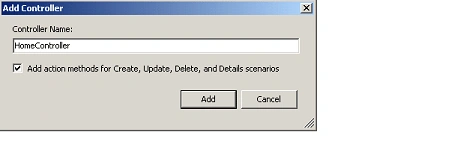
Now create a Controller Class named "HomeController" under the "ControllerFolder. After that check the
"Add action for create.update,delete.." so it will automatically create the action method in the Controller class.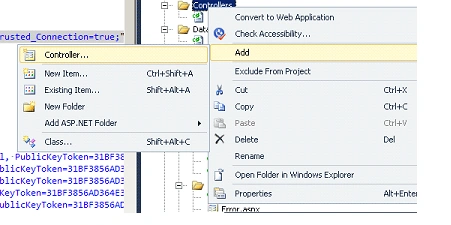
Step 9:
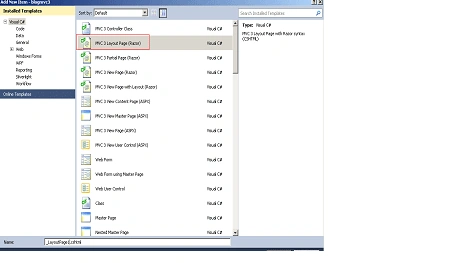
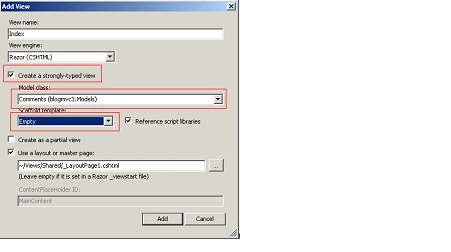
Now in the "HomeController" class first create the object of class "BlogDbContext":

Mahesh MahaaPosted Aug 4, 2014, 2:20 AM
Excellent Article\
Ganesh PatePosted Apr 2, 2014, 9:05 AM
Please add "EntityFramework.dll" externally in this rar folder. after download it was crashed.
Former membereditedPosted Oct 22, 2012, 2:18 PMEdited Dec 5, 2012, 6:53 AM
This is really nice article. While surfing i have found one link . http://dotnetpools.com/Article/ArticleDetiail/?articleId=48&title=Binding%20Dropdownlist%20In%20MVC3%20Using%20C#
Ian MyersPosted Jan 30, 2012, 12:25 AM
I download blogmvc3.rar, unzipped it, ran it, and it crashed. I tried a few times. I got this error message: Problem signature: Problem Event Name: CLR20r3 Problem Signature 01: devenv.exe Problem Signature 02: 10.0.40219.1 Problem Signature 03: 4d5f2a73 Problem Signature 04: NuGet.Console Problem Signature 05: 1.2.20325.9034 Problem Signature 06: 4d8d0777 Problem Signature 07: 131 Problem Signature 08: 23 Problem Signature 09: System.NullReferenceException OS Version: 6.1.7601.2.1.0.256.4 Locale ID: 1033 Additional information about the problem: LCID: 1033 Read our privacy statement online: http://go.microsoft.com/fwlink/?linkid=104288&clcid=0x0409 If the online privacy statement is not available, please read our privacy statement offline: C:\Windows\system32\en-US\erofflps.txt I ran it with Visual Studio 2010 Ultimate Edition and have the latest version of MVC3 installed.