

Background
I have read many forum posts regarding how to calculate duration between two dates, such as year, months, days and hours but no single post provided the proper solutions so I decided to. So let us start creating a web application as:
- "Start" - "All Programs" - "Microsoft Visual Studio 2010".
- "File" - "New WebSite" - "C#" - "Empty WebSite" (to avoid adding a master page).
- Provide the website a name such as "CalculateDuration"or another as you wish and specify the location.
- Then right-click on Solution Explorer - "Add New Item" - Add Web Form.
- Drag and drop one button and two textBoxes on the <form> section of the Default.aspx page.
- Add Ajax Calender Extender for two text boxes (optional). (If do not want to use a calendar then enter date manually.)
- Now the default.aspx Page source code will look such as follows.
- <%@ Page Language="C#" AutoEventWireup="true" CodeFile="Default.aspx.cs" Inherits="_Default" %>
- <%@ Register Assembly="AjaxControlToolkit" Namespace="AjaxControlToolkit" TagPrefix="asp" %>
- <!DOCTYPE html PUBLIC "-//W3C//DTD XHTML 1.0 Transitional//EN" "http://www.w3.org/TR/xhtml1/DTD/xhtml1-transitional.dtd">
- <html xmlns="http://www.w3.org/1999/xhtml">
- <head runat="server">
- <title></title>
- </head>
- <body style="background-color: #000080">
- <form id="form1" runat="server">
- <asp:ScriptManager ID="ScriptManager1" runat="server">
- </asp:ScriptManager>
- <table style="padding: 30px; color: White; margin-top: 30px">
- <tr>
- <td>
- From Date
- </td>
- <td>
- <asp:TextBox ID="FromYearTxt" runat="server"></asp:TextBox>
- <asp:CalendarExtender ID="FromYearTxt_CalendarExtender" runat="server" Enabled="True"
- TargetControlID="FromYearTxt" Format="dd/MM/yyyy">
- </asp:CalendarExtender>
- </td>
- <td>
- To Date
- </td>
- <td>
- <asp:TextBox ID="ToYearTxt" runat="server"></asp:TextBox>
- <asp:CalendarExtender ID="ToYearTxt_CalendarExtender" runat="server" Enabled="True"
- TargetControlID="ToYearTxt">
- </asp:CalendarExtender>
- </td>
- </tr>
- </table>
- <div style="margin-left: 180px">
- <asp:Button ID="btncalculate" runat="server" Text="Calculate" OnClick="btncalculate_Click" />
- </div>
- <table style="background-color: #0000FF; color: White; padding: 30px; margin-top: 20px;
- margin-left: 15px" id="tblResults" runat="server">
- <tr>
- <td>
- Years
- </td>
- <td id="tdYear" runat="server">
- </td>
- </tr>
- <tr>
- <td>
- Total Months
- </td>
- <td id="tdMonths" runat="server">
- </td>
- </tr>
- <tr>
- <td>
- Total Days
- </td>
- <td id="tdDays" runat="server">
- </td>
- </tr>
- <tr>
- <td>
- Total Hours
- </td>
- <td id="tdHrs" runat="server">
- </td>
- </tr>
- <tr>
- <td>
- Total Minutes
- </td>
- <td id="tdminuts" runat="server">
- </td>
- </tr>
- <tr>
- <td>
- Total Seconds
- </td>
- <td id="tdseconds" runat="server">
- </td>
- </tr>
- <tr>
- <td>
- Total MileSesonds
- </td>
- <td id="tdmileSec" runat="server">
- </td>
- </tr>
- </table>
- </form>
- </body>
- </html>
Now switch to design mode; it will look such as follows.
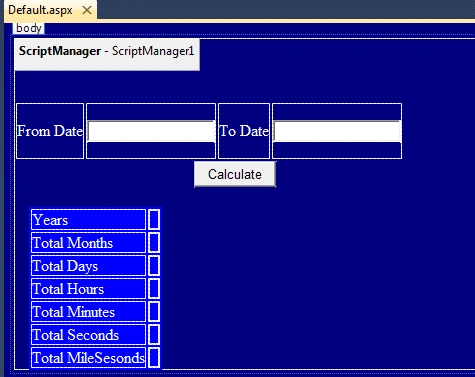
Now open the default.aspx page and add the following code in the calculate button click event.
Read two input TextBox texts and assign them to a DateTime data type variable as in the following:
- //Storing input Dates
- DateTime FromYear = Convert.ToDateTime(FromYearTxt.Text);
- DateTime ToYear = Convert.ToDateTime(ToYearTxt.Text);
- //years
- int Years = ToYear.Year - FromYear.Year;
- //months
- int month = ToYear.Month - FromYear.Month;
- //Total Months
- int TotalMonths = (Years * 12) + month;
- //Creating object of TimeSpan Class
- TimeSpan objTimeSpan = ToYear - FromYear;
- //Total Hours
- double TotalHours = objTimeSpan.TotalHours;
- //Total Minutes
- double TotalMinutes = objTimeSpan.TotalMinutes;
- //Total Seconds
- double TotalSeconds = objTimeSpan.TotalSeconds;
- //Total Mile Seconds
- double TotalMileSeconds = objTimeSpan.TotalMilliseconds;
- //Assining values to td tags
- tdYear.InnerText = Years + " Year " + month + " Months";
- tdMonths.InnerText = Convert.ToString(TotalMonths);
- tdDays.InnerText = Convert.ToString(Days);
- tdHrs.InnerText = Convert.ToString(TotalHours);
- tdminuts.InnerText = Convert.ToString(TotalMinutes);
- tdseconds.InnerText = Convert.ToString(TotalSeconds);
- tdmileSec.InnerText = Convert.ToString(TotalMileSeconds);
Now in default.aspx.cs the entire code will look such as follows:
- using System;
- using System.Collections.Generic;
- using System.Linq;
- using System.Web;
- using System.Web.UI;
- using System.Web.UI.WebControls;
- public partial class _Default : System.Web.UI.Page
- {
- protected void Page_Load(object sender, EventArgs e)
- {
- tblResults.Visible = false;
- }
- protected void btncalculate_Click(object sender, EventArgs e)
- {
- if (FromYearTxt.Text != "" && ToYearTxt.Text != "")
- {
- //Storing input Dates
- DateTime FromYear = Convert.ToDateTime(FromYearTxt.Text);
- DateTime ToYear = Convert.ToDateTime(ToYearTxt.Text);
- //Creating object of TimeSpan Class
- TimeSpan objTimeSpan = ToYear - FromYear;
- //years
- int Years = ToYear.Year - FromYear.Year;
- //months
- int month = ToYear.Month - FromYear.Month;
- //TotalDays
- double Days = Convert.ToDouble(objTimeSpan.TotalDays);
- //Total Months
- int TotalMonths = (Years * 12) + month;
- //Total Hours
- double TotalHours = objTimeSpan.TotalHours;
- //Total Minutes
- double TotalMinutes = objTimeSpan.TotalMinutes;
- //Total Seconds
- double TotalSeconds = objTimeSpan.TotalSeconds;
- //Total Mile Seconds
- double TotalMileSeconds = objTimeSpan.TotalMilliseconds;
- //Assining values to td tags
- tdYear.InnerText = Years + " Year " + month + " Months";
- tdMonths.InnerText = Convert.ToString(TotalMonths);
- tdDays.InnerText = Convert.ToString(Days);
- tdHrs.InnerText = Convert.ToString(TotalHours);
- tdminuts.InnerText = Convert.ToString(TotalMinutes);
- tdseconds.InnerText = Convert.ToString(TotalSeconds);
- tdmileSec.InnerText = Convert.ToString(TotalMileSeconds);
- tblResults.Visible = true;
- }
- }
- }
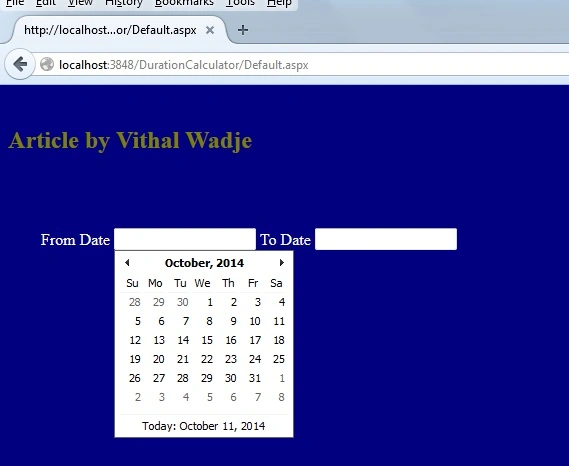
I have entered the following dates:
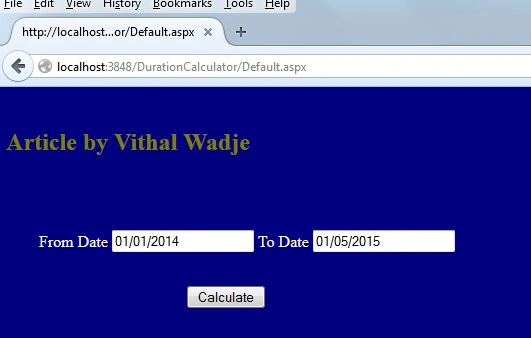
Now click on the Calculate button. It will display the following output:
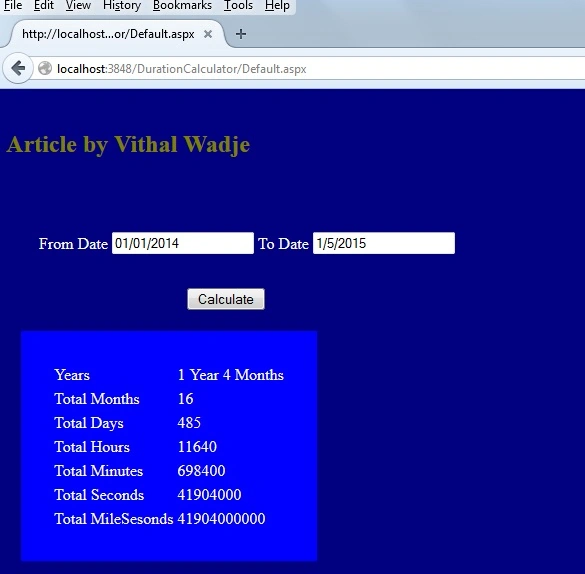
Now from all the preceding examples, we have learned how to calculate the years, months, days, minutes, seconds & milliseconds between two dates
Note:
- For detailed code please download the sample Zip file.
- Do Proper Validation such as date input values when implementing.
- Use the ScriptManager if you are using the Ajax Calender Extender that I used in the preceding demo application.
Summary
From all the examples above, we have learned how to calculate the duration between two dates. I hope this article is useful for all readers, if you have a suggestion then please contact me.
Subhasis TripathyPosted Aug 21, 2020, 8:49 AM
If i am taking date from database then it is not calculating getting error.
Jinish GandhiPosted Oct 13, 2015, 2:41 PM
String was not recognized as a valid DateTime. error..plz help me
Vithal WadjePosted Sep 9, 2015, 7:48 AM
thanks
Vinodh NarayananPosted Sep 9, 2015, 7:26 AM
good one thanks a lot u saved me today
vineeth sPosted Sep 7, 2015, 1:11 AM
it can't work while uploading..why?
Vithal WadjePosted Oct 15, 2014, 5:46 AM
add ajax control toolkit reference to ur project from ajaxcontrol toolkit website or remove that two textboxes and add new one and enter date manually
Herry JonathanPosted Oct 15, 2014, 5:15 AM
i got error when i am run the application, it says that "Element 'CalendarExtender' is not a known element. This can occur if there is a compilation error in the Web site, or the web.config file is missing". i have no idea what this is about, please need your help. i am new to ajaxcontrol kit. really appreciate for your help
Herry JonathanPosted Oct 15, 2014, 5:14 AM
i got wr