

Introduction
Windows Azure provides various cloud enabled storage services and BLOB storage is one of them. BLOB stands for "Binary Large Object" that means unstructured data that typically includes images, documents, audio, video or other multimedia objects. The main purpose for using BLOB cloud services is it has a many advantages over storing files in local file systems.
As the MSDN suggests the advantages are:
- It is highly Scalable: That is a single storage account (will be discussed later) that can store hundreds of terabytes of data and one can have multiple storage accounts.
- It is Durable: That is every file (images, documents, audio, video or other) stored, automatically has a backup.
And many more, for the time these are of more focus.
Concept Behind
Storage Account: All access to Azure Storage is done using a storage account.
Container: A container provides a grouping of a set of BLOBs. All BLOBs must be in a container. An account can contain an unlimited number of containers. A container can store an unlimited number of BLOBs.
BLOB: A file of any type and size. There are two types of BLOBs that can be stored in Azure Storage: block and page BLOBs. Most files are block BLOBs. A single block BLOB can be up to 200GB in size. This tutorial uses block BLOBs. Page BLOBs, another BLOB type, can be up to 1TB in size and are more efficient when ranges of bytes in a file are modified frequently.
Background
This article mainly focuses on the use of cloud services such as here it is Azure, checking for containers in our development storage and creating BLOBs dynamically into it and uploading files to it, since it's being used in nearly every site.
To develop Azure Cloud enabled applications, we need to install the Software Development Kit (SDK) (a software development tool required to create applications using specific software) first. The best way to get the SDK is:
- Go to the site and download the Azure SDK for Visual Studio 2013/12.
- Else go to Visual Studio and select New project -> Cloud.
Using the code
- Let's use the following procedure (I will follow with screenshots for a better understanding).
- Step 1: Navigate to Visual Studio.
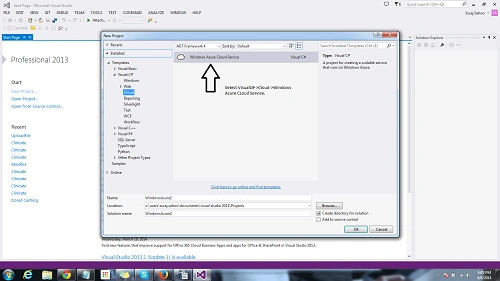
Step 2: After selecting a new project, we select Cloud and then Windows Azure Cloud Service. After clicking OK you get a popup as shown below: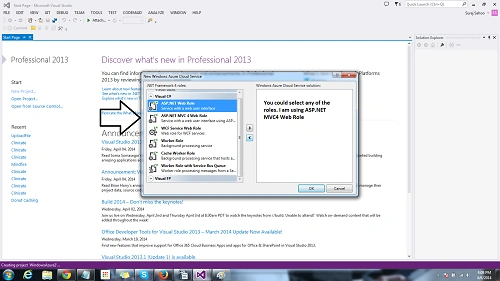
As I have said we can select any web/worker roles, but here I select the ASP.NET MVC4 Web Role.
- Step 3: Now your solution looks as in the image below.
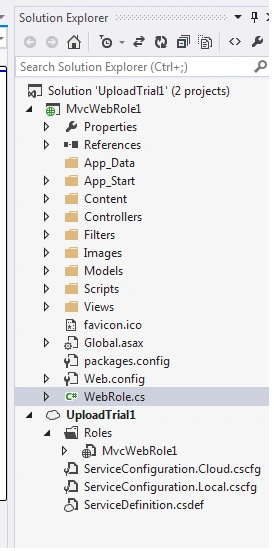
Now our architecture looks as in the preceding. Now we might notice in the MVCWebRole project there is a class WebRole.cs, this class executes before the execution of the Global.asax, we can configure what to do before the starting of the project in the OnStart() method. You can check the code provided for download.
The second project as you can see in the figure is UploadTrial1 that is basically the cloud service. It contains a Roles folder that contains MvcWebRole. When we open the file a dialog is shown that contains all the Configurations Settings required for our cloud services and even local settings. The dialog is shown below.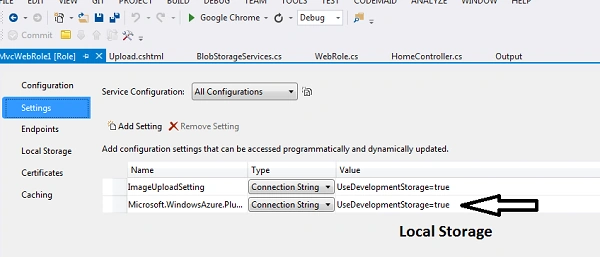
In the settings, we prescribe a setting name and then select the storage for us. "UseDevelopmentStorage=true", this directs to the local storage. You can navigate to the Server Explorer and select Windows Azure --> Development --> BLOBs. You find your container there with its contents. We can opt for manually entered credentials during deployment. Here I have chosen local storage.
We then add our Class for checking for the container BLOBs and dynamically create it. The following is the code:
Check for the namespaces correctly as the assemblies are required in the reference. Now it's time for coding our Controller (HomeController.cs), we write the code here for the Upload action method[Httpget]/[HttpPost]. The following is the code:- //namespaces used
- using Microsoft.WindowsAzure.ServiceRuntime;
- using Microsoft.WindowsAzure.Storage;
- using Microsoft.WindowsAzure.Storage.Blob;
- using System;
- using System.Collections.Generic;
- using System.Linq;
- using System.Web;
- namespace MvcWebRole1
- {
- //Container information
- public class BlobStorageServices
- {
- public CloudBlobContainer GetCloudBlobContainer()
- {
- CloudStorageAccount storageAccount = CloudStorageAccount.Parse(RoleEnvironment.GetConfigurationSettingValue("ImageUploadSetting"));//gets settings value
- CloudBlobClient blobClient = storageAccount.CreateCloudBlobClient();//activates the storage account on local
- CloudBlobContainer blobContainer = blobClient.GetContainerReference("imagesupload");
- if(blobContainer.CreateIfNotExists())
- {
- blobContainer.SetPermissions(new BlobContainerPermissions { PublicAccess = BlobContainerPublicAccessType.Blob });//Allowing public Access
- }
- return blobContainer;
- }
- }
- }
Then our work is to create/add a view to the upload action (remember to the get method). :)The following is the image that follows our view page (upload.cshtml), one thing to say is that I have used a Razor view engine here:- BlobStorageServices blobStorageServices = new BlobStorageServices();
- //Instantiate object of the class we just created.
- /// summary///
- /// Uploads this blobs.
- /// summary///
- /// <returns>Views of blobs<returns>
- public ActionResult Upload()
- {
- CloudBlobContainer blobContainer = blobStorageServices.GetCloudBlobContainer();
- List<string> blobs=new List<string>();
- foreach(var blobItem in blobContainer.ListBlobs())
- {
- blobs.Add(blobItem.Uri.ToString());//Returns all the blobs Uri in the container.
- }
- return View(blobs);//Returns to view to display all blobs.
- }
- ///summary///
- /// Uploads the specified image.
- ///
- /// <param name="image"/>The image.
- /// <returns>Redirected to Upload Action</returns>
- [HttpPost]
- public ActionResult Upload(HttpPostedFileBase image) //Accept the posted file
- {
- try
- {
- if (image.ContentLength > 0)
- {
- CloudBlobContainer blobContainer = blobStorageServices.GetCloudBlobContainer();
- CloudBlockBlob blob = blobContainer.GetBlockBlobReference(image.FileName);
- // Upload content to the blob, which will create the blob if it does not already exist.
- blob.UploadFromStream(image.InputStream);
- }
- }
- catch(Exception ex)
- {
- CloudBlobContainer blobContainer = blobStorageServices.GetCloudBlobContainer();
- CloudBlockBlob blob2 = blobContainer.GetBlockBlobReference("myfile.txt");
- blob2.UploadText(ex.ToString());
- }
- return RedirectToAction("Upload");
- }

And we are done with uploading files. One important thing you can check in the code I have written or the download of the code given is that I have implemented one thing, to upload the exception if it occurs in a ".txt" format.
Points of Interest
Web Role in Windows Azure are special purpose services and provide a dedicated IIS used for hosting web applications, we can easily add and deploy applications to a Webrole and scale as per our compatibility depending on requirements. It is basically a front-end that appears to the users.
Worker Roles are processes that can do some work as the name suggests. For example, compressing an uploaded image automatically or on the fly, any changes in the database, best is notifications that are received.
The queue contains a set of messages and those messages should be queued. The main thing is that Web Role, Worker Role and Queues are Virtual Machines run on the cloud.
Sibeesh VenuPosted May 19, 2016, 1:17 AM
Hey Buddy, that was a good read.