

In some complex scenarios developers need to create runtime GridView dynamically. So obviously developers need to create dynamic columns for dynamic gridviews. Here in this article I will explain how one can develop or implement runtime dynamically create bound column as well as template column of a GridView control and also how to bind data into the dynamically created GridView. For simplicity here I use a datatable but you can bind data from database as well. Here I also showed how developers can write dynamic event handler for dynamically created button within the template column. The output will be:
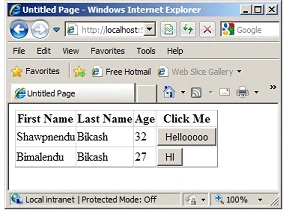
Creating bound column is easier than template column because if you want to add dynamic template column in your GridView then you must implement ITemplate interface. When you instantiate the implemented object then it will automatically call the "InstantiateIn" method. To implement my example first add a class in your project and named it "TemplateHandler". Then copy the code sample:
using System;
using System.Web.UI;
using System.Web.UI.WebControls;
public class TemplateHandler : ITemplate
{
void ITemplate.InstantiateIn(Control
container)
{
Button
cmd = new Button();
cmd.ID = "cmd";
cmd.Text = "HI";
cmd.Click += new
EventHandler(Dynamic_Method);
container.Controls.Add(cmd);
}
protected void Dynamic_Method(object
sender, EventArgs e)
{
kalu singh raoPosted Jul 13, 2016, 7:55 AM
Nice...
Ajeet MishraPosted Feb 15, 2016, 7:16 AM
nice
Ashish DhyaniPosted Jul 3, 2012, 6:38 AM
Pgs
manav jhaPosted May 19, 2012, 10:52 AM
xcellent article.!!
manav jhaPosted May 19, 2012, 10:52 AM
xcellent article.!!
B M SuchitraPosted Aug 24, 2011, 1:17 AM
Shawpnendu Bikash Maloroy , How do i update such gridview and also add new row to it?