

Introduction
MongoDB is a document database with the scalability and flexibility that you want with the querying and indexing that you need. MongoDB stores data in versatile, JSON-like documents. This means that the fields will vary from document to document and the data structure can be changed over time.
MongoDB has exceptionally good documentation. Please open this link to explore more features of MongoDB.
C# Corner also has a set of good articles on MongoDB. Please refer to these articles to get started with MongoDB.
MongoDB Atlas is a fully managed cloud database. Atlas handles all the complexity of deploying, managing, and healing your deployments on the cloud service provider of your choice (Azure, AWS, and GCP).
Currently, MongoDB Atlas supplies 512 MB free space. I have already authored an article to create a free MongoDB cluster and connect with MVC application. Please refer to this article.
In this post, we will see all the steps to connect MongoDB database with .NET 6 web application and consume this Web API in an Angular 13 application. We will use an already provisioned MongoDB Atlas cluster to create our database.
Create ASP.NET 6 Web API in Visual Studio 2022
We can open Visual Studio 2022 and choose ASP.NET Core Web API template. After choosing a valid name and directory we can choose .NET 6.0 framework.
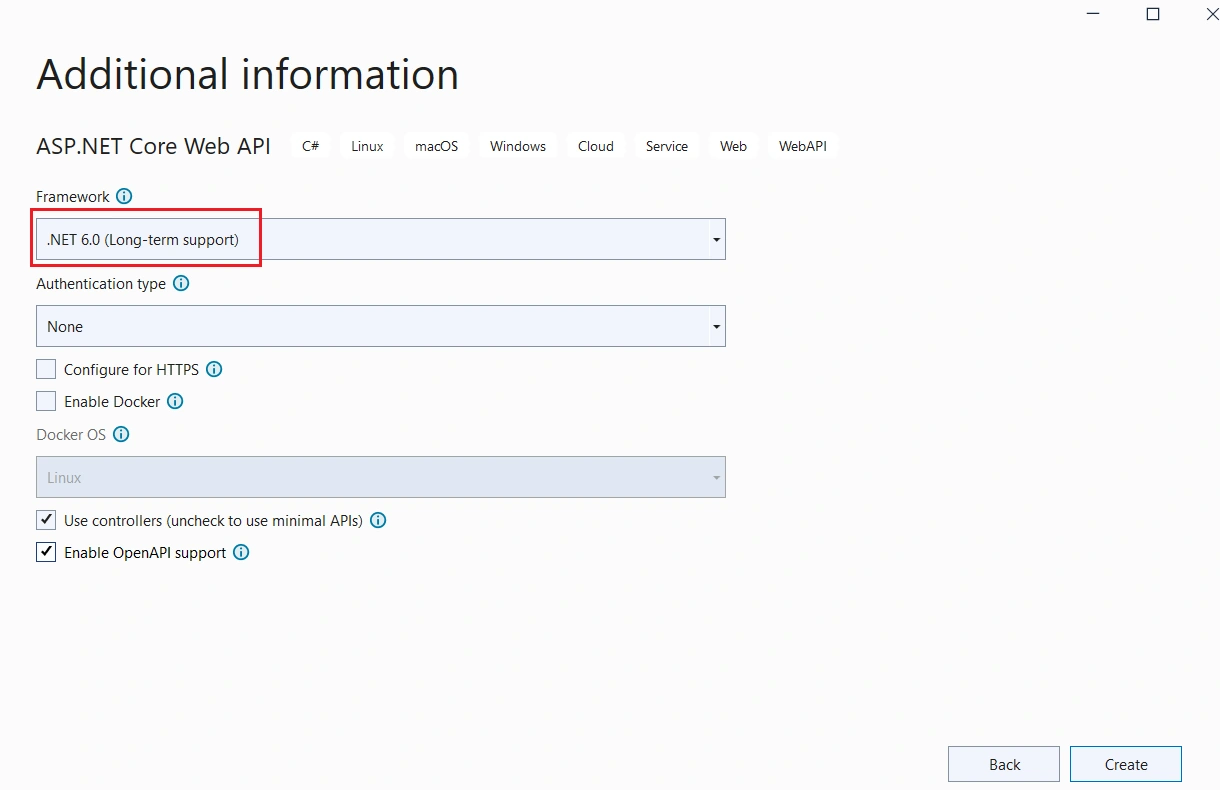
The new application will be ready in a few moments.
We can install MongoDB.Driver library using NuGet Package Manager.

Above is the official MongoDB .NET driver created by MongoDB Inc.
We can create a “Models” folder and create an Employee class inside this folder.
Employee.cs
using MongoDB.Bson;
using MongoDB.Bson.Serialization.Attributes;

namespace MongoDBDotNET6.Models
{
    public class Employee
    {
        [BsonId]
        [BsonRepresentation(BsonType.ObjectId)]
        public string? Id { get; set; }

        public string Name { get; set; } = null!;

        public string Designation { get; set; } = null!;

        public string Company { get; set; } = null!;

        public string Cityname { get; set; } = null!;

        public string Address { get; set; } = null!;
    }
}
In the above class, the Id property is:
- Required for mapping the Common Language Runtime (CLR) object to the MongoDB collection.
- Annotated with [BsonId] to make this property the document's primary key.
- Annotated with [BsonRepresentation(BsonType.ObjectId)] to allow passing the parameter as type string instead of an ObjectId structure. Mongo handles the conversion from string to ObjectId.
We can create a DatabaseSettings class inside the Models folder.
DatabaseSettings.cs
namespace MongoDBDotNET6.Models
{
    public class DatabaseSettings
    {
        public string ConnectionString { get; set; } = null!;

        public string DatabaseName { get; set; } = null!;

    }
}
The above class is used to store database connection and name inside the appsettings.json file. These connection properties will be used to set up connection between MongoDB database and .NET application.
We can add connection properties inside the appsettings.json file as well.
appsettings.json
{
  "Logging": {
    "LogLevel": {
      "Default": "Information",
      "Microsoft.AspNetCore": "Warning"
    }
  },
  "AllowedHosts": "*",
  "DatabaseSettings": {
    "ConnectionString": "mongodb+srv://<username>:<password>@sarathlal.8vuub.mongodb.net/?retryWrites=true&w=majority",
    "DatabaseName": "EmployeeDB"
  }
}
We can create an Employee service inside a new folder “Services”
EmployeeService.cs
using Microsoft.Extensions.Options;
using MongoDB.Driver;
using MongoDBDotNET6.Models;

namespace MongoDBDotNET6.Services
{
    public class EmployeeService
    {
        private readonly IMongoCollection<Employee> _employeeCollection;

        public EmployeeService(
            IOptions<DatabaseSettings> dabaseSettings)
        {
            var mongoClient = new MongoClient(dabaseSettings.Value.ConnectionString);

            var mongoDatabase = mongoClient.GetDatabase(dabaseSettings.Value.DatabaseName);

            _employeeCollection = mongoDatabase.GetCollection<Employee>("Employee");
        }

        public async Task<List<Employee>> GetAsync() =>
            await _employeeCollection.Find(_ => true).ToListAsync();

        public async Task<Employee?> GetAsync(string id) =>
            await _employeeCollection.Find(x => x.Id == id).FirstOrDefaultAsync();

        public async Task CreateAsync(Employee newEmployee) =>
            await _employeeCollection.InsertOneAsync(newEmployee);

        public async Task UpdateAsync(string id, Employee updatedEmployee) =>
            await _employeeCollection.ReplaceOneAsync(x => x.Id == id, updatedEmployee);

        public async Task RemoveAsync(string id) => await _employeeCollection.DeleteOneAsync(x => x.Id == id);
    }
}
In the above service we have implemented all the methods for CRUD operations with MongoDB database. We will use this service inside our API controller soon.
We can change the Program.cs file with the code changes below.
Program.cs
using MongoDBDotNET6.Models;
using MongoDBDotNET6.Services;

var builder = WebApplication.CreateBuilder(args);

// Add services to the container.
builder.Services.Configure<DatabaseSettings>(builder.Configuration.GetSection("DatabaseSettings"));
builder.Services.AddSingleton<EmployeeService>();

builder.Services.AddControllers();
// Learn more about configuring Swagger/OpenAPI at https://aka.ms/aspnetcore/swashbuckle
builder.Services.AddEndpointsApiExplorer();
builder.Services.AddSwaggerGen();

var MyAllowedOrigins = "_myAllowedOrigins";
builder.Services.AddCors(options =>
{
    options.AddPolicy(MyAllowedOrigins,
                          builder =>
                          {
                              builder.WithOrigins("http://localhost:4200")
                                                  .AllowAnyHeader()
                                                  .AllowAnyMethod();
                          });
});

var app = builder.Build();

// Configure the HTTP request pipeline.
if (app.Environment.IsDevelopment())
{
    app.UseSwagger();
    app.UseSwaggerUI();
}

app.UseAuthorization();

app.MapControllers();

app.UseCors(MyAllowedOrigins);

app.Run();
The above code is used to register dependency injection with appsettings.json file’s DatabaseSettings properties. Also, EmployeeService class is registered with DI to support constructor injection in consuming classes. The singleton service lifetime is most proper because EmployeeService takes a direct dependency on MongoClient.
We have also added the code for enabling CORS (Cross Origin Resource Sharing).
We can create an API controller EmployeeController inside the Controllers folder and add the code below.
EmployeeController.cs
using Microsoft.AspNetCore.Mvc;
using MongoDBDotNET6.Models;
using MongoDBDotNET6.Services;

namespace MongoDBDotNET6.Controllers
{
    [Route("api/[controller]")]
    [ApiController]
    public class EmployeeController : ControllerBase
    {
        private readonly EmployeeService _employeeService;

        public EmployeeController(EmployeeService employeeService) => _employeeService = employeeService;

        [HttpGet]
        public async Task<List<Employee>> Get() => await _employeeService.GetAsync();

        [HttpGet("{id:length(24)}")]
        public async Task<ActionResult<Employee>> Get(string id)
        {
            var employee = await _employeeService.GetAsync(id);

            if (employee is null)
            {
                return NotFound();
            }

            return employee;
        }

        [HttpPost]
        public async Task<IActionResult> Post(Employee newEmployee)
        {
            await _employeeService.CreateAsync(newEmployee);

            return NoContent();
        }

        [HttpPut("{id:length(24)}")]
        public async Task<IActionResult> Update(string id, Employee updatedEmployee)
        {
            var employee = await _employeeService.GetAsync(id);

            if (employee is null)
            {
                return NotFound();
            }

            updatedEmployee.Id = employee.Id;

            await _employeeService.UpdateAsync(id, updatedEmployee);

            return NoContent();
        }

        [HttpDelete("{id:length(24)}")]
        public async Task<IActionResult> Delete(string id)
        {
            var employee = await _employeeService.GetAsync(id);

            if (employee is null)
            {
                return NotFound();
            }

            await _employeeService.RemoveAsync(id);

            return NoContent();
        }
    }
}
We have used EmployeeService class to implement CRUD operations inside the API controller.
Controller has action methods to support GET, POST, PUT, and DELETE HTTP requests.
We have completed the Web API application. You can use swagger to test the CRUD operations if needed.
Create Angular 13 application using CLI and consume .NET 6 Web API
We can use Angular CLI commands to create Angular applications and other components.
ng new MongoDBAngular13
We can choose routing choice as Yes.
We can add bootstrap and font-awesome libraries to the project.
npm install bootstrap font-awesome
We must change “styles.css” file in the root folder with below changes to access these packages globally in the application without further references.
styles.css
@import "~bootstrap/dist/css/bootstrap.css";
@import "~font-awesome/css/font-awesome.css";
Create an environment variable inside environment class for baseUrl. This will be used across the application.
environment.ts
export const environment = {
  production: false,
  baseUrl: 'http://localhost:5000/'
};
We can create an employee interface now.
ng g class employee\employee
Use the below code.
employee.ts
export interface Employee {
    id: string,
    name: string,
    address: string,
    company: string,
    designation: string,
    cityname: string
}
We can create an employee service now.
ng g service employee\employee
Use the below code.
employee.service.ts
import { Injectable } from '@angular/core';
import { HttpClient } from '@angular/common/http';
import { Observable, throwError, of } from 'rxjs';
import { catchError, map } from 'rxjs/operators';
import { Employee } from './employee';
import { environment } from 'src/environments/environment';

@Injectable({
  providedIn: 'root'
})
export class EmployeeService {
  private employeesUrl = environment.baseUrl + 'api/employee';

  constructor(private http: HttpClient) { }

  getEmployees(): Observable<Employee[]> {
    return this.http.get<Employee[]>(this.employeesUrl)
      .pipe(
        catchError(this.handleError)
      );
  }

  getEmployee(id: string | null): Observable<Employee> {
    if (id === '') {
      return of(this.initializeEmployee());
    }
    const url = `${this.employeesUrl}/${id}`;
    return this.http.get<Employee>(url)
      .pipe(
        catchError(this.handleError)
      );
  }

  createEmployee(employee: Employee): Observable<Employee> {
    employee.id = '';
    return this.http.post<Employee>(this.employeesUrl, employee)
      .pipe(
        catchError(this.handleError)
      );
  }

  deleteEmployee(id: string): Observable<{}> {
    const url = `${this.employeesUrl}/${id}`;
    return this.http.delete<Employee>(url)
      .pipe(
        catchError(this.handleError)
      );
  }

  updateEmployee(employee: Employee): Observable<Employee> {
    const url = `${this.employeesUrl}/${employee.id}`;
    return this.http.put<Employee>(url, employee)
      .pipe(
        map(() => employee),
        catchError(this.handleError)
      );
  }

  private handleError(err: any) {
    let errorMessage: string;
    if (err.error instanceof ErrorEvent) {
      errorMessage = `An error occurred: ${err.error.message}`;
    } else {
      errorMessage = `Backend returned code ${err.status}: ${err.body.error}`;
    }
    console.error(err);
    return throwError(() => errorMessage);
  }

  private initializeEmployee(): Employee {
    return {
      id: "",
      name: "",
      address: "",
      company: "",
      designation: "",
      cityname: ""
    };
  }
}
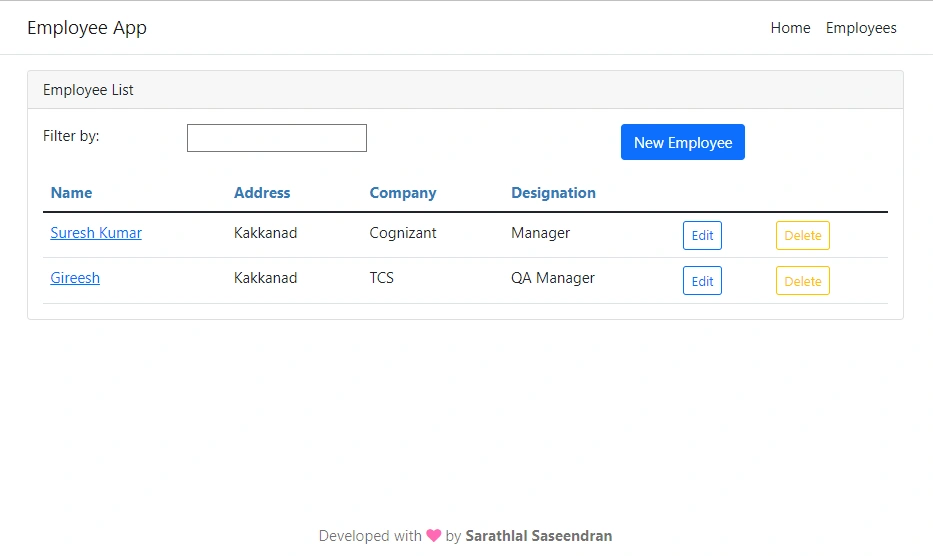
We can create an employee list component. This component will be used to display all the employee information. This component is also used to edit and remove employee data.
ng g component employee\EmployeeList
We can change the class file with the code below.
employee-list.component.ts
import { Component, OnInit } from '@angular/core';
import { Employee } from '../employee';
import { EmployeeService } from '../employee.service';

@Component({
  selector: 'app-employee-list',
  templateUrl: './employee-list.component.html',
  styleUrls: ['./employee-list.component.css']
})
export class EmployeeListComponent implements OnInit {
  pageTitle = 'Employee List';
  filteredEmployees: Employee[] = [];
  employees: Employee[] = [];
  errorMessage = '';

  _listFilter = '';
  get listFilter(): string {
    return this._listFilter;
  }
  set listFilter(value: string) {
    this._listFilter = value;
    this.filteredEmployees = this.listFilter ? this.performFilter(this.listFilter) : this.employees;
  }

  constructor(private employeeService: EmployeeService) { }

  performFilter(filterBy: string): Employee[] {
    filterBy = filterBy.toLocaleLowerCase();
    return this.employees.filter((employee: Employee) =>
      employee.name.toLocaleLowerCase().indexOf(filterBy) !== -1);
  }

  ngOnInit(): void {
    this.getEmployeeData();
  }

  getEmployeeData() {
    this.employeeService.getEmployees()
      .subscribe({
        next: (employees) => {
          this.employees = employees;
          this.filteredEmployees = employees;
        },
        error: (err) => this.errorMessage = <any>err,
        complete: () => console.info('Get employees in employee list')
      });
  }

  deleteEmployee(id: string, name: string): void {
    if (id === '') {
      this.onSaveComplete();
    } else {
      if (confirm(`Are you sure want to delete this Employee: ${name}?`)) {
        this.employeeService.deleteEmployee(id)
          .subscribe({
            next: () => this.onSaveComplete(),
            error: (err) => this.errorMessage = <any>err,
            complete: () => console.info('Delete employee in employee list')
          });
      }
    }
  }

  onSaveComplete(): void {
    this.employeeService.getEmployees()
      .subscribe({
        next: (employees) => {
          this.employees = employees;
          this.filteredEmployees = employees;
        },
        error: (err) => this.errorMessage = <any>err,
        complete: () => console.info('Get employees in employee list')
      });
  }
}
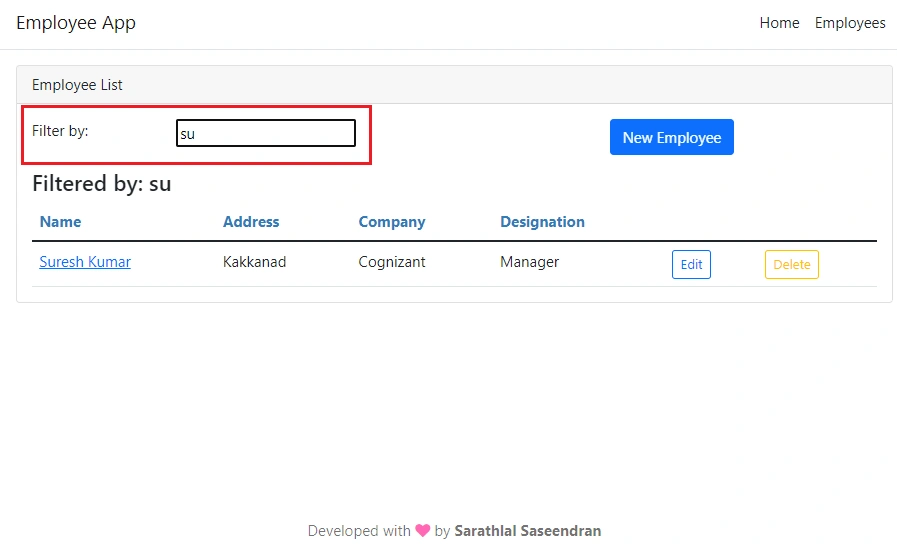
We can change the template and style files also.
employee-list.component.html
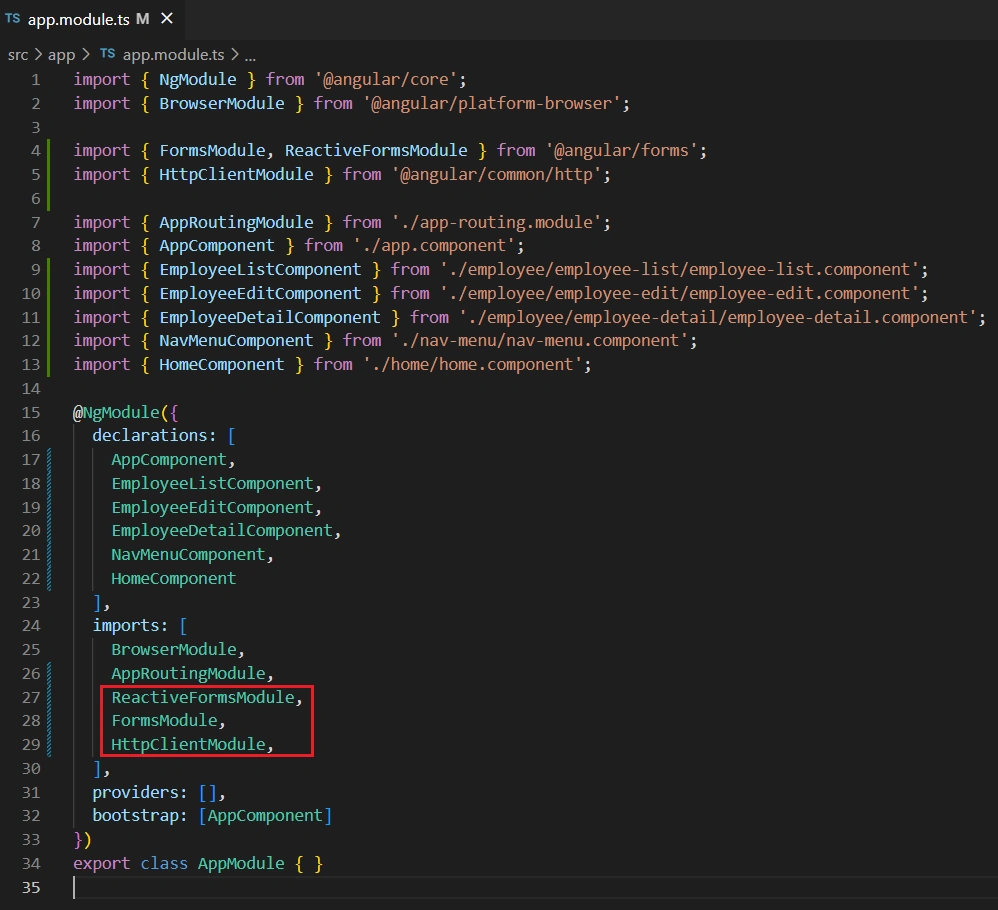

Kuppu SwamiPosted Apr 19, 2023, 5:54 AM
I am New to Mongo DB if we run the application Mongo DB will create automatically?
Chandan SahPosted Jun 13, 2022, 6:48 AM
Excellent learning materials with practicals...
Hamid KhanPosted Jun 10, 2022, 3:13 PM
Awesome article................