

Introduction
This article explains how to edit and update records using a GridView without writing a single line of code behind C# code.
Step 1
First of all create a table using the following scripts in SQL Server:
- CREATE TABLE [dbo].[tblStudents](
- [Id] [int] IDENTITY(1,1) NOT NULL,
- [StudentName] [varchar](50) NOT NULL,
- [RollNo] [varchar](20) NOT NULL,
- [Add] [varchar](50) NULL,
- [MobileNo] [varchar](10) NOT NULL,
- CONSTRAINT [PK_tblStudents] PRIMARY KEY CLUSTERED
- (
- [Id] ASC
- )WITH (PAD_INDEX = OFF, STATISTICS_NORECOMPUTE = OFF,
- IGNORE_DUP_KEY = OFF, ALLOW_ROW_LOCKS = ON,
- ALLOW_PAGE_LOCKS = ON) ON [PRIMARY]
- ) ON [PRIMARY]
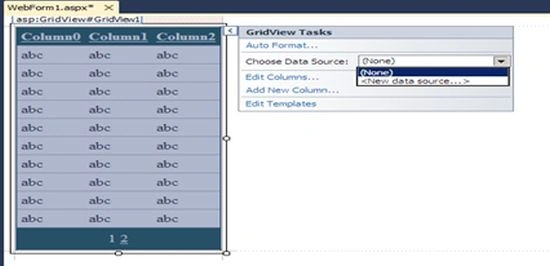
Now open Visual Studio and create a new project and provide the name, whatever you want. Add a page to your project and drag and drop a GridView.
Step 3
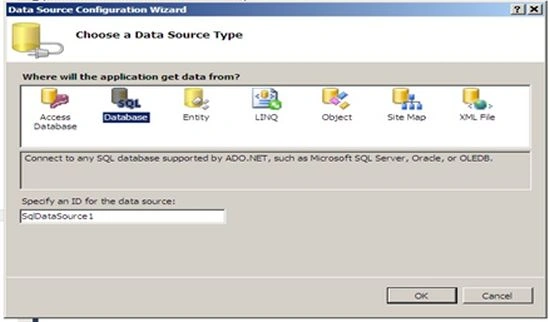
Click on the new data source and:
Step 4
Select the proper database and click on ok.
Step 5
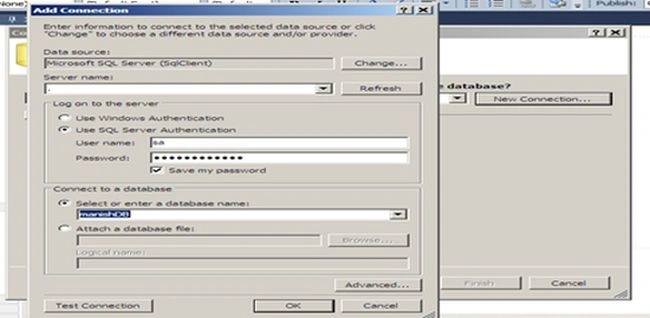
Enter proper information and click on ok then another window will open like:
Step 6
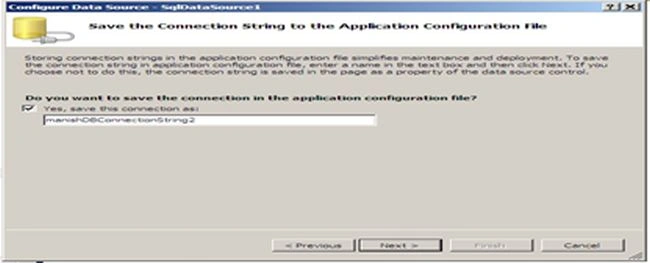
Click on "Next" and:
Step 7
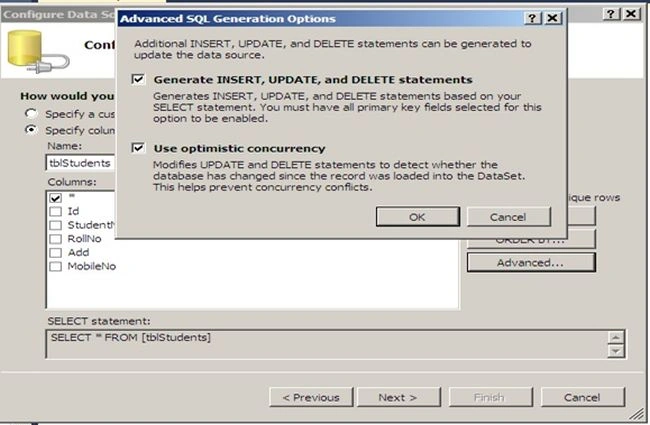
Select a table name and click on the advanced button, then check those two checkboxes and click on ok and go to next.
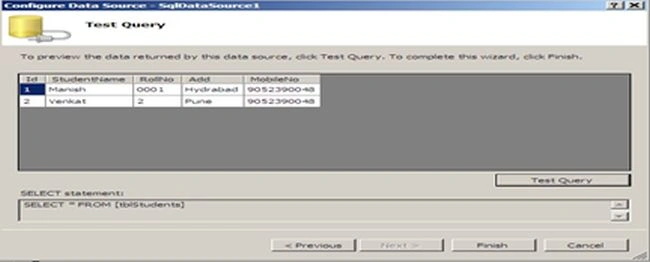
Now test the query and click on the Finish button.
Step 8
Now check all the checkboxes that you require.
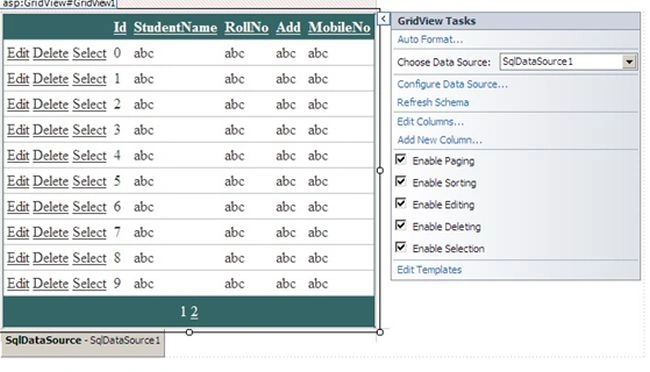
- For Edit operation check Enable Editing.
- Delete operation check Enable Deleting.
- Sorting enable shorting and so on.
Now if you go to the source it will look like:
GridView =>
- <asp:GridView ID="GridView1" runat="server" AllowPaging="True"
- AllowSorting="True" AutoGenerateColumns="False" BackColor="White"
- BorderColor="#336666" BorderStyle="Double" BorderWidth="3px" CellPadding="4"
- DataKeyNames="Id" DataSourceID="SqlDataSource1" GridLines="Horizontal">
- <Columns>
- <asp:CommandField ShowDeleteButton="True" ShowEditButton="True"
- ShowSelectButton="True" HeaderText="Action" />
- <asp:BoundField DataField="Id" HeaderText="Id" InsertVisible="False"
- ReadOnly="True" SortExpression="Id" />
- <asp:BoundField DataField="StudentName" HeaderText="StudentName"
- SortExpression="StudentName" />
- <asp:BoundField DataField="RollNo" HeaderText="RollNo"
- SortExpression="RollNo" />
- <asp:BoundField DataField="Add" HeaderText="Add" SortExpression="Add" />
- <asp:BoundField DataField="MobileNo" HeaderText="MobileNo"
- SortExpression="MobileNo" />
- </Columns>
- <FooterStyle BackColor="White" ForeColor="#333333" />
- <HeaderStyle BackColor="#336666" Font-Bold="True" ForeColor="White" />
- <PagerStyle BackColor="#336666" ForeColor="White" HorizontalAlign="Center" />
- <RowStyle BackColor="White" ForeColor="#333333" />
- <SelectedRowStyle BackColor="#339966" Font-Bold="True" ForeColor="White" />
- <SortedAscendingCellStyle BackColor="#F7F7F7" />
- <SortedAscendingHeaderStyle BackColor="#487575" />
- <SortedDescendingCellStyle BackColor="#E5E5E5" />
- <SortedDescendingHeaderStyle BackColor="#275353" />
- </asp:GridView>
- <asp:SqlDataSource ID="SqlDataSource1" runat="server"
- ConflictDetection="CompareAllValues"
- ConnectionString="<%$ ConnectionStrings:manishDBConnectionString2 %>"
- DeleteCommand="DELETE FROM [tblStudents] WHERE [Id] = @original_Id AND [StudentName] = @original_StudentName AND [RollNo] = @original_RollNo AND (([Add] = @original_Add) OR ([Add] IS NULL AND @original_Add IS NULL)) AND [MobileNo] = @original_MobileNo"
- InsertCommand="INSERT INTO [tblStudents] ([StudentName], [RollNo], [Add], [MobileNo]) VALUES (@StudentName, @RollNo, @Add, @MobileNo)"
- OldValuesParameterFormatString="original_{0}"
- SelectCommand="SELECT * FROM [tblStudents]"
- UpdateCommand="UPDATE [tblStudents] SET [StudentName] = @StudentName, [RollNo] = @RollNo, [Add] = @Add, [MobileNo] = @MobileNo WHERE [Id] = @original_Id AND [StudentName] = @original_StudentName AND [RollNo] = @original_RollNo AND (([Add] = @original_Add) OR ([Add] IS NULL AND @original_Add IS NULL)) AND [MobileNo] = @original_MobileNo">
- <DeleteParameters>
- <asp:Parameter Name="original_Id" Type="Int32" />
- <asp:Parameter Name="original_StudentName" Type="String" />
- <asp:Parameter Name="original_RollNo" Type="String" />
- <asp:Parameter Name="original_Add" Type="String" />
- <asp:Parameter Name="original_MobileNo" Type="String" />
- </DeleteParameters>
- <InsertParameters>
- <asp:Parameter Name="StudentName" Type="String" />
- <asp:Parameter Name="RollNo" Type="String" />
- <asp:Parameter Name="Add" Type="String" />
- <asp:Parameter Name="MobileNo" Type="String" />
- </InsertParameters>
- <UpdateParameters>
- <asp:Parameter Name="StudentName" Type="String" />
- <asp:Parameter Name="RollNo" Type="String" />
- <asp:Parameter Name="Add" Type="String" />
- <asp:Parameter Name="MobileNo" Type="String" />
- <asp:Parameter Name="original_Id" Type="Int32" />
- <asp:Parameter Name="original_StudentName" Type="String" />
- <asp:Parameter Name="original_RollNo" Type="String" />
- <asp:Parameter Name="original_Add" Type="String" />
- <asp:Parameter Name="original_MobileNo" Type="String" />
- </UpdateParameters>
- </asp:SqlDataSource>
Now run the page using Ctrl+F5; it will look like:
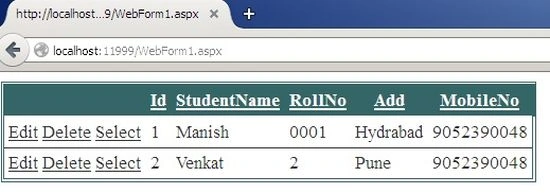
Now click on the edit or delete button and modify the data.
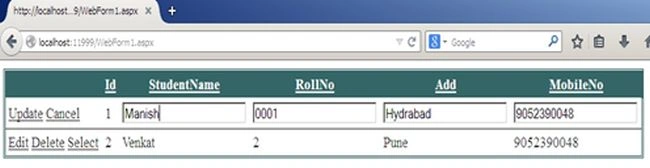
Here you can see I have not written a single line of cs code in code behind.
Summary
In this illustration we learned how to update and delete database records using a GridView without C# code. Please provide your valuable comments about this article.
John HarveyPosted Feb 12, 2024, 9:41 AM
Manish sir, kindly include optimistic concurrency when editing data in GridView.
John HarveyPosted Feb 12, 2024, 9:20 AM
Thank you for sharing this fast way of building a GridView. Can you share us some tips on how we can achieve this same GridView without C# code if we instead use Stored Procedures to select, update and delete the table rows.