

Introduction
This is Part 3 of the article series. If you have not read Part 1 and Part 2 of the series previously, then please go through the following articles:
In this article, we will generate a certificate and use this certificate to encrypt and decrypt the string.
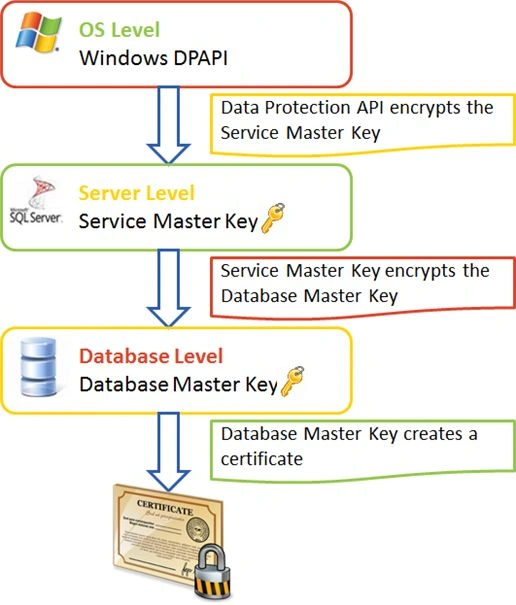
Create Certificate
CREATE CERTIFICATE TESTCERT   ENCRYPTION BY PASSWORD  = '@k$h@yPatel'    WITH SUBJECT  = 'TEST CERTIFICATE',
   START_DATE = '01/10/2013',
    EXPIRY_DATE = '01/10/2014'
If start_date is not provided, then the current date will be startdate, and if expiry_date is not provided, then startdate will be considered after one year.
Backup Certificate
BACKUP CERTIFICATE TESTCERT   TO FILE  =   'd:\TestCert.CER'    WITH PRIVATE KEY   (
           FILE = 'd:\TestCert.PVK',
           ENCRYPTION BY PASSWORD = '@k$h@yPatel',
           DECRYPTION BY PASSWORD = '@k$h@yPatel'
)    GO
Restore Certificate
DROP CERTIFICATE TESTCERT
CREATE CERTIFICATE TESTCERT
FROM FILE='D:\TestCert.CER'
Encrypt & Decrypt
DECLARE @Text VARCHAR(50)
DECLARE @EncryptedText VARBINARY(128)
DECLARE @DecryptedText VARCHAR(MAX)
SET @Text = 'I am Akshay Patel'
SET @EncryptedText=ENCRYPTBYCERT(CERT_ID('TESTCERT'),@Text)
SET @DecryptedText=DECRYPTBYCERT(CERT_ID('TESTCERT'),@EncryptedText,N'@k$h@yPatel')
SELECT @Text AS 'TextToEncrypt',@EncryptedText AS 'EncryptedText',@DecryptedText as 'DecryptedText'
Conclusion
In the next article, we will generate an asymmetric key and encrypt and decrypt the string using public and private keys.
Join the conversation! Your thoughts help the community grow.