

Introduction
This is Part 5 of the article series. If you have not read the previous articles in this series, then please go through the following articles:
- Encrypt & Decrypt in SQL Server Part-1
- Encrypt & Decrypt in SQL Server Part-2
- Encrypt & Decrypt in SQL Server Part-3
- Encrypt & Decrypt in SQL Server Part-4
In this article, we will create a symmetric key and encrypt and decrypt a string using this key.
How to Create Symmetric Key in SQL Server?
CREATE SYMMETRIC KEY TestSymKey
WITH ALGORITHM =AES_256
ENCRYPTION BY CERTIFICATE TestCert
GO

Open Symmetric Key in SQL Server
Once we create the symmetric key, we must open it before use.
OPEN SYMMETRIC KEY TestSymKey
DECRYPTION BY CERTIFICATE TestCert
WITH PASSWORD  = '@k$h@yPatel'
GO
Encrypt
DECLARE @Text VARCHAR(MAX)
SET @Text = 'I am Akshay Patel'

DECLARE @EncryptedText VARBINARY(128)
SET @EncryptedText = (SELECT ENCRYPTBYKEY(KEY_GUID(N'TestSymKey'),@Text))
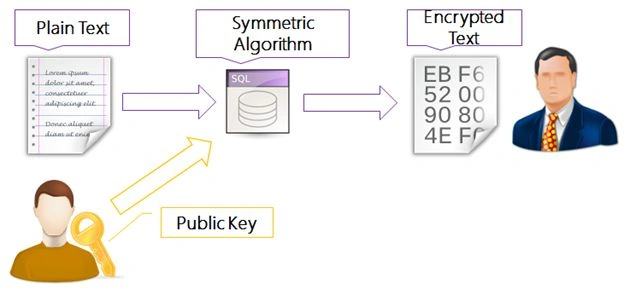
Decrypt
DECLARE @DecryptedText VARCHAR(MAX)

SET @DecryptedText = (SELECT CONVERT(VARCHAR(MAX),DECRYPTBYKEY(@EncryptedText)))
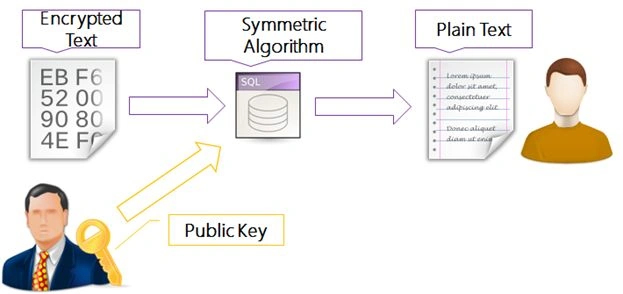
SELECT @Text AS 'TextToEncrypt',@TextEnrypt AS 'EncryptedText',@TextDecrypt AS 'DecryptedText'
GO

Drop Asymmetric Key
DROP SYMMETRIC KEY TestSymKey
GO
Conclusion
In this five-article series, we have seen Service Master Key, Database Master Key, and Encrypt & Decrypt using Certificate, Asymmetric Key, and Symmetric Key in SQL Server.
Find the whole series here.
Thoulath KhanPosted Jun 25, 2013, 2:47 AM
I m not getting the decrypted text sir.... What to do??????? Awaiting your reply.
Akshay PatelPosted May 16, 2013, 12:57 PM
@Mahesh Sir - Thanks sir, I will definitely create an e-book.
Mahesh ChandPosted May 16, 2013, 12:25 PM
Great going Akshay. Once done, you may want to create an e-book on all these parts. Cheers!